Showing posts with label Apple Apps. Show all posts

Sunday, September 21, 2014

My Thoughts on Kids & iPads

Date:  Sep 21, 2014

Human needs to evolve.

We cannot stop evolution.

Nature will find a way to evolve.

Man created iPad.

Man stop kids to use iPad.

Kids will find way to use iPad.  (Secretly).

Recently, a very interesting reading on Steve Job’s wouldn’t let his children touch an iPad and other digital gadgets.
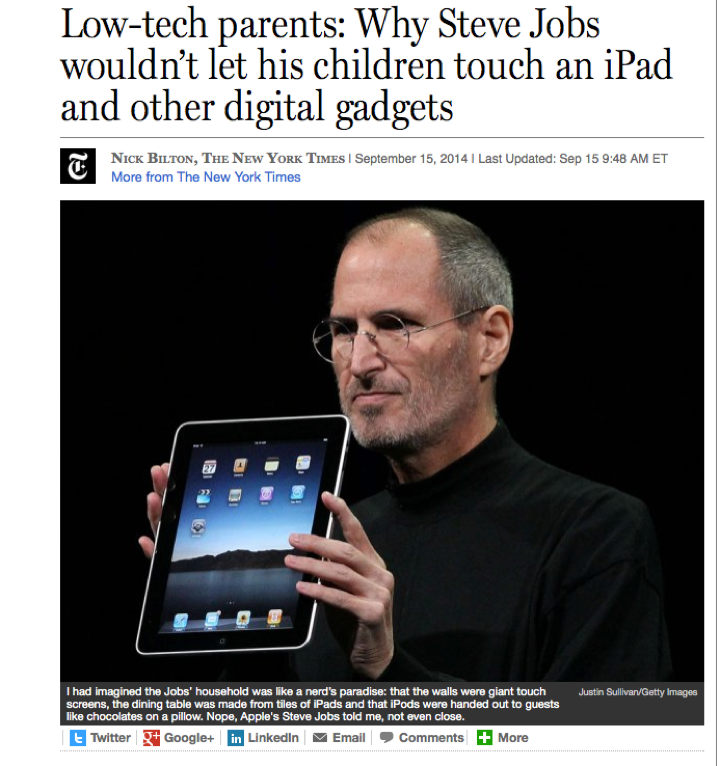
Screen Shot 2014 09 21 at 8 06 43 am

Today, on the paper.

IMG 1047

These are my rules.  And it works for my family.  And I like it this way.

House Rules

1.  No iPad on dining table.  Be it at home, or at the restaurant.

2.  No iPad during kids’ friends gathering.

3.  No kids shall ask for iPad at home.  It is always be given based on reasons but not answer to an “asking for it”.

4.  I will take away the iPad immediately, if the eyes to iPad distance is less than 400-500cm.  To protect the eyes.

5.  When parents says “Stop”, within 2 seconds, kids must press HOME BUTTON, and then POWER BUTTON.  And bring the iPads to keep.

6.  Absolutely, no kids can touch the iPad, even they are lying in front of you, and your mom and dad are not around.


Associates iPads To Good Behaviour

1.  It is a reward, to award 20 minutes of iPad time for the kids if they really did something astonished, something you like.

2.  You score a good enough marks for good efforts put in, reward.

3.  You help daddy mommy to do something, reward.

4.  Make sure they know is a reward.


Do Not Mention the name “iPad"

1.  My kids has not spoken the word “iPad” for couple of years.

2.  In their mind, they know it is called iPad.

3.  “Can I play iPad?” is a prohibited question at home.

4.  They invented the other name “i-i” instead of “iPad”.


Addiction is Prohibited

1.  The more you asked for it, the longer you will be band from using it.

2.  It is the same like drug addiction.  We must find ways to cut the addiction.  It’s painful, but it will be helpful.

3.  Associate punishment with addiction.  Cane-cane should be another word they remember, if they ever got addicted.


Education or Games?

1.  Download both educational games and fun games.

2.  In a week, at least one day should be education day.  Means, they run Math games, Sight Words game and so on.


What Games?

1.  Should download common puzzle games.  Like Angry bird, Amigo Pancho.

2.  At least when they are playing, stay near to them, help them if you can.

3.  My son currently plays “Sim City”.  This are the games should be installed.  For example, Civilisations.

4.  My two sons sometimes play "Chess".

5.  The family sometimes play “Marble Mixer”.

6.  Other puzzle games is such as Match-3, etc.  It helps their brain.

7.  Don’t let them play games like shooting games, or those that associates violence.


Who Owns The iPad?

1.  Each of my kids own their own iPads.

2.  The iPad is theirs.  But, to use it, they must obey the House iPad Rules.

3.  Break any of the rules, means no iPad for 1 day, 2 days or 3 days.


Let Them Play

1.  Kids talk about iPad in school.

2.  If they mention a game, as long as it is educational, and puzzle, need to use brain, and not violence.  Reward them by downloading them.  Let them play.

3.  Do not stop them playing for wrong reasons.

4.  You suppress them, they will find ways.  You will loose your communication with the kids.  When you loose it, you loose your child.

5.  Always associate rewards with good behaviour, always associates punishment with bad behaviour.


Read Books

1.  Show them what iPad can do.  

2.  Read books to them on iPad.

3.  Associate reading to iPad.


Find Answers

1.  Associate tools to iPad.

2.  Dictionaries.

3.  Wiki Page.

4.  Measuring conversion.

5.  Cooking Instructions.

6.  Make them aware that technology is a tool to help them, but not to make them addict.  Them let them think it is a handheld game console machine.


Sports & Activities

1.  Do more activities at home.

2.  Let them do more sports.

3.  Your home got a tennis court, how many time you have uses it?

4.  Packed more sports, they will have fun, and they will be tired after sports, and they will sleep nicely.


Other Notes

1.  Always remember, raising kids is your priorities.

2.  Not give them an iPad to exchange for a quiet moment.  Remember it.

3.  Don’t give them iPad so that you can talk to your friend.

4.  Don’t give them iPad so that you can work.  Don’t bring work home.

5.  If you need to work at home, do it after the kids are sleep.

6.  Always be around them when you let them play iPad.  You can play your own iPad, be it games or read news, and so on.


That is my way how I taught Jay & Kay.  And it works for so many years.

And I am glad that I raised them this way.

And I think their mental is clean this way.

IMG 0934


Friday, July 4, 2014

How To Watch World Cup

Date:  July 4, 2014

Note:  This blog entry is for education purpose.  Once you learn it and satisfy your curiosity, you may delete the program.  :)  Some friends asked me how to do it.  So, I decided to write a tutorial on it.  Of course, when you subscribe to ViewQwest Broadband Service, ViewQwest might already given you a IPTV box (looks like Apple TV box) which they have iTV player installed on it.  But just in case, you want the iTV Player to be installed on your iPad, here is how to do it.


This month is World Cup fever.  

NewImage

Here is how you can watch World Cup on your iPad.  And Hence, you can AirPlay it to your big screen TV using Apple TV.


**********************************************************

REQUIREMENT

You must have ViewQwest Freedom VPN service.  Means, you must have ViewQwest Broadband Internet service and you must subscribe to ViewQwest Freedom VPN service.

If you do not have the above ViewQwest service, then, an alternative is My Republic VPN service or some third party VPN service.

ViewQwest Freedom VPN is pre-configured on your ViewQwest router.  So, you need not to do any configuration.  

**********************************************************

1.  The World Cup as well as a lot of English TV drama are available free on ITV Player or BBC iPlayer.

2.  But when you go and download ITV Player or BBC iPlayer from your iTune Store, you may not find these two programs.

3.  The reason is because it is available only in iTune Store in United Kingdom.

4.  Both iTV Player & BBC iPlayer are FREE.  So that means there is a way you can download it without paying it.

5.  That means you will need to have an UK Apple ID in order to logon to the UK iTunes Store to download both iTV Player & BBC iPlayer.


Creating UK Apple ID

A.  On your iMac or PC.  Launch iTunes program.

B.  Select iTunes Store.  If you are login, you will see your Apple ID on the top left navigation bar.  Click on the Apple ID and select "Sign Out".

C.  Scroll down to the bottom, and on the bottom right, you see a flag round icon.  It may be either a Singapore flag, or US flag or other country.

D.  Click on that flag.

Screen Shot 2014 07 04 at 8 38 00 pm

E.  Scroll down, until you find the “United Kingdom” flag.  The UK flag is in Europe section, of course.  Click on it.

Screen Shot 2014 07 04 at 8 38 32 pm

F.  On the search field, key in “iTV Player”.  Then, it will find everything might related to "iTV Player”.  iTV Player is listed as "Free”.  Click on the “Free” button to download it.

Screen Shot 2014 07 04 at 8 44 03 pm

G.  Immediately, iTunes Stores will ask you to login.  But you do not have a UK iTunes Store account, so, you will need to click on “Create Apple ID”.

Screen Shot 2014 07 04 at 8 44 16 pm

H.  Click “Continue” on the next page.

Screen Shot 2014 07 04 at 8 44 28 pm

I.  Check the box “I have read and agree to these terms and conditions”.  And click “Agree” button.

Screen Shot 2014 07 04 at 8 44 53 pm

J.  Key in your Apple ID details.  And click Continue.  Now they have stricter rules to create password.  Make sure it has a upper case, a number, and not so obvious english word.

Screen Shot 2014 07 04 at 8 46 35 pm

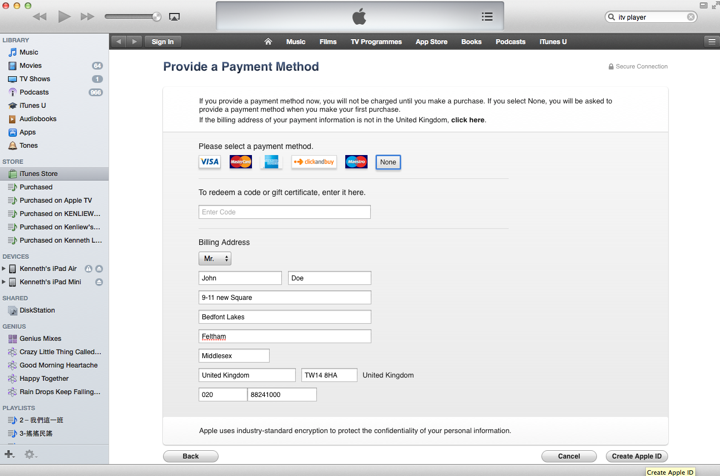
K.  The most important step.  In the Provide a Payment Method page, select “None” payment method.  Key in your details.You may use the following info.  Or any UK address you can search from the web.

Screen Shot 2014 07 04 at 6 39 03 pm

L.  And click “Create Apple ID”.

Screen Shot 2014 07 04 at 8 49 06 pm

M.  You are done.  

Screen Shot 2014 07 04 at 8 49 27 pm

N.  Now, go to your email client, and see the email Apple just sent you.  Click on “johnVerify now>"

Screen Shot 2014 07 04 at 9 10 02 pm

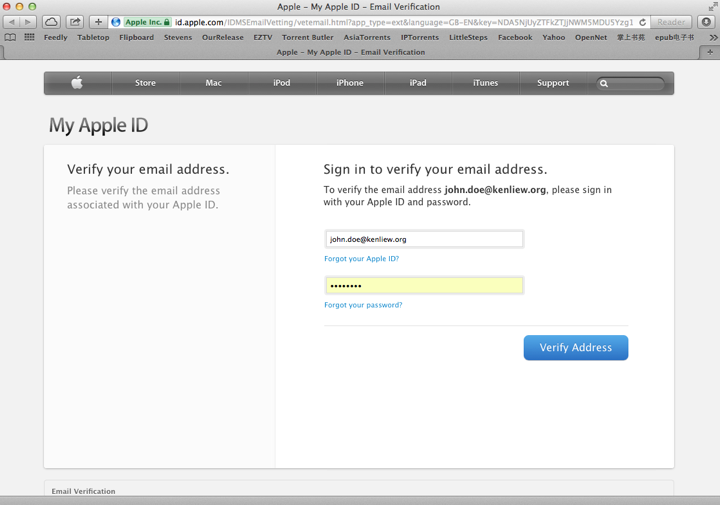
O.  Now, as for the last step, you simply login with your newly created UK iTunes Store Apple ID.  Click on “Verify Address”

Screen Shot 2014 07 04 at 9 11 40 pm


6.  Now, after you have created the UK Apple ID.  You can now download iTV Player or BBC iPlayer from iPad.  

7.  To do so, you will need to “Sign Out” from your existing Apple ID, and key in the newly created UK Apple ID.

8.  Now, iTunes store will recognise that the Apple ID you just log in can be used for UK iTunes Store only.

9.  Search for iTV Player and BBC iPlayer, and download them.

10.  When you first launch iTV Player, they will ask you to key in the Postal Code.  You can key in "TW14 8HA” which is a valid UK Postal Code.

11.  And you are done.  You can now watch all the UK shows on these two iPad App.

12.  Best of all, you can always click the “AirPlay” button to stream this onto your big screen TV via the Apple TV.  Yeap, you must have Apple TV on this.  If no, then, watch it only on your iPad lor.

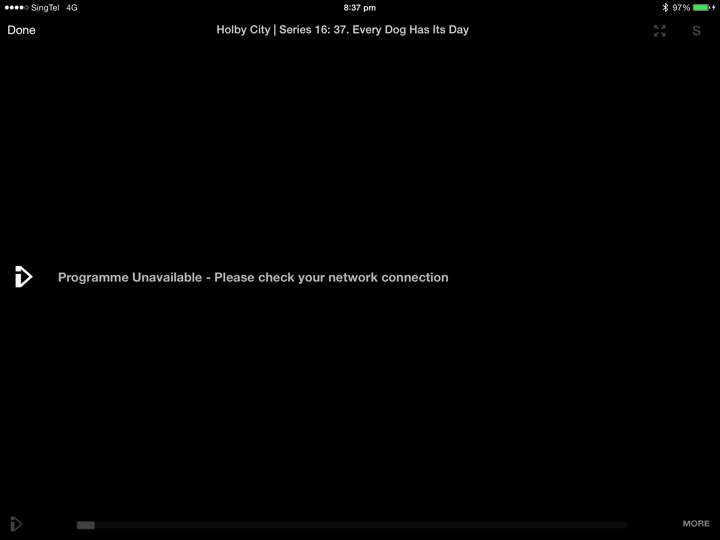
13.  If you do not have ViewQwest Freedom VPN, when you click on Play to play the movie, they will give you “Network Error” message.  You need to have a UK IP address in order to play all these iTV or BBC movies and TV programs.

iTV Player gives you this.

IMG 0166

BBC Player gives you this error.

IMG 0168

Oh ya… the video streaming is adaptive to your network speed.

So, when you first launch it, it will be like SD quality, then, when they find out that you can stream high bandwidth, then, they will push you the HD quality.


14.  Happy viewing! 


At home, I got many ways watching the world cup.  I can watch it on my ELTA Sport Channel (Mandarin) or TVB (Cantonese) which is on my Minix IPTV Android box.  I can watch it on CCTV5 on my YunOS IPTV Android box.  I can also watch it on my iPad using iTV Player.  

Also, I found that different streaming will have different lagging time.  iTV is still the best.  It also been tested out that MIO TV is few seconds lag behind iTV streaming.  That explains why some of your neighbour scream “Goal” while your MIO TV still not seeing any goal.  Wahahahhahaahahahaha

IMG 0170


Friday, July 12, 2013

BookU - The Other eBook Reader You Need.

Date:  July 12, 2013

Today, I would like to introduce a new Apple IOS App.  It is called BookU.

Screen Shot 2013 07 12 at 12 41 43 PM

It is just another eBook reader.  But it is in Chinese.

IMG 0085

You don't buy books here.  But you subscribe an account.  For example, for less than US$40/year, you can enjoy downloading and reading high quality ePub books, not those lousy "scanned" PDF books.  

IMG 0081

When I plans for traveling I usually will buy a few books from the book stores to do the planning.  And those cost money.  With BookU, there are many NEW books available here.  Like I download a few Taiwanese Travel books.

IMG 0082

The quality is quite OK.  And the reading is fast.

IMG 0083

The zoom in functions works properly and fast and clear.

IMG 0084

It is quite simple to use too.

IMG 0089

I took another glance of the books, and I think all these books are quite new and recent.

IMG 0086

There are many categories for you to choose too.

IMG 0087

Try it.

Wednesday, April 10, 2013

Jay & His iPod Touch

Date: Apr 10, 2013

Jay Jay was having problems doing his Chinese homework from Berries enrichment class.

There are many Chinese characters that he has forgotten or it looks foreign to him.


So, in order to help him, I downloaded 新华字典 App for him.

So, I asked him to write the Chinese character that he does not know. For example, 大 (of course Jay knows this word!)


So, it will gives you the meaning with the Pin Yin. So, I asked him to write the Pin Yin just beside the word so that he knows tge word next time when he sees it again.

By using this app, amazingly, he finished his 2 pages of home work on his own during my shower time. Previously, he would ask me what word is this and that.

So, using this method, he has a way to complete his Berries homework without parents guidance. This is especially useful when parents need to work.

At the same time, by writing the word to find the Pin Yin and meaning also increase his learning speed. He will learn faster this way.


A lot of parents tempted to give or share their iPhones to their kids.

I recommend that you give iPod Touch to them. So that it really belong to them.


At the same time, make it clear that it is not a toy, but it is a learning tool. This is very important!

So, you don't put a lot of arcade games on it. If you look at Jay's iPod Touch, there is no angry bird or any other arcade games on it.


Only put in useful stuff for them.


Jay can iMessage me any time he wanted too.


Jay also can FaceTime me if needed.


The FaceTime is good and it allows you to see your child facial expression when you speak to him.


So what else I have for him. I got a Cross Word games called "Word 365"... This is for him to learn new vocab.


I have Sudoku school for him to start learning Sudoku. Jay now slowly learned 2x2 sudoku.


He loves to play it.


Soon, I expected him to play sudoku on the newspaper magazine.


I have key in his sight words and weekly spelling into the Spelling Board.

So he can learn and take the spelling quizzes.


I can check his progress from the history. How many times he took the test, how many times he learn the spelling, how long he spent each time.


For new English words, he can use the word wizards to learn the new words. Learn the phonics and so on.


There is a Brain School programs for him to play some puzzles game suppose to improve logic thinking...


There is a Chinese Sight Words program to learn Chinese new words too.


Teach you how to write too.


Of course not to forget his Pei Tong school app.


Of course in the daily todo list, I incorporate the iPod learning time in there too.

Of course you must restrict timing too. Such as must finish homework before doing the iPod Touch learning. Each time can only do 30min only and so on.


You slowly choose and install the App for him. At the moment I also have Wechat, facebook and email personalized to him.

So, the effect that you want to have by introducing iPod Touch to your kid is

1. Your kid owns and IOS device.
2. Learn using iPod Touch.
3. Gaming but educational.
4. Your kid will be happy and a happy kid tends to learn more and absorb more.
5. Your kid will get use to using technology to assist in growing knowledge.

Welcome to the space age.

- Posted using BlogPress from my iPhone

Saturday, March 16, 2013

AppsGoneFree

Date: Mar 16, 2013

I don't jailbreak my IOS devices anymore as I was an IOS developers and I have to respect the programmers.

The apple apps store remind me about twenty years ago where I used to download a lot of shareware applications.

Two problems...

1) There are simply too many new apps and application out there and you simply have no time looking at all of them....

2). Some apps are expensive...

Luckily, there are solution to that... Appsgonefree


This is a must have application on your iPhone and iPad. This app will introduce and tell you which app has gone free on that day itself. Some apps developers will give away the app for one day free so that these people who is lucky enough can say good things about their app. Most of these app, be it games or applications will have an expiry date for the free download...

For example, this Montessori Worksheet for kids, cost about $4.98. Under normal circumstances, I will not buy this app. But today, it has gone free...


A click on the app, shows you the introductions and screen shots.


If you like the app, click again, and it will bring you directly to the App Store.


I use this on a daily basis. And most of the time, I simply download it first and will launch the app when I am free.

Appsgonefree will save lots of time and money for you. And most of the time, checking out new app become a new hobby of mine.

Have fun!

- Posted using BlogPress from my iPad