Showing posts with label RT-N56U. Show all posts

Sunday, March 11, 2012

My Home Network Updates

Date:  Mar 10, 2012

This is my finalized design of my home network.  It has been running for the past 7 months with ultimate performance.  :)
Kenneth Network.png
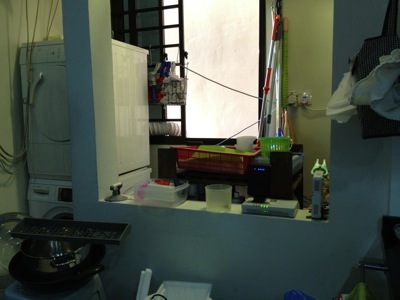
This is my washing area/kitchen.  Behind the wall on the right hand side is where OpenNet put their TP (Termination Point).  You can see I placed my ONT (Optical Network Termination) boxes there.  The main reason is I do not allow SingTel, or OpenNet to drill holes, and placed those ugly cable run from the front entrance.  So, I asked them to come in via the back door.  And the backdoor is the washing area / kitchen.  My network cabinet/cupboard is at the main entrance there.  It is there where all my entire apartment CAT6 cable runs are centralised.  And, I do not have a cable between this two location.  So, what did I do?
IMG_4794.jpg
So, in order to connect from the kitchen, I make used of two technologies.  Homeplug via the powerline and AirWire via the 5.8Ghz wifi space.  From the ONT location, there is no wired / CAT6 cable going to the network cabinet which is just left side of the kitchen (viewing from here).
IMG_4796.jpg
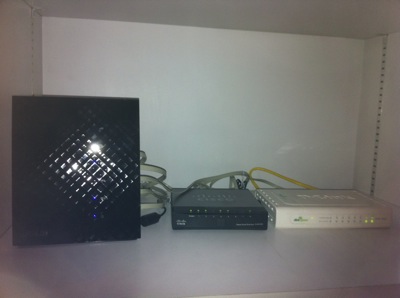
That is my network cabinet.  All the CAT6 network point in the house, except the kitchen, all come back to here.
IMG_4797.jpg
By the way, in my place, I have both ViewQwest and SingTel Fiber Broadband network.  The SingTel fiber broadband is notorious of throttle your traffic if they detect a slight abnomal traffic.  Once they throttle your traffic, all traffic will be slow.  So, I gave this network to my wife to use.  As she will always use it for her WebEx, Video Conferencing, etc.  As for me, I use it for my day to day web surfing and so on, I used ViewQwest Fiber Broadband that does not throttle my traffic at the moment.
1.)  So, for Singtel, I bought a pair of Airwave from X Concept.  They are the distributor of Airwave.  Now, they are located at #07-04, Burlington Square.
IMG_4775.jpg
I have used it for almost 7 months.  And it is still working fine.  I got this from X Concept.  This is a product from Ubiquiti Networks.  http://www.ubnt.com/.  A pair of this will connect at 5.8Ghz Wifi frequencies, without line of sight.  So, from the kitchen to my network cabinet.  It is brainless, simply connect and plug and play.  It is like a real cable like that.  except that they uses Wireless to connect the two points.
OK.  I know, I know, I am a techical guy, I can set up a switch and create a VLAN and pump it thru the power line using homeplug.  Those are the good old days, when you have 2 kids, your time seems to vanish pretty fast.  ahhaha so brainless thing will always catch my attention.
IMG_4776.jpg
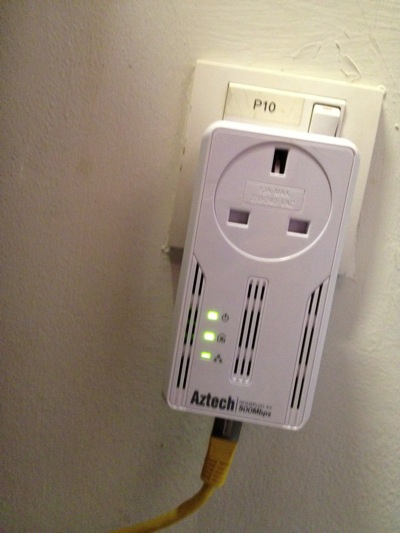
2)  So far, this is the most reliable homeplug that I have tested.  It has not been down, and does not need to reset it all the time as in the 1Gbps version.  It also have a noise filter, where you plug almost other things in there.  This one, I place it just opposite my dryer and washing machine.  My domestic helper wash cloths during day time, where all of us are working.  So, I did not get a chance to test weather the noise level is high during the washing and drying.  So far, I am happy with it.
IMG_4779.jpg

In my network cabinet, I plugged a plug extender on the noise filter of the homeplug.  That means every single electronics, i.e. switches, routers, etc are plugged in and pass thru the Aztech homeplug.  Except the NAS, I plug it separately.

IMG_4785.jpg

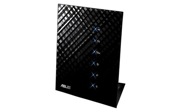
3)  SSID Mouse9 inside the network cabinet.  This is ASUS Black Diamond, the best WAN to LAN and LAN to WAN router in the market.

IMG_4783.jpg

4)  SSID Mouse5, running SingTel network, resides in my study room for my lovely wife to use.  Of course, the switch below is running ViewQwest network.

IMG_4788.jpg

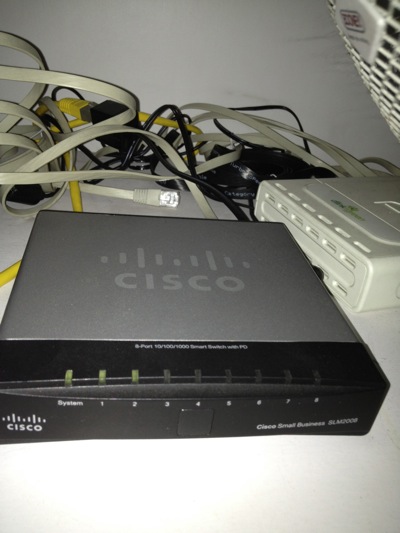
6)  As I threw away the SingTel's 2wire router.  I need this managed switch Cisco SLM2008 to untag the VLANS for me from Singtel Fiber Broadband.  I do this is to increase the performance of WAN to LAN network.  Singtel's 2wire is really crappy!
IMG_4784.jpg

7)  SSID Mouse3, sitting at the TV Console area, provides internet and Wifi exclusively to Apple TV, Wii and XBox, and my Internet Radio.  Apple Airport Extreme does the work here.  When you Airplay the movie on your IOS devices, it is fast!

IMG_4790.jpg

8)  The Internet Radio.

IMG_4793.jpg

9)  SSID Mouse6 in my bed room.  I can received 2-3 bars Wifi Signal from Mouse9, but that is not enough.  so, I put my Apple Airport Express here.

Related Posts:

From here you can explore more related topics at the botom of this post.

http://miniliew.blogspot.com/2011/05/bye-bye-singtel-2wire-5012nv.html

Friday, October 28, 2011

Gadget Playoff: Apple Airport Extreme Vs. ASUS Black Diamond

Date:  Oct 28, 2011

This is the two wireless access point I have at home.  Let's compare their performance.

Asus Black Diamond RT N56U VS.   Apple AirPort Extreme 4

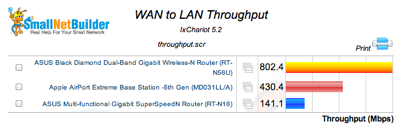
1.  WAN to LAN Throughput.  This router is connecting to your Internet Provider.  And it shows how fast the top speed it can handled.  ASUS is clearly superior in this as its processor are much faster and can handle much more.  Both devices has GE ports.

Screen Shot 2011 10 28 at 9 39 12 AM

2.  LAN to WAN Throughput.  This is important where the outside Internet content how fast can they sent to your network.  Clearly, ASUS is double the speed of Apple.

Screen Shot 2011 10 28 at 9 39 26 AM

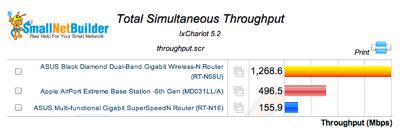
3.  Total Simultaneous Throughput.  The throughput seems impressive.  Not sure what does it mean.

Screen Shot 2011 10 28 at 9 39 38 AM

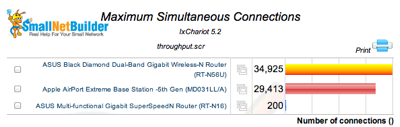
4.  Maximum Simultaneous Connections.  I think this is the TCP IP Sessions.  Actually Apple is not far behind.

Screen Shot 2011 10 28 at 9 39 57 AM

5.  Average 2.4Ghz Downlink Throughput.  Again, Apple is not behind of ASUS.

Screen Shot 2011 10 28 at 9 40 11 AM

6.  Average 2.4Ghz Uplink Throughput.  Apple in this case is also not far behind,

Screen Shot 2011 10 28 at 9 40 26 AM


Conclusions:

A.  ASUS Black Diamond Router definitely stay behind SingTel Fiber ONT.  That is because I want to ensure the LAN-to-WAN and WAN-to-LAN at the top speed.

B.  Apple Extreme is to move to beside Apple TV.  This is to ensure I have very good speed on Wireless connecting to Apple TV with minimum Cat6 cable length.  This is to ensure Air-Play capability is optimum at my place.  And now, when I played Real Racing 2 or Chopper 2, I don't see much lagging anymore.

:)

Friday, July 29, 2011

Home Network Improvement Plan - Asus Black Diamond

Date:  July 29, 2011

I just got a new router.  I bought it in Sim Lim for S$220.  But later, when I shop at IMM, one of the computer store beside Challenger is selling at S$209.

IMG_8499.JPG

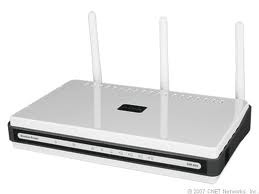
Before that, I replaced my home Internet network router and throw away Singtel useless 2Wire 5012NV Fiber Broadband router (now it is only used for deliverying MIO TV).  I was using a D-link DIR-655.  The Wireless AP served me well for the pass two years.  It's time to change.

NewImage.jpg

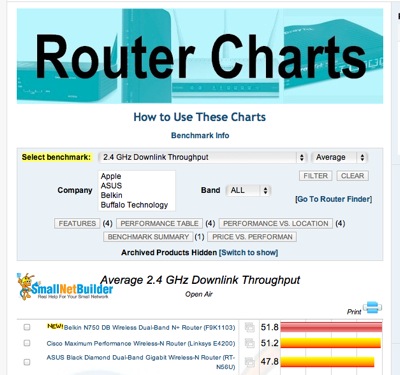
My friend Larry introduced me to a website that has router comparisons.

http://www.smallnetbuilder.com/wireless/wireless-reviews/31436-asus-rt-n56u-black-diamond-dual-band-gigabit-wireless-n-router-reviewed

Go to this website, and start selecting your next router...  For me, I choose "Total Simultaneous Throughput" and you get ASUS Black Diamond Dual-Band Gigabit Wireless-N Router (RT-56U) as the top runner.

Screen Shot 2011-07-29 at 7.11.17 AM.png

And If I compare with the D-Link DIR-655, which is ranked 20th from the top.

Screen Shot 2011-07-29 at 7.14.03 AM.png

My Apple Extreme (ranked 14th) at home is much faster than the DIR-655 ...

Screen Shot 2011-07-29 at 7.15.48 AM.png

And in my office, I think they recently bought a Netgear WNR3500L which is ranked 18th ...

Screen Shot 2011-07-29 at 7.17.36 AM.png

But all these routers I have seen is no where compared with Asus Black Diamond!!!  It is three times faster than my Apple Extreme.  And the router is stylist too.  One thin piece of devise standing vertically.

IMG_8515.JPG

Now, how good is this router and its AP (Wireless) function... Here are some of the test I have done in the office and at home...

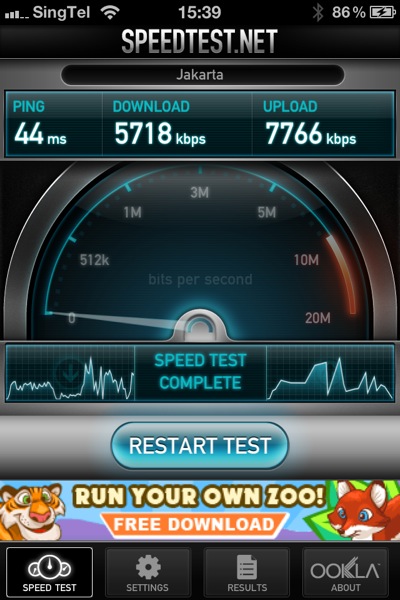
In Office We have two Wireless Access Point Router, where one ofthem is the newly bought Netplus WNR3500L... So, I run the speed test on it... As you can see I can achieve 5.7Mbps download and 7.8Mbps upload.  And I am doing the test ping to the Jakarta speed test server.

IMG_8502.PNG

Then, I disconnect the netplus, and log on to the 2nd wireless router.  I don't know what router is that, but I suspect is a cheap router too.  I will not use this AP router as a reference, as it goes to another broadband link that connects to NewMedia Test server.  I provided it here to give a reference.

IMG_8506.PNG

Then, when I plug in my new ASUS Black Diamond.... WOW... I am speechless.  I managed to get 9.1Mbps download and 14Mbps upload.  I am impressed.

IMG_8501.PNG

So, I re-run another round of testing... just to make sure I don't get some isolated results... and the results came back almost similar...

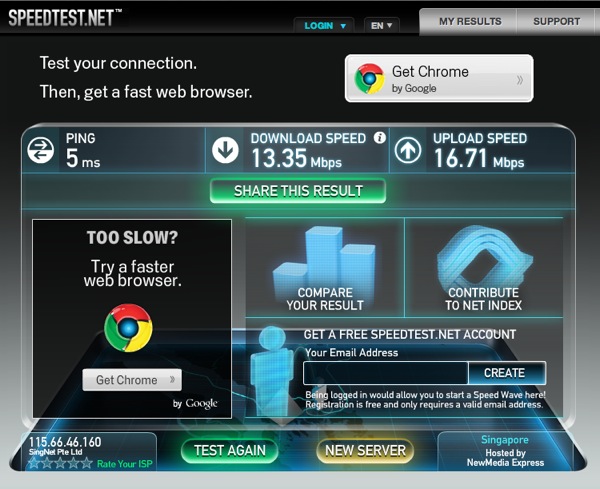
So, next thing I do, is to go back home immediately, and re-run the test at home.  So, at home, before replacing the router, this is what I get... 13.35Mbps DOWN and 16.71Mbps UP.

mouse before Test1.png

And after I plug that ASUS Black Diamond in, replacing the DIR-655...  The speed becomes 26.77Mbps DOWN and 23.85Mbps UP.  That is what I am talking about.  I had an OpenNet fiber, with Singtel Fiber Internet service of 50Mbps.  My speed should at least closer to 50Mbps, right.

wireless after door open Test1.png

So, I am speechless after I see all the result and I am very happy!

So, I go do more research.... For WAN to LAN Thruput, this is to let the Internet come into your home, handled by your router.

Screen Shot 2011-07-29 at 7.33.18 AM.png

For LAN to WAN Thruput, where your Internet going out...

Screen Shot 2011-07-29 at 7.35.40 AM.png

For Maximum Simultaneous Connections.... this is for P2P download... how mcuh you can handle when you download torrents... ASUS Black Diamond is #6 not too far behind..

Screen Shot 2011-07-29 at 7.36.18 AM.png

The 2.4Ghz Wireless Downlink thruput, Black Diamond scored #3...

Screen Shot 2011-07-29 at 7.37.53 AM.png

I think I made a right choice for the router... and I am damn happy about it.  The performance I get is much better than before... and I can feel the speed is very stable too.

GET IT NOW!

NewImage.jpg

I am still keeping my Apple Airport Extreme and Apple Airport for home Wifi access.  :)