Showing posts with label SLM2008. Show all posts

Sunday, March 11, 2012

My Home Network Updates

Date:  Mar 10, 2012

This is my finalized design of my home network.  It has been running for the past 7 months with ultimate performance.  :)
Kenneth Network.png
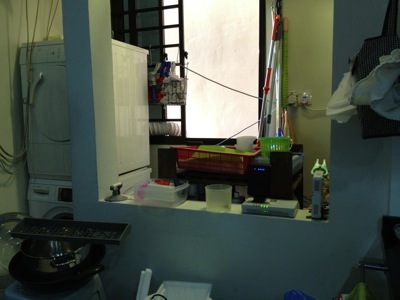
This is my washing area/kitchen.  Behind the wall on the right hand side is where OpenNet put their TP (Termination Point).  You can see I placed my ONT (Optical Network Termination) boxes there.  The main reason is I do not allow SingTel, or OpenNet to drill holes, and placed those ugly cable run from the front entrance.  So, I asked them to come in via the back door.  And the backdoor is the washing area / kitchen.  My network cabinet/cupboard is at the main entrance there.  It is there where all my entire apartment CAT6 cable runs are centralised.  And, I do not have a cable between this two location.  So, what did I do?
IMG_4794.jpg
So, in order to connect from the kitchen, I make used of two technologies.  Homeplug via the powerline and AirWire via the 5.8Ghz wifi space.  From the ONT location, there is no wired / CAT6 cable going to the network cabinet which is just left side of the kitchen (viewing from here).
IMG_4796.jpg
That is my network cabinet.  All the CAT6 network point in the house, except the kitchen, all come back to here.
IMG_4797.jpg
By the way, in my place, I have both ViewQwest and SingTel Fiber Broadband network.  The SingTel fiber broadband is notorious of throttle your traffic if they detect a slight abnomal traffic.  Once they throttle your traffic, all traffic will be slow.  So, I gave this network to my wife to use.  As she will always use it for her WebEx, Video Conferencing, etc.  As for me, I use it for my day to day web surfing and so on, I used ViewQwest Fiber Broadband that does not throttle my traffic at the moment.
1.)  So, for Singtel, I bought a pair of Airwave from X Concept.  They are the distributor of Airwave.  Now, they are located at #07-04, Burlington Square.
IMG_4775.jpg
I have used it for almost 7 months.  And it is still working fine.  I got this from X Concept.  This is a product from Ubiquiti Networks.  http://www.ubnt.com/.  A pair of this will connect at 5.8Ghz Wifi frequencies, without line of sight.  So, from the kitchen to my network cabinet.  It is brainless, simply connect and plug and play.  It is like a real cable like that.  except that they uses Wireless to connect the two points.
OK.  I know, I know, I am a techical guy, I can set up a switch and create a VLAN and pump it thru the power line using homeplug.  Those are the good old days, when you have 2 kids, your time seems to vanish pretty fast.  ahhaha so brainless thing will always catch my attention.
IMG_4776.jpg
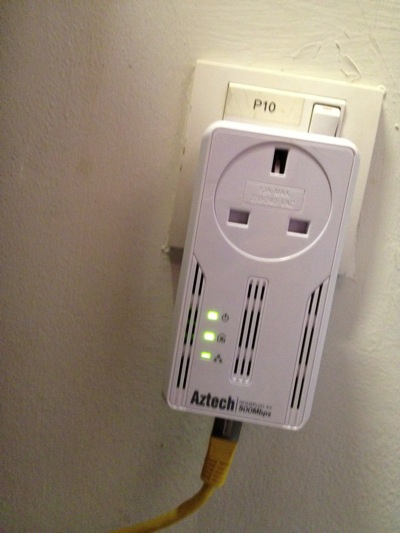
2)  So far, this is the most reliable homeplug that I have tested.  It has not been down, and does not need to reset it all the time as in the 1Gbps version.  It also have a noise filter, where you plug almost other things in there.  This one, I place it just opposite my dryer and washing machine.  My domestic helper wash cloths during day time, where all of us are working.  So, I did not get a chance to test weather the noise level is high during the washing and drying.  So far, I am happy with it.

IMG_4779.jpg

In my network cabinet, I plugged a plug extender on the noise filter of the homeplug.  That means every single electronics, i.e. switches, routers, etc are plugged in and pass thru the Aztech homeplug.  Except the NAS, I plug it separately.

IMG_4785.jpg

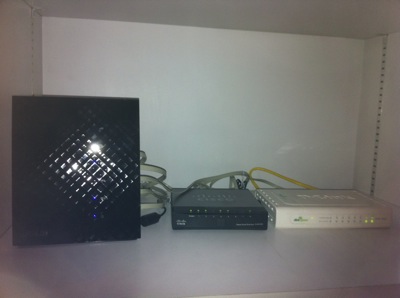
3)  SSID Mouse9 inside the network cabinet.  This is ASUS Black Diamond, the best WAN to LAN and LAN to WAN router in the market.

IMG_4783.jpg

4)  SSID Mouse5, running SingTel network, resides in my study room for my lovely wife to use.  Of course, the switch below is running ViewQwest network.

IMG_4788.jpg

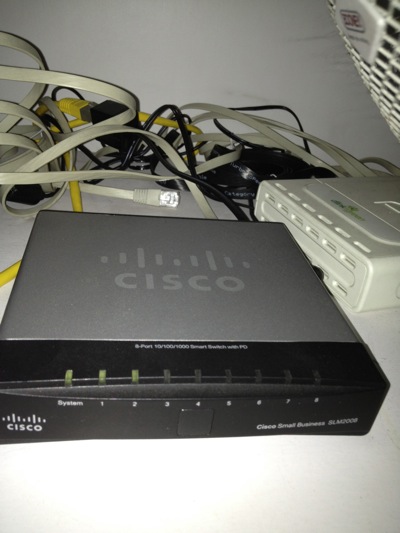
6)  As I threw away the SingTel's 2wire router.  I need this managed switch Cisco SLM2008 to untag the VLANS for me from Singtel Fiber Broadband.  I do this is to increase the performance of WAN to LAN network.  Singtel's 2wire is really crappy!

IMG_4784.jpg

7)  SSID Mouse3, sitting at the TV Console area, provides internet and Wifi exclusively to Apple TV, Wii and XBox, and my Internet Radio.  Apple Airport Extreme does the work here.  When you Airplay the movie on your IOS devices, it is fast!

IMG_4790.jpg

8)  The Internet Radio.

IMG_4793.jpg

9)  SSID Mouse6 in my bed room.  I can received 2-3 bars Wifi Signal from Mouse9, but that is not enough.  so, I put my Apple Airport Express here.

Related Posts:

From here you can explore more related topics at the botom of this post.

http://miniliew.blogspot.com/2011/05/bye-bye-singtel-2wire-5012nv.html

Friday, July 29, 2011

Home Network Improvement Plan - Asus Black Diamond

Date:  July 29, 2011

I just got a new router.  I bought it in Sim Lim for S$220.  But later, when I shop at IMM, one of the computer store beside Challenger is selling at S$209.

IMG_8499.JPG

Before that, I replaced my home Internet network router and throw away Singtel useless 2Wire 5012NV Fiber Broadband router (now it is only used for deliverying MIO TV).  I was using a D-link DIR-655.  The Wireless AP served me well for the pass two years.  It's time to change.

NewImage.jpg

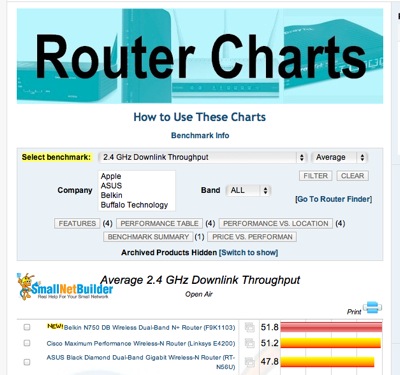
My friend Larry introduced me to a website that has router comparisons.

http://www.smallnetbuilder.com/wireless/wireless-reviews/31436-asus-rt-n56u-black-diamond-dual-band-gigabit-wireless-n-router-reviewed

Go to this website, and start selecting your next router...  For me, I choose "Total Simultaneous Throughput" and you get ASUS Black Diamond Dual-Band Gigabit Wireless-N Router (RT-56U) as the top runner.

Screen Shot 2011-07-29 at 7.11.17 AM.png

And If I compare with the D-Link DIR-655, which is ranked 20th from the top.

Screen Shot 2011-07-29 at 7.14.03 AM.png

My Apple Extreme (ranked 14th) at home is much faster than the DIR-655 ...

Screen Shot 2011-07-29 at 7.15.48 AM.png

And in my office, I think they recently bought a Netgear WNR3500L which is ranked 18th ...

Screen Shot 2011-07-29 at 7.17.36 AM.png

But all these routers I have seen is no where compared with Asus Black Diamond!!!  It is three times faster than my Apple Extreme.  And the router is stylist too.  One thin piece of devise standing vertically.

IMG_8515.JPG

Now, how good is this router and its AP (Wireless) function... Here are some of the test I have done in the office and at home...

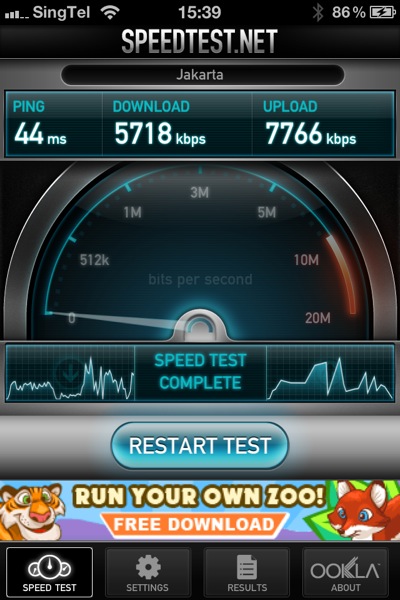
In Office We have two Wireless Access Point Router, where one ofthem is the newly bought Netplus WNR3500L... So, I run the speed test on it... As you can see I can achieve 5.7Mbps download and 7.8Mbps upload.  And I am doing the test ping to the Jakarta speed test server.

IMG_8502.PNG

Then, I disconnect the netplus, and log on to the 2nd wireless router.  I don't know what router is that, but I suspect is a cheap router too.  I will not use this AP router as a reference, as it goes to another broadband link that connects to NewMedia Test server.  I provided it here to give a reference.

IMG_8506.PNG

Then, when I plug in my new ASUS Black Diamond.... WOW... I am speechless.  I managed to get 9.1Mbps download and 14Mbps upload.  I am impressed.

IMG_8501.PNG

So, I re-run another round of testing... just to make sure I don't get some isolated results... and the results came back almost similar...

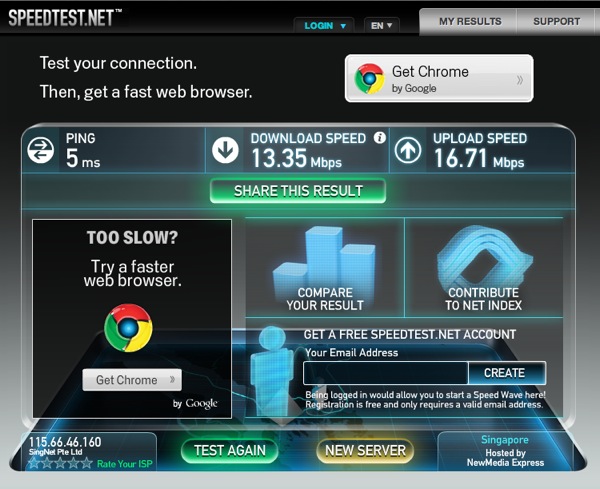
So, next thing I do, is to go back home immediately, and re-run the test at home.  So, at home, before replacing the router, this is what I get... 13.35Mbps DOWN and 16.71Mbps UP.

mouse before Test1.png

And after I plug that ASUS Black Diamond in, replacing the DIR-655...  The speed becomes 26.77Mbps DOWN and 23.85Mbps UP.  That is what I am talking about.  I had an OpenNet fiber, with Singtel Fiber Internet service of 50Mbps.  My speed should at least closer to 50Mbps, right.

wireless after door open Test1.png

So, I am speechless after I see all the result and I am very happy!

So, I go do more research.... For WAN to LAN Thruput, this is to let the Internet come into your home, handled by your router.

Screen Shot 2011-07-29 at 7.33.18 AM.png

For LAN to WAN Thruput, where your Internet going out...

Screen Shot 2011-07-29 at 7.35.40 AM.png

For Maximum Simultaneous Connections.... this is for P2P download... how mcuh you can handle when you download torrents... ASUS Black Diamond is #6 not too far behind..

Screen Shot 2011-07-29 at 7.36.18 AM.png

The 2.4Ghz Wireless Downlink thruput, Black Diamond scored #3...

Screen Shot 2011-07-29 at 7.37.53 AM.png

I think I made a right choice for the router... and I am damn happy about it.  The performance I get is much better than before... and I can feel the speed is very stable too.

GET IT NOW!

NewImage.jpg

I am still keeping my Apple Airport Extreme and Apple Airport for home Wifi access.  :)


Wednesday, June 1, 2011

My Home Fiber Network - After Revamping

Date:  June 1, 2011

Mug_Everything_Works_With_Caffeine_590x400-200x130.jpg

Ever since I bought the Cisco Linksys SLM2008, and link it after the ONT, I am very satisfy with my home Fiber Network.  Everything seems to work now.  And Everything Works With Caffeine!

Here is how my network looks like now...

My Home Network NEW.png

My MIO TV Works!

As you can see the biggest benefit out of this revamping exercise is... My MIO TV finally works after 1.5 years since it is cold storage in my store room.  I finally can have sport channel now.  I can watch ESPN Sport News too.  And it does not freeze any more.

So, the trick is, I uses an extra set of Aztech HL280e Powerline Home Plug (A technology that uses your home power line at home as a media to transport IP data) to trunk the traffic from ONT directly to the Singtel 2Wire 5012NV router.  By doing so, I am running very clean pipe from the ONT to the MIO TV.  So, now I am suspecting that my internal Cat6e fiber from the data cabinet to TV console area are bad.

And YES, I have found the only usage for SingTel 2Wire 5012NV is to provide IPTV for the MIO TV console.  :)

My AirPort Extreme/Express Works!

The ONT connects to my Cisco Linksys SLM2008 managed switch which has VLAN 10 tagged.  So, whatever behinds it can see the tagged traffic.  i.e. my DLink DIR-655 AP router actually can get another set of Public IP from SingTel.  And then, I daisy chain two DLink GE switch behind, and my AirPort Extreme / Express connecting to it are able to interoperate with the DIR-655 AP router.  No longer I need to set static IP on all my wireless devices, and I can also see each wireless segments.  Unlike before.  That 2Wire 5012NV is really crappy.

NewImage.jpg

Bye Bye Singtel's 2Wire 5012NV

Date: May 31, 2011

This article is to teach you how to dump Singtel's 2Wire 5012NV Router for your Internet High Speed Fiber Broadband.  This is for those people who ONLY needs Internet at home, and no need to have MIO TV at home.  Although SingTel always bundled both together, means, they give you FREE MIO TV.  But still, I will keep on researching to see how to make it work for MIO TV.  Stay tune.  For now, only for Internet uses.

Singtel.JPG

1.  What do I subscribe?

I had my fiber Internet for almost 2 months now.  I have been enjoying the high speed internet very much.  I had the following plan from SingTel...  At this home, Internet is important as almost every night there are teleconference to US, Europe using collaboration tools such as WebEx.  What I had before is a 15Mbps High Speed ADSL2+ Plan.  So, upgrading to the 50Mbps will give you true 50Mbps LOCAL download, 25Mbps LOCAL upload, and real 15Mbps International download.  I have been testing it, and so far, it is a true upgrade for me.  As for MIO TV, it never work at my home, it freezes every 20 seconds or so.  So, at this point, I don't care about MIO TV.  But with the method described below, may be it will also work for your MIO TV.

Screen shot 2011-06-01 at AM 06.30.26.png

2.  What I have before?

This is my home settings.  I asked the OpenNet to pull the fiber into my Kitchen / Washing area.  Because I don't want UGLY cabling in my home.  From there, I used Aztech Homeplus (using Power Line) to bring the network to my Switch/Router cabinet that hooks into my internal cabling at home.  As me and my wife each has iPhone4 and iPad2.  So, we need 3x Wifi Zone to provide maximum coverage of the Wireless Access for our Apple handheld devices and those will talk to my Apple TV2 and AirPlay movies, Photos onto my TV.


My Home Network.png

A bit complicated for me, but it is necessary at my home.

3.  So, What is the problem with SingTel 2Wire 5012NV Router?

This router provided by SingTel, does not work well with my AirPort Extreme or AirPort Express.  70% of the major appliance in my home is Apple, so, I would pretty much want to use Apple AirPort here fore the wireless.  I cannot throw away my Apple AirPort.

The symptom are, even when you set the AirPort Extreme or Express to BRIDGE MODE, all the wireless devices at home does not get a DYNAMIC IP address from the DHCP running on the 2Wire 5012NV.  I google it and found that it is indeed a major problem.  And every one suspect that the 2Wire DHCP is non-standard.  Because my AirPorts work with the previous SIngTel ADSL modem plus DLINK AP Router.

So, I end up have to set STATIC IP on every Wireless Devices.  And worst has yet to come, AirPort Extreme or Express will sometime loses Internet, and blink amber lights.  And when you check it, double NAT detected.  It has to be some conflict somewhere, and all finger points to this SingTel 2Wire 5012NV Router.  It's crapy.

4.  Can I simply plug another router to replace the SingTel 2Wire 5012NV?

The answer is NO.  Because SingTel push VLANS onto the Singtel 2Wire 5012NV.  Unless your Wireless AP support VLAN tagging, you are not able to change the 2Wire 5012NV.  Now, that's evil.  May be SingTel don't want users to simply anyhow change the router so that they do not need to support any other brand of routers except their own.

5.  So what are the VLAN tagging needed?

SingTel tag the following VLANs.  So, you make sure you tag the port with these VLAN ID, then, you should be able to get the IP from SingTel.  I did this using the 2nd and 3rd Aztech HL280e Gigabits Switch, and I actually can get 2x SingTel IP for the Fiber Internet.  (This is interesting!!)  Does it mean that I can get 2x 50Mbps??  I will test it out and let you know.

VLAN 10 = Internet

VLAN 20 = MIO TV

VLAN 30 = VoIP

VLAN 40 = Management

6.  So, the solution is to put a Managed Switch that support VLAN tagging.

After google it on hardware zone, the recommended switch is Cisco Linksys SLM2008 Switch.  You can buy this from Bizgram at 5th Floor Sim Lim.  And it cost about S$165.

images-16.jpeg

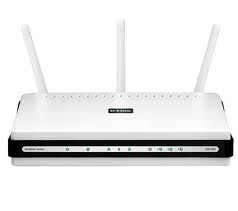
And then, you simply plug in any Wireless AP behind the switch to do the routing and provide DHCP address.  In my case, I used back my old DLink Wireless AP.  Configure it to get IP from Singtel, and then provide your Internet Network.
images.jpg


7.  How to configure it?

Screen shot 2011-06-01 at AM 07.32.17.png

You log in first.  Configure your laptop to have manual IP of 192.168.1.xx, with sub netmask of 255.255.255.0, plug into the switch.

Screen shot 2011-06-01 at AM 07.35.55.png

Create VLAN of 10, 20, 30, 40

Screen shot 2011-06-01 at AM 07.36.41.png

Screen shot 2011-06-01 at AM 07.37.25.png

Screen shot 2011-06-01 at AM 07.37.40.png

Screen shot 2011-06-01 at AM 07.37.50.png

This is how I do for VLAN 10, 20, 30 40.

After you created the VLAN ID, and make it a member to 1, 2 and 3.  You have to set the VLAN Port Settings.

Screen shot 2011-06-01 at AM 07.39.12.png

So, in my case, the ONT will come into Port 1.  So, I will need to Enable Ingress Filter, and select Tagged Only.  For PVID, I leave it at 1.

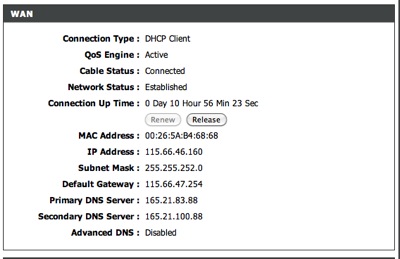
For Port 2, that will go into my DLink Wireless AP Router, so, I tagged 10 and Enable Tx Force Untag.  Once you have done this, plug in your laptop to test it, and you will get a Dynamic IP from SingTel.  So, on your DLink Wireless AP, you simply need to do DHCP address from the Internet.
Screen shot 2011-06-01 at AM 07.42.14.png

So, every things work!  I plug in my Wireless AP Router, and then all my AirPort Extreme, Express works seamlessly as before.  And I do not need to configure Static IP on my wireless devices and they do not lost Internet connections.

8.  What else that I have found out?

I also put everything behind the Aztech HL280e.  That means, I don't need to put the router in front of it.  The Aztech HL280e magically acts as a MEDIA in this case.  i.e. a wire/cable.  If your home does not need to run Internal Network as I need, (because of the NAS), then, you can buy lots of Aztech HL280e just to run Internet into every devices (which able to get Dynamic IP from SingTel).

9.  What's Next?

Next, I will try to replace the DLink Wireless AP to Gigabits version.  Now it is still 100baseT.

Also, I need to figure out why Synology and iMac does not run stable on 1Gbits.

I will try Jumbo Frame.

Lastly, I will try to make MIO TV work, since now I found a way to do all these.  Let's see how.

I will update more.

[UPDATES] - Sep 13, 2011

Related Posts:

1.  Phase 2 of my network.  http://miniliew.blogspot.com/2011/06/my-home-fiber-network-after-revamping.html

2.  Initially, I got an Aztech HL280E, the fastest 1Gbps Powerline/Homeplug.  But it keeps going down.  And I finally figure out why.  http://miniliew.blogspot.com/2011/07/home-networking-why-my-aztech-hl280e.html

3.  So, I dumped the 1Gbps power line, and switch it to the latest HomePlug from Aztech, HL115EP.  And it has been running for almost 6 weeks now, and I have not had any problem with it.  http://miniliew.blogspot.com/2011/07/home-network-improvement-plan-homeplug.html

4.  I did my bench mark test for my ASUS Black Diamond.  It is really the LAN-to-WAN speed super performance that I like. http://miniliew.blogspot.com/2011/07/home-network-improvement-plan-asus.html

5.  How I benchmark and improve my wireless at home.  http://miniliew.blogspot.com/2011/08/network-performance-1-wireless.html

6.  I also satisfy with my gigabits network at home.  And here is how I bench mark it.  http://miniliew.blogspot.com/2011/08/network-performance-2-is-gigabits.html

7.  Oh ya, about the black diamond.  In Malaysia, LoYat building, you can get it at least S$30 cheaper. http://miniliew.blogspot.com/2011/08/malaysia-boleh-buy-this-toy.html

8.  I tried to explained why it is important to watch out the power plug and what is the surrounding power noise.  Understanding it, then, you can improve your powerline/Homeplug experience.  http://miniliew.blogspot.com/2011/08/slow-homeplug-try-powerline-filter.html

9.  The latest benchmark I have done.  I switch to use AFP instead of SMB on my Synology box. http://miniliew.blogspot.com/2011/09/afp-or-smb-synology-dsm-32-for-ds411ii.html

10.  If you read KLSeet.Com website, you will now that now ASUS Black Diamond has a Beta Firmware 8.1.1.4 that is supporting both Malaysia Unifi and Singapore Sintel exStream Fiber.

http://www.asus.com/Networks/Wireless_Routers/RTN56U/#download &

Screen Shot 2011-09-14 at 9.16.56 AM.png

http://klseet.com/index.php?option=com_content&view=article&id=93&Itemid=87

Again, I am not a tech reviewer etc... I am just an average guy trying to enjoy building my own network, and share whatever I have learn at my blog.  So I have not try to install the 8.1.1.4 yet, because I already have SLM2008 running, there is no urge for me to upgrade it to test out.  I always believe a router is a router, a switch is a switch, and try not to "overload" everything in a single box.  :)  Have fun readings the updates.