Date: Nov 19, 2011
I love Apple products. Steve Jobs really left behind a great innovations for us. So, we got to appreciate his efforts. I bought one of these T-Shirt from Taobao.

So, I asked my wife to buy and carry these back from her US trip. Actually it is a nice gift to give to some VIP customers. You can't buy it in Singapore from any Apple reseller store. The reason is Apple TV has a lot of US-centric Movie, and TV shows that Apple has signed copyright with all the content providers so that they can only distributed it in US only. Means, in order to see those content, you need an US-based Apple ID account. You don't have this, and you only use your Singapore based Apple ID account to login, the Movies and TV-Series menu will not show up.
So, you might asked, if that is the case, what else you can do with Apple TV in Singapore or Malaysia?

1. Photo Slide Shows
So, instead of showing your photo from your PC, iMac, iPhone, iPad2, etc. Your Apple TV can get the contents of your iTunes/iPhoto, or iPhone/iPad2, and show it on the big screen TV, so that every one can see the photo on a wide screen TV in the living room. This is particularily very useful during gathering at your home.
With AirPlay capability on iPhone, iPad2. When your friends visit your home, they can simply "AIRPLAY" their photos onto your TV via the Apple TV.
2. AirPlay Mirroring

Play Games
If you have iPhone 4S or iPad2. You are equiped with AirPlay Mirroring feature. That means, thru the Apple TV, everyone can see what you do on your iPhone 4S or iPad2. So, this means, your kid when he or she is playing Angry Bird, instead of their cousins standing beside, around he/she to watch they playing games... the kids can see it on TV. Everybody can enjoy playing Angry Birds, as they can see how one another perform and play the games.

For games like Real Racing 2, Pinball HD, Star Wars Arcade - Falcon Gunner, and etc. You can use the iPad2 as a controller to control your ship, your car, your pin ball and play it from the big screen TV.
Office Presentations
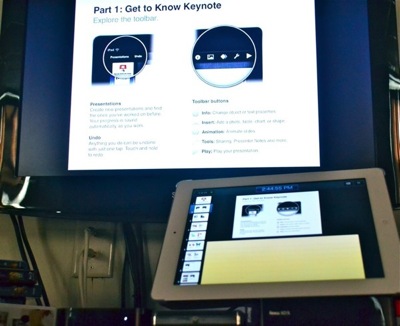
When your customers come to your office, and your office equipped with Apple TV, and WiFi, you can present it using AirPlay Mirroring. One of the coolest thing is, the real laser pointer will not work on the TV screen, but if you hold your finger on the screen, there is a laser pointer appeared on the screen. (only using Keynote Apps).
Watch TV/Movies
There are a lot of Apps in the app store you can download and usually you watch it on your iPhone or iPad. Now, you can AIRPLAY it onto the TV Screen using Apple TV. All these below are excellent streaming TV program on iPhone and iPad. Now you can project it onto the big screen TV with AirPlay.
- PPS TV
- PPTV
- 奇艺影视
- Dedo TV
- Le TV
- 高清影视




I used Air Video Server & Air Video to stream my TV / Movies collections from my NAS onto the TV screen using Apple TV.

3. Facetime or Skype
Lastly, very important, you can run facetime, or skype video conferencing on iPad2 or iPhone 4S, and then AIRPLAY it on the big screen TV. All audio and images will be air played on the TV. How about that!

It's cheap!
There are a lot of things that you can do on this small little devise. And how much is it? USD$99 per box. It is affordable. You add up the tax, and exchange rate... its about SGD$140 or so.
One More Thing...
Look at the remote. SO SIMPLE and ELEGANT!

A SIMPLE SETUP GUIDE
Here, I just want to run thru a very quick guide to show you how easy to setup the Apple TV.
After you open a box, this is what it looks like. So, go buy a HDMI cable, and then plug it into the TV and Apple TV.
Plug in the Power Cable.
That's it! (You can plug in the LAN cable, but I uses wireless)

OK. Please take a look at this blog for info how to optimized Apple TV2 for AirPlay Mirroring..
http://miniliew.blogspot.com/2011/10/how-to-optimized-apple-tv2-for-air-play.html
In short, it is best if you can place the WiFi Access Point just beside your Apple TV. As most of the time you going to use your iPhone/iPad2 to Air Play, so, it is a good suggestion to keep the WiFi Access Point near to you. Of course, you can just buy a AirPort Express to do the job. :)

After you boot up, Apple TV will start "talking" and greet you. So, from the first screen, you select English.

Next, as there is no LAN cable plug in, Apple TV will look for Wi-Fi for you. So, choose your WiFi access point.

If WiFi Access is password protected, key in the password.

If you want Apple TV to feedback automatically to Apple when it has trouble, click OK. Otherwise No Thanks!

That's done! You are good to go. You can AirPlay your iPhone and iPad now.
Check your settings - General - About. It should tell you that your Apple TV is connected to WiFi. And what is the Signal Strength.

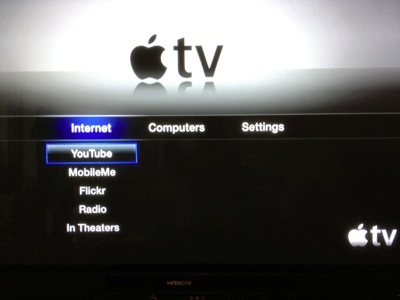
As said, you do not see the Movies and TV Series menu item, this is because, you have not configure the iTunes shop yet and you do not have an American based Apple ID. An American based Apple ID means you need to have both US credit card that match to your US address. If you do not have it, then, you do not have to go beyond this setup stage.
What I did is long long time ago, I sign up an Apple ID that is US-based with a US address. And all the while I buy GIFT VOUCHERS from ITunes-Express!
http://itunes-express.web.officelive.com/default.aspx
So, you pay 20% more for the credits. i.e. US$30.25 for US$25 worth of iTunes Credit.

SETUP GUIDE if you have US-BASED APPLE-ID
(Do not follow these steps if you do not have a US-based Apple ID, A US-based Apple ID requires a US-based Credit Card with US Address. If you don't understand what I wrote here, that means you have a Singapore or Malaysia based Apple ID that tie to your Singapore or Malaysia Credit card that has your Singapore and Malaysia mailing Address!)
Now, go to the Settings, and go into General.

Under Settings - General, you can select the iTunes Store.
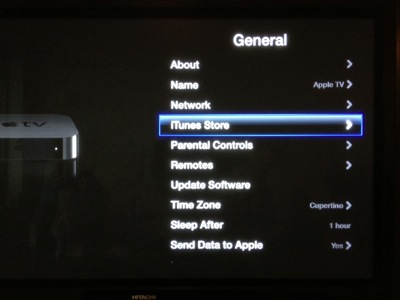
Very important step. If you have US based Apple ID, your address must be in US. So, you must first select the "Location" to set it to "United State"

If you do not select United States, even if you have a US based Apple ID, you still will not see the Movie and TV menu.

Then, you go back to "Sign In" page to sign in your US-based Apple-ID

Key in your password.

Say YES to remember password.

After you have done it, you shoud see this on your screen. The Movies, TV Shows and Music Channel. And of course, if you got money in your account, you can buy those movies. Some how these movies are of very high HD quality and the file size is much smaller.

One more thing...
Always update your software. Under General - Update Software.

Update software usually take few minutes to download and another few minutes to update. Very seamless.

One Last Thing...
There are many Internet resources or google info that you can find for creating a US based Apple ID. This is how.
http://www.ipadmalaysialabs.com/how-to-create-a-us-apple-id/
Very easy.
Once you have it, then, you can go to iTunes-Express to buy your GIFT VOUCHER. If you really need to spent the money to buy Apps or TV Shows, etc.
http://itunes-express.web.officelive.com/default.aspx
Enjoy!