Showing posts with label Network Performance. Show all posts

Monday, September 8, 2014

Gadget: Sineoji 1800Mbps Gigabit HomePlug AV2 MIMO

Date:  Sep 8, 2014

Notes:  Please scroll to below to see the original posting.

Updates (sep 26, 2014):  The Sineoji’s Dean sms back and let me know that the Sineoji lab has tested one of the “faulty” unit that I have sent back to them.  And after the test, they found out that one of the capacitor is faulty (manufacture defects) and cause the shut down of that “faulty” unit.  

I have been happily using the new Sineoji 1800Mbps Gigabit HomePlug AV2 MIMO ever since they replace that faulty unit until now, and the result is consistent.  The speed has not dropped.

Let’s do a quick summary here.

1.  Every home has very unique power cable network.  Therefore, the home plug (any brand that you buy) will try to deliver the best Ethernet quality for you.

2.  For example, I cannot plug the Simeoji unit in my kitchen without an extension.  As there is ONLY one power outlet there.  (I can move my router into my network cabinet, but I will loss Wifi in kitchen area).  So, I have to plug the Sineoji into an extension.  And that will cut down some bandwidth there.  And by using the power extension, I also share the power noise with others.  That explains why my input is 200Mbps, but I only get 110Mbps out.

3.  For example, from my kitchen, I have to go thru my washing machine, dryer, dish washer, microwave, oven, steamer, stove and then reach the Network cabinet outside my living room there.  That is why such power noise will reduce your network to 110Mbps.  

4.  So, please do not expect that you buy 1800Mbps and you get 1800Mbps.  That is the ideal lab speed.  

5.  So, your home speed may varies.  You may get much higher results.  Or lower results.  It all depends on your home.
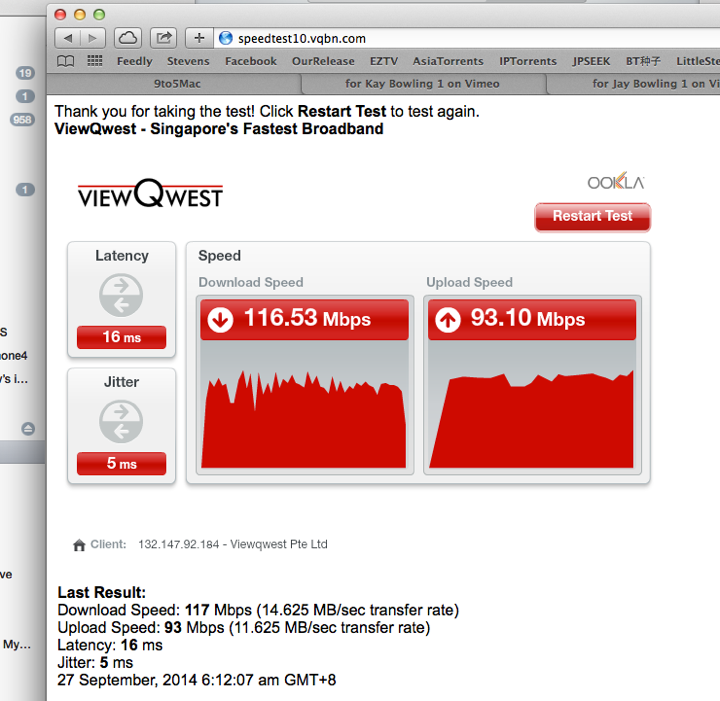
Screen Shot 2014 09 27 at 6 12 24 am

Updates (sep 15, 2014):

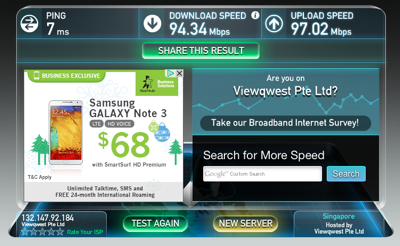
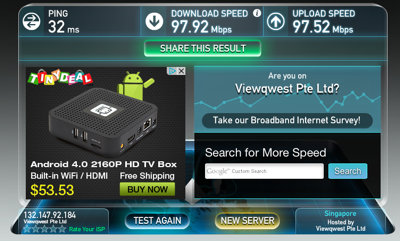
This is the latest Speed Test which I just did few minutes ago.  I used to get 70Mbps-90Mbps on the 600Mbps AV2.  Now, I can constantly bump up to 110-120Mbps download.  

Screen Shot 2014 09 15 at 8 58 24 am

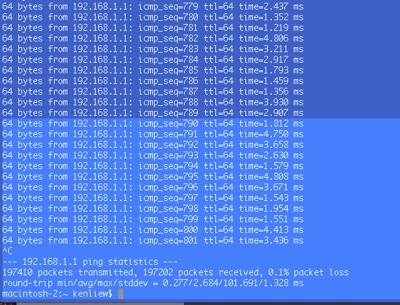
And I have been running the ping test continuously.  Seems OK.  0.1% packet loss out of 38542 packets.  Seems acceptable.

This result done yesterday.

Screen Shot 2014 09 15 at 8 59 59 am

Sep 13 result.  0.1% packet loss for 254253 packets.  I did this test before I go Jakarta, and this result is collected after I come back 4 days later.

Screen Shot 2014 09 15 at 9 03 04 am


Conclusion:

1.  This gadget works.

2.  It has been stress test for almost a week.  And it is average about 0.1% packet loss if running over night or for a few days.  Which is good!

3.  Previously, the 600Mbps AV2 unit was quite stable.  However, sometimes, the speed dropped down to 20-30Mbps for the same set up.  The previous unit maximum can pump up 90Mbps or download and upload traffic.  Compare to the latest 1800Mbps, I am now getting > 110-120Mbps for download, and it has been constant and steady without dropping the speed.

4.  My wife did not complaint.  My maid did not complaint.  So, during the 4 days I was out of Singapore, it runs without a problem.

5.  Don’t expect 3 times of speed increment.  HaHaHa What I was hopping for is to increase the speed only.  So, a 20%-30% speed increase is good for me.

6.  I am still waiting for Dean from Sineoji to get back to me on that first unit which I suspect is faulty unit.  He is doing the same stress test too.  I also suspect there are algorithm to auto shutdown and auto adjust internal settings to make it run better.  But until there is any official answer from Sineoji, we just leave it as Faulty Unit.

7.  I am HAPPY.

8.  My recommendation:  CAN BUY.


Updates (Sep 10, 2014:  10:30AM):

The Sineoji people got hold of my unit, and at the moment is running burn in test with traffic to check it out.  

After yesterday two times of shutdown (2min interval), the new unit run perfectly for 12 hours or so.  With only 0.2% packet loss out of 39645 packets ping.

That means, there is no down time after that.  But then, it is during night that I tested it.  So, I will keep it running for another 24 hours to test out the hot and humid weather of Singapore.   Hopefully it is fine.

Photo


Updates (Sep 9, 2014 11:58PM):  

A guy from Sineoji trying to contact me today.  

I returned back one of the unit and exchange a new unit to do the testing.

I managed to phone the Sineoji guy name Dean.  We spoke.

And this is what he told me.

He said that the Sineoji comes with an adaptive intelligence that it can “learn” your power lines and then adapt to it.  He wasn’t sure what it will do, but it will improve stability.

Guess what.  I actually bought that idea.

So, I went home, and test it out again around 7:30pm.

I did not do anything.  I simply run a Terminal and run the command “ping -v 203.120.90.40”.

Yes.  I continuous ping to PacNet’s DNS server.

Not long after… the unit die again!

Screen Shot 2014 09 10 at 12 18 52 am 

And then, MAGICALLY, it come back online again!  So, I lost the packets from seq#652 to seq#786.  That is approximately 134 packets loss.  Means Network DOWN!

So, if I give each packet timeout roughly about 1 second.  That is about 134 seconds of lost network.  About 2 minutes.

 Screen Shot 2014 09 10 at 12 19 30 am

And then, after running for some time, it dropped again!

Screen Shot 2014 09 10 at 12 21 37 am

The second down time is from seq#1321 to seq#1476.  So, that is about 155 packet loss, and about approx 155 seconds long.

Now, I am getting a bit frustrated.  But then, I remember what Dean has told me, and I simply cannot believe that Sineoji will allow a product to go out for sales if it cannot survive the heat and humid in Singapore.  It does not make sense at all.

Screen Shot 2014 09 10 at 12 22 34 am

So, for the first round of test.  I fired 75284 packets,a nd got 0.6% packet loss.  That is mainly due to the two downtime intervals.

Screen Shot 2014 09 10 at 12 26 38 am

So, I run the ping again.  And leave it on for few hours.  Fired about 10859 packets, and the packet loss dropped to 0.2%.  And from time to time I do loss a bit of packets.  But there is NO OUTAGE.

Screen Shot 2014 09 10 at 12 28 20 am

Both results are available here...

File #1.  https://drive.google.com/file/d/0B_2LIa_dWu8sSEpFREdqZGx5U2M/edit?usp=sharing

File #2.  https://drive.google.com/file/d/0B_2LIa_dWu8sSEpFREdqZGx5U2M/edit?usp=sharing

Conclusions:  (as of Sep 10, 12:31am)

1.  Could it be that the auto-shut off is due to its build in adaptive intelligence?  It actually turn off it self just to learn and adjust to make it faster?

2.  Because after the initial down time, after that, I no longer experienced the downtime.  The unit is still very hot.  

3.  I will let it run for over night and then, will observe the ping test results to see if it actually got any further downtime or not.  I also suspect that the temperature actually cool down during night time.  So, let’s see during day time, when the air is more higher temperature and more humid.  Will update again.

Here is the speed test, and it is consistently go above 100Mbps.  No complaint about it.

(Will resume extensive test after I come back from Jakarta.  :))

Screen Shot 2014 09 09 at 7 39 59 pm

Updates (Sep 8, 2014 6:42PM):  It die again.  And the temperature is very high.  I am going to return it to the shop.  It could be a faulty unit.  And again, it mysteriously come back online again after 1-2 minutes.  This is getting annoying.  So, my conclusion is the device is either faulty or not stable!

IMG 0378Unboxing

***** End of Updates *****

Today, I am going to unbox my new toy.  

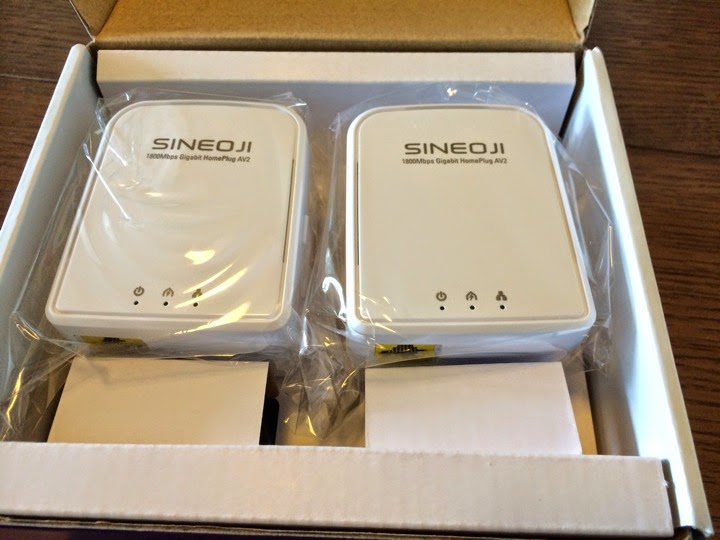
Sineoji 1800Mbps Gigabit HomePlug AV2 MIMO

IMG 0354

A pair of this cost $149.

This is the fastest speed Home Plug AV2 available in the market.  But last time I had a huge failure on Aztech fastest speed Home Plug, so, let’s see how this Sineoji is doing this time.

IMG 0355

It looks pretty much the same.

IMG 0358

And I wonder why it has so much holes to ventilate hot air?

IMG 0360


My Home Network

Take a look at the simple network diagram of my home.

1.  I arranged the OpenNet fibre to come in from the back door, so that they don’t do ugly white boxing cabling from the front door.

2.  My home has structured cabling except the kitchen.  OK, who thought of OpenNet can only come in from behind.

3.  My network cabinet is by the front door.  That is where all my Cat6 cabling ends.

4.  I placed ViewQwest ONT at the kitchen washing area too.  I have 200Mbps Internet Access from ViewQwest with Freedom VPN.

5.  I placed my D-Link AC1200 Routers at the washing area too.

6.  So, now I need to solve the problem of “Connecting” from my kitchen Router to my network cabinet.  It is a short 15-20m distance.

Screen Shot 2014 09 08 at 5 14 17 pm


What have I done?

OK.  You see there is this Washing Machine and Dryer at the Washing Area.  I also have Microwave, Oven and Dish Washer along the way.

So, you know that when these equipment turn on, you will have POWER NOISE.  And these POWER NOISE will affect your Home Plug devices.

IMG 0364

Later I will show you what I meant.

Option 1.  Use high quality point  to point wireless devices such as AirWave from UBiQUiTi

IMG 0353

This is a point to point wireless devices that does not need real line of sight.  So, I cannot see my kitchen from my network cabinet.  So, the wireless signal operating at 5.8GHz will bounce of the wall and connect to the other side. 

Using wireless.  This is the result I usually get.  Slightly below 100Mbps, and I can never pump above 100Mbps.

Screen Shot 2014 09 05 at 8 58 03 am

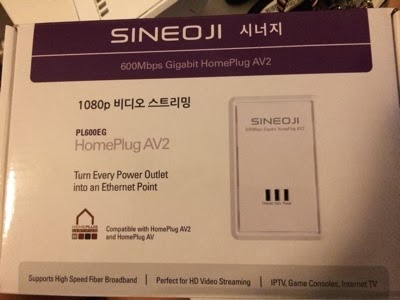
Option 2.  Use Sineoji 600Mbps Home Plug AV2

As you recalled, I was using Aztech H115EP very happily, and then Aztech Home Plug AV2 has failed to delivered a stable network.  That is why I switched to a more stable Sineoji 600Mbps AV2.
But the problem with this is…. It will get too hot, and suddenly the speed is dropped by half.  I have not experience any network down yet with this Sineoji 600Mbps AV2. 

IMG 0367

I have my dryer running.  

I have my Sineoji 600Mbps AV2 connected.

And this is the speed I get.  It used to be like 90Mbps download and 90Mbps upload speed.

Screen Shot 2014 09 08 at 4 31 20 pm

Option 3.  Use Sineoji 1800Mbps Home Plug AV2 MIMO

Now, let’s test drive our new Sineoji 1800Mbps AV2.

When the dryer is running.

This is what I got.   As you can see it can pump even higher speed.
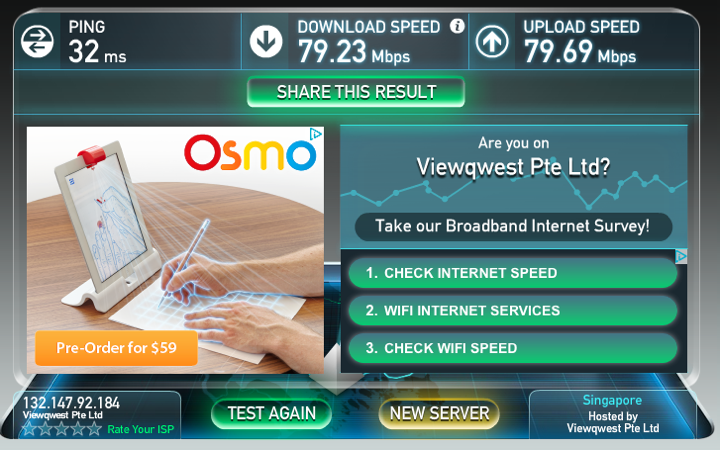
Screen Shot 2014 09 08 at 4 33 55 pm

Now, when the dryer is not working. 

I am happy to see > 100Mbps speed.  But some how the upload speed is a bit erratic.

Screen Shot 2014 09 08 at 4 40 49 pm

I did again.  And it is > 100Mbps with higher upload speed than before.

Screen Shot 2014 09 08 at 5 23 02 pm

Then, something bad happen.

The Sineoji STOP WORKING!

There is no lights on it.

IMG 0370

Then, after a few moment (1 minute or so), it come back up again!  

And it happened two times already!

I touched the Sineoji and it seems very hot.

It could be the temperature that shut it down.

IMG 0371

So, this is my recommendation.

I saw it drap the connection and “die” for two times.  

The first time, I turn off power and and take it out and then turn on power again when it cools down.  It went back online.

The second time, It magically light up again.

This is not acceptable compared to its previous version (600Mbps).

So, I don’t think I can use this if the mysteriously dying problem came back again.

I am waiting for Aztech 1200Mbps Home Plug AV2 to come around October.

Funny thing is it is always the kitchen unit that has problem.  It could be a faulty unit.  Or it could be over heating problem.

I have two USB fans blowing at the one at my network cabinet.  So, that one is still light up and fine.

I will check with Sineoji and update again.

IMG 0372

Saturday, March 8, 2014

My Internet Download Speed Vs. Speedtest Result

Date:  Mar 8, 2014

Today, when I wake up, I saw my friend doing the Speedtest on his new improved network.

I always very sceptical about the “Speed Test” app from OOKLA.  The results may not mean anything.

It only useful when you compare the results as it has a reference point.  But the result may not be accurate too because the speedtest server has a limitation in terms of its web server capability.  More people using it, more slower it is.  Unless the end server is setup to allow only one person to use, than, you can get accurate result.

Let’s recap.  This is my home network.

Notice that I have this Seneoji Homeplug AV2 600Mbps devices from my main router to my network cabinet?

Haiz…. Don’t mentioned it.  This is due to unforeseen circumstances where I did not pull Cat6 cables from my network cabinet to the kitchen where I allow OpenNet to come into the home.  Haiz.  So, the solution is, I have to use Power Ethernet (i.e. Homeplug) to do it.  Homeplug is nice, but sometimes it is erratic when you have “Power Noise” and we cannot always remove or predict the power noise.  So, although it says 600Mbps, but the real throughput is sometimes much lesser.  May be between 50Mbps to 200Mbps depending on distance.

Screen Shot 2014 03 07 at 8 13 44 am

My home I think have only 100Mbps.  At the router, you get close to 100Mbps.  But after it goes thru the Power Line Ehternet, I get this.

Not sure why it is so low.  May be later I go and reset both my Sineoji.  Sometimes you run the network for so many months, must reset it.  HaHaHa.

Screen Shot 2014 03 08 at 6 18 11 am

The OOKA main site confirms the result.  

Speedtest to ViewQwest Server is like this for me.  Due to my design fault in home renovation.  HaHaHa.

Screen Shot 2014 03 08 at 6 20 26 am

 Let’s do a speedtest again.  As you can clearly see… lousy speedtest result.

Let’s try the SGIX speedtest too.  Same lousy result.

So, you think with this kind of speed test result, my demonstration of torrent download will fail right?  will be slow right?

IMG 0917

Unfortunately, I don’t think so.

Let’s do the test yesterday again.  Download a torrent file.  Let’s use back the same file.

The big bang theory latest episode.  (of course, you have to remove yesterday file.  also this is for demonstration purpose only, file will be remove after downloaded).

So, as you can see, this is the power of un-blocked & un-throttled internet download!  Not even 2min (roughly about 1:30min) and it is done!  

So, who is the one telling you “Buy bigger bandwidth, download speed is better?”  You can now call him a liar!  Wahahahahaha

The key things to look for are 

1.  The ISP cannot block or throttle your bandwidth.  Throttle means, it actually monitor what you are downloading, if you are downloading things that the ISP don’t like or they think you are using too much bandwidth… They sell you 100Mbps does not mean that they will give you DEDICATED 100Mbps for you to use it by yourself.  It is most likely that they will oversubscribe the link by 10-30 times for consumers.  Oversubscribing means, you are sharing the 100Mbps with another 10 or 30x 100Mbps users.  Depending on the behaviour of these 10 or 30 people, you sometimes get a good bandwidth when the other 9 or 29 people or not using the network.  Or you will get sometimes good sometimes bad bandwidth.  On top of this over subscriptions of bandwidth, if the ISP don’t like you, most likely, they will throttle your bandwidth, means they put this

NewImageinto your bandwidth usage restrictions.  Some better one will allow you to do email, web serving at full speed you paid for, and then, block or severely slow down your torrent downloads.  Some other better one will throttle the bandwidth during peak hours, and then allow you to do unlimited download of torrents during 2am-6am off peak hours.  Some clueless ISP will throttle the bandwidth on all traffic.  So, when you start downloading, your are penalised by the ISP to throttle your entire traffic including your email and web surfing.  So, you have to read HardwareZone forum to figure out from the mass users on who or which ISP is good ISP for not throttling your bandwidth.  One tip:  Do you know how much a throttling equipment cost?  VERY EXPENSIVE.  So, I do know some ISP did not throttle bandwidth because they simply has no money or do not want to spent some a huge amount of money to buy the throttling machines.  These ISP do not earn huge profits.  

2.  Depends on what you are looking for.  If you watch PPTV or Netflix, a high quality HD TV or movie streaming is about 6-7Mbps per streams.  So, don’t you think with a good 50Mbps it will be enough?  There is no such things as buy more get better quality.  I bet you if you buy 200Mbps and compare to the performance of 50Mbps, the quality of streaming is still the same.  The quality of streaming is due to whether your ISP has good peering with the content provider or not.  And the ISP cannot please so many people, they can only please the majority.  So, if majority watching netflix, PPTV, then, the ISP will find ways to make the peering better, or to host the content servers near to them.  So sorry for those who wants to watch specific TV streaming from not a major player.  

3.  Speed test is still a crap to conclude if the ISP is good or not.  It can only tells whether your link got problem or no problem by comparing to history results.  It is heavily depending on how popular the server it is, the more popular the speed test server, the more NOT ACCURATE it is.  Think about it, a computer has only limited computing power.  1 person accessing the web server Vs. 10,000 people accessing the same web server, who will be faster and who will be slower?

4.  Ping Test is even worst.  There is a setting on the ISP routers call prioritisation of packets. The ISP can prioritise the packets.  So, most of the ISP just put very low prioritisation on the PING packets.  So, whenever you do the ping test, you get erratic results, sometime good, sometime bad.  Imagin 1,000,000 trying to run automatic ping programs to ping the server, you as ISP, do you want to give prioritisation to these ping packets?  or you want to let your customers’ legitimate Email packets or web packets to go first?  Some ISP if they know a certain regulatory is doing constant check on the performance, they can prioritise the packet to the optimal performance, so that they always get a very good ping result regardless of all the hardware zones netizens screaming and complaint about the slowness.  Gzzz.. That’s bad isn’t it?

That’s it for today!


Wednesday, December 4, 2013

Gadget: Sineoji 600Mbps Gigabit HomePlug AV2

Date:  Dec 4, 2013

* Updates:  I really itchy hand.  I go and buy a pair of Aztech Av2 600Mbps to test out.  I was wrong.  Very wrong.  The Aztech AV2 is much lesser powerful than its own Aztech HL115EP (earlier generation).  Somehow, at my place, my network configurations, it does not perform at all.  Lose out to Sineoji AV2 600Mbps.  So, my recommendations is to buy Sineoji AV2 600Mbps, or still buy Aztech HL115EP.  I don’t recommend to buy Aztech HL119EP.  See here for more test results … http://miniliew.blogspot.sg/2013/12/gadget-aztech-homeplug-av2-600mbps.html *

I am a simple guy.

I do not do complicated stuff.  

At my age, complicated stuff will bring headache.

Lazy to think.

Wahahahahahaha

I did a simple test, and here are the results shown below.  And I draw a simple conclusion.

Let’s look at my home scenario again...

1)  I terminated OpenNet Fibre at the wash area behind my kitchen.  Basically OpenNet Fibre comes in using my back door.

2)  Opps!  When I design the network in this house, I never thought of bringing internet into the kitchen washing area.  So, there is no Gigabits Cat6 cable pull to the back door.

3)  I certainly do not want OpenNet Fibre to come form the front door and put those white plastic cable runs over the place.  Very ugly.

4)  What shall I do from Kitchen to my Network cabinet?

5)  So, the only way is to use Homeplug/PLC technology to pump entire WAN traffic thru this technology.

http://miniliew.blogspot.sg/2011/07/home-network-improvement-plan-homeplug.html

I have been using my Aztech HomePlug HL115EP for a long time.  I think almost 2 and half years.  It is very reliable and serve me well.

But when new technology comes, your hand always get very inchy.  Wahahaha

So, there I am in SITEX.  And I first found out that Aztech has an AV2 which comes with AC pass-thru.  But then, just about I wanted to pay money for it.  I saw Sineoji just beside Aztech.  

NewImage

So, out of curiosity, I went to check out Sineoji.  

IMG 2721

And they are offering $33 per piece, instead of $60 per piece from Aztech.

So, without thinking much, my brain decided to give Sineoji a try.  First 150 customers, can get $33 per piece.  (Original price is $60).

But this one does not come with any AC pass thru (Noise Filtering).  Hmmm...

Let’s buy it anyway since it is cheap.

IMG 2720

It is a Korean brand.

 IMG 3218

It has quite good review on Hardware Zone, may be because they are the only AC2 Homeplug available for the last few months since PC show.

IMG 3219

Looks like this.

IMG 3215

As said, I am a simple person.  So, I do simple test.  And Let’s compare the result.

1)  ORIGINAL STATE.  WITHOUT any changes.  From my iMac in my study room, connected to a CAT6 Gigabits cable to a DLINK GE Switch, and connecting to A pair of Aztech Home Plug HL115EP (power line from network cabinet to kitchen washing area) and connecting to my DLink AC1750 DIR-868L router and go out to Internet using ViewQwest.

Result #1:  7:34.18am

Screen Shot 2013 12 04 at 7 34 18 am

Result #2:  7:35.13am

Screen Shot 2013 12 04 at 7 35 03 am

2) COMPATIBILITY TEST.  I changed the Network Cabinet to use Sideoji 600Mbps AC2.  And at the Kitchen wash area, I still use the Aztech HomePlug 500Mbps HL115EP.  Every other things remain the same.  

Result #1:  7:37.06am

Screen Shot 2013 12 04 at 7 37 06 am

Result #2:  7:37.56am

Screen Shot 2013 12 04 at 7 37 56 am

Conclusions:  Aztech & Sineoji does not have a happy marriage.

It is amazing to see that both the devices when they interop, they cannot talk well.  The Download speed is dropped to 5-6Mbps.  And the upload speed is still high.  This is a very puzzled results.  But for sure when we buy these sort of Home Plug devises, we do not intended to use multi brand together.

So, the marketing about they are compatible with home plug earlier version, and other brand is a crap!!!!  It is compatible, but lower and erratic results.

3)  SINEOJI AV2 600Mbps Test.  Now, at the washing area, I also use the Sineoji AV2 600Mbps.  Rebooted both side just to be sure.

Result #1:  7:42.46am

Screen Shot 2013 12 04 at 7 42 46 am

Result #2:  7:43.34am

Screen Shot 2013 12 04 at 7 43 34 am

Conclusions:  I did not see any huge improvement from the speed test.  It is just a slightly few Mbps increased compared to the original state results.  

But let’s look at another parameter.

Let’s ping to the router and see what you can see.

1)  Original state.

As you can see… the ping results is a bit erratic in a sense.  I did not noticed that few years ago.

Screen Shot 2013 11 28 at 7 26 38 pm

Let’s look at the result of 2.5 years ago with the same Aztech HL115EP but different router (Asus Black Diamond).

Again, I am seeing not so stable ping result from my iMac to the router.

NewImage

2) Sineoji AV2 600Mbps Ping result.

The AV2 technology gives a steady ping time.  At least it is not fluctuated like last time.  That means the jitter will be small and the delivery of videos and voice will be much better.  So, the performance between 500Mbps AV1 Vs 600Mbps AV2 is not so much on the speedtest, but from the Ping time perspective it is much more stable, which is good.

Screen Shot 2013 12 04 at 7 51 43 am

OK.  I did see some small improvement but the improvement is not big at all.  And now I think I may have made a mistake, for going for Sineoji.  Yes, it has improvement, but what if the AV2 from Aztech which has the AC Pass-Thru Noise Filter will pump even more higher throughput?  So, that will leave it for my next test if I got money to buy the Aztech version of AV2.  (when is my hand itchy and when do I go Sim Lim again.. )  Wahahahaha  I wrote in the follow blog before to explain the noise from the fan can affect your HomePlug performance.

http://miniliew.blogspot.sg/2011/07/home-networking-why-my-aztech-hl280e.html

Having said all these...

I still don’t like Speedtest.  But that is the only way to give a benchmark by comparing two results.

http://miniliew.blogspot.sg/2012/09/something-about-speedtestnet.html

Sunday, March 11, 2012

My Home Network Updates

Date:  Mar 10, 2012

This is my finalized design of my home network.  It has been running for the past 7 months with ultimate performance.  :)
Kenneth Network.png
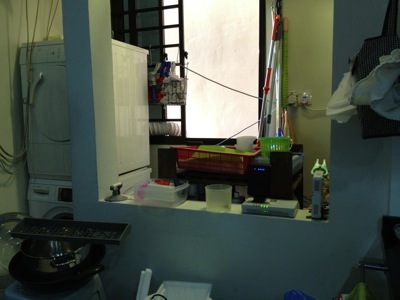
This is my washing area/kitchen.  Behind the wall on the right hand side is where OpenNet put their TP (Termination Point).  You can see I placed my ONT (Optical Network Termination) boxes there.  The main reason is I do not allow SingTel, or OpenNet to drill holes, and placed those ugly cable run from the front entrance.  So, I asked them to come in via the back door.  And the backdoor is the washing area / kitchen.  My network cabinet/cupboard is at the main entrance there.  It is there where all my entire apartment CAT6 cable runs are centralised.  And, I do not have a cable between this two location.  So, what did I do?
IMG_4794.jpg
So, in order to connect from the kitchen, I make used of two technologies.  Homeplug via the powerline and AirWire via the 5.8Ghz wifi space.  From the ONT location, there is no wired / CAT6 cable going to the network cabinet which is just left side of the kitchen (viewing from here).
IMG_4796.jpg
That is my network cabinet.  All the CAT6 network point in the house, except the kitchen, all come back to here.
IMG_4797.jpg
By the way, in my place, I have both ViewQwest and SingTel Fiber Broadband network.  The SingTel fiber broadband is notorious of throttle your traffic if they detect a slight abnomal traffic.  Once they throttle your traffic, all traffic will be slow.  So, I gave this network to my wife to use.  As she will always use it for her WebEx, Video Conferencing, etc.  As for me, I use it for my day to day web surfing and so on, I used ViewQwest Fiber Broadband that does not throttle my traffic at the moment.
1.)  So, for Singtel, I bought a pair of Airwave from X Concept.  They are the distributor of Airwave.  Now, they are located at #07-04, Burlington Square.
IMG_4775.jpg
I have used it for almost 7 months.  And it is still working fine.  I got this from X Concept.  This is a product from Ubiquiti Networks.  http://www.ubnt.com/.  A pair of this will connect at 5.8Ghz Wifi frequencies, without line of sight.  So, from the kitchen to my network cabinet.  It is brainless, simply connect and plug and play.  It is like a real cable like that.  except that they uses Wireless to connect the two points.
OK.  I know, I know, I am a techical guy, I can set up a switch and create a VLAN and pump it thru the power line using homeplug.  Those are the good old days, when you have 2 kids, your time seems to vanish pretty fast.  ahhaha so brainless thing will always catch my attention.
IMG_4776.jpg
2)  So far, this is the most reliable homeplug that I have tested.  It has not been down, and does not need to reset it all the time as in the 1Gbps version.  It also have a noise filter, where you plug almost other things in there.  This one, I place it just opposite my dryer and washing machine.  My domestic helper wash cloths during day time, where all of us are working.  So, I did not get a chance to test weather the noise level is high during the washing and drying.  So far, I am happy with it.

IMG_4779.jpg

In my network cabinet, I plugged a plug extender on the noise filter of the homeplug.  That means every single electronics, i.e. switches, routers, etc are plugged in and pass thru the Aztech homeplug.  Except the NAS, I plug it separately.

IMG_4785.jpg

3)  SSID Mouse9 inside the network cabinet.  This is ASUS Black Diamond, the best WAN to LAN and LAN to WAN router in the market.

IMG_4783.jpg

4)  SSID Mouse5, running SingTel network, resides in my study room for my lovely wife to use.  Of course, the switch below is running ViewQwest network.

IMG_4788.jpg

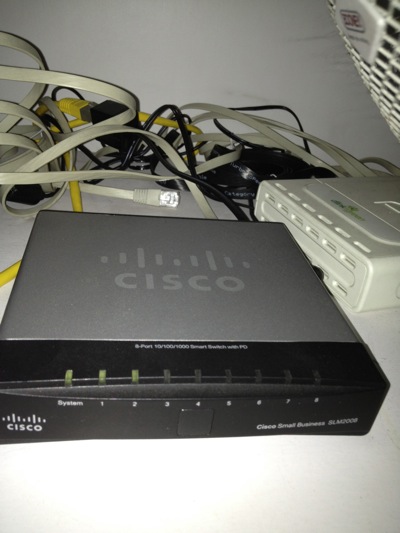
6)  As I threw away the SingTel's 2wire router.  I need this managed switch Cisco SLM2008 to untag the VLANS for me from Singtel Fiber Broadband.  I do this is to increase the performance of WAN to LAN network.  Singtel's 2wire is really crappy!

IMG_4784.jpg

7)  SSID Mouse3, sitting at the TV Console area, provides internet and Wifi exclusively to Apple TV, Wii and XBox, and my Internet Radio.  Apple Airport Extreme does the work here.  When you Airplay the movie on your IOS devices, it is fast!

IMG_4790.jpg

8)  The Internet Radio.

IMG_4793.jpg

9)  SSID Mouse6 in my bed room.  I can received 2-3 bars Wifi Signal from Mouse9, but that is not enough.  so, I put my Apple Airport Express here.

Related Posts:

From here you can explore more related topics at the botom of this post.

http://miniliew.blogspot.com/2011/05/bye-bye-singtel-2wire-5012nv.html