Showing posts with label Lion. Show all posts

Monday, August 15, 2011

My iPhoto is Eating Up All My Diskspace

Date:  Aug 15, 2011

After a short vacation, and synced all my photos into the iMac, I found my iMac hard disk space quickly dropped to less than 10Gb again.  Hmmm.... who is eating up my hard disk space?

Last time, I shared with you, how I move the iOS backup folder into my NAS (i.e. Synology), this time, let's try to see what other folders are growing on my iMac.

By using an App called OmniDiskSweeper, I am able to see where all my hard disk has gone too.

Screen Shot 2011-08-15 at 6.40.31 AM.png

As you can see clearly, out from my 280Gb hard disk on iMac, almost half of it has gone to iPhoto Library.  And inside this iPhoto Library, there are "iPod Photo Cache" and "Masters" which takes up equal size.  So, according to

Screen Shot 2011-08-15 at 6.55.25 AM.png

The Masters are all your original photos, i.e. your raw files.  "iPod Photo Cache" folder is where iTunes stored all the optimized photos for your iPod, iPhone, iPad.  It actually takes the original photos and optimized it for display on your iOS devices.  This is another culprit that will grow when you add your photo in.

Screen Shot 2011-08-15 at 6.55.13 AM.png

And sometimes the folder size of the iPod Photo Cache can be larger than your Masters folder.

Screen Shot 2011-08-15 at 6.55.34 AM.png

So, now I found out that what is the problem, the solutions becomes easy.

I have a Synology (NAS) on my network.  (i.e. you can also plug in "permanently" a USB backup drive), means you do not move the USB hard disk.  Or when you sync your iOS devices, you always remember to plug in the USB hard disk.

Step 1.  Copy all files together with the "iPod Photo Cache" folder to your Synology drive.  For me, it takes about an hour to move the 61.71GB files over to the NAS drive.

Screen Shot 2011-08-15 at 7.18.24 AM.png

Once you have done that.

Step 2.  Go to your NAS drive.  Right click on the "Ipod Photo Cache" directory you have just created.  Select "Make Alias".

Screen Shot 2011-08-15 at 7.21.33 AM.png

An "ipod Photo Cache alias" folder will be created.  This is a soft link that point to the "iPod Photo Cache".

Step 3.  Go to your Pictures folder, and then right click on the "iPhoto Library" folder.  You cannot double click on the "iPhoto Library" as it is a package file, which will launch your iPhoto when you double click on it.  When you right click, select "Show Package Contents".

Screen Shot 2011-08-15 at 7.23.32 AM.png

Step 4.  In here, you will see your "iPod Photo Cache" folder here.  Move it to the trash, and right click on Trash to "Empty Trash".  Before you do so, please make sure that you have completely copy everything onto your NAS drive.

Step 5.  Go back to the NAS drive folder, move (or drag) the "iPod Photo Cache alias" into your "iPhoto Library" folder.

Step 6.  Important!  Don't forget to change the "iPod Photo Cache alias" folder name into "iPod Photo Cache".

So, what you have done is to move the iPod Photo Cache folder to a NAS drive, and create an alias (or soft link) to it from the original directory.  So, when iTunes is syncing the photos, instead of sync it to your iMac hard disk, it will sync it to your NAS drive.

Once I did that, I have freed about 62Gb of hard disk space!  Yoohooooo.


Sunday, August 14, 2011

Antivirus @ MacOS - So Boring!

Date: Aug 14, 2011

NewImage.jpg

Yes, I arrived home after a few days vacations.  Have not been reading news, touching my iMac for soemtimes...

Suddenly, Adobe Installer screen pops up, wanted me to intall the latest FlashPlayer...

NewImage.jpg

So, without any doubt, i simply just click NEXT NEXT AGREE NEXT NEXT install...

This morning, when I woke up, and read this piece of news... I was shocked, oh dear, a trojan, my goodness, Aug 5, oh no... So, I quickly google and see what is this trojan about... So, this is a trojan that will hijacck your search results and then change your /private/etc/hosts file so that it gives you a fake google result page with lots of junkie ads....

Screen Shot 2011-08-14 at 9.05.28 AM.png

Oh, dear, we are "trained" to scan and kill the virus back in the old days when we are using Windows OS.  So, obviously, the instinct has not gone, I quickly search the net to find a cure, and then....

A check on the /private/etc/hosts, seems ok leh... does not seems to have any infections...

Screen Shot 2011-08-14 at 9.15.58 AM.png

Then I found this... Apple seems to know about this fake Flash player trojan, and has already.. apply a fix to its OS already... HUH???

Screen Shot 2011-08-14 at 9.09.21 AM.png

And Apple has a anti-malware system builded in that doesnot required manual updates.  So, Apple has already in fact corrected this malware.  I didn't know this!

Screen Shot 2011-08-14 at 9.09.42 AM.png

If it is Windows, I will have to spent time run scans try to isolate the virus, and so on, it could take some times...

So, that is why I say, Antivirus @ MacOS, so boring.  requires zero actions from human, the machine fixes the viruses... cool...

I accidentally installed the malware, I sleep, I found out news about malware, I google for a cure, but Apple already cure it as we speak... So boring.. hahahahhahaha

NewImage.jpg

Thursday, August 4, 2011

Who's Suck? Apple or UOB?

Date:  Aug 4, 2011

(This is a guide to show how to get UOB Internet Banking work on Lion)

Updates (Dec 5, 2011):  There is another work around, which I don't like is to change the Web User Agent in the "Developer Menu" to "iPhone" or "iPad".  This is to "fool" UOB website that you are surfing from iPhone or iPad, and some how I am not sure why the loading of Java applet is correct for iPhone or iPad or Firefox but not Safari on Lion.  So interesting!  If you are interested in this solution, please see here...

http://tech.2pd.us/2011/12/02/looks-a-tad-sloppy-a-solution/

(Below is the original blog)

I am very straight forward person.  On the first day, I "gung-ho" and installed the Lion.

NewImage.jpg

Then, I go to use DBS Internet Banking... It's OK

NewImage.jpgNewImage.jpg

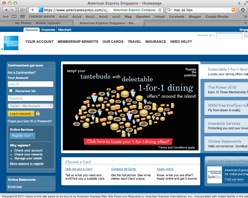
I go use American Express... It's OK

Screen Shot 2011-08-04 at 7.05.47 AM.pngNewImage.jpg

I go use Citibank .... It's OK

NewImage.jpgNewImage.jpg

I go use Maybank .... It's OK

Screen Shot 2011-08-04 at 7.14.44 AM.pngNewImage.jpg

I go use HSBC .... It's OK

Screen Shot 2011-08-04 at 7.16.27 AM.pngNewImage.jpg

But, when I go to UOB Internet Banking.... Safari complaint "Applet not loaded properly, Please reload the page again!"

Screen Shot 2011-08-04 at 6.46.47 AM.png

What is this?  All the rest of the Internet Banking works fine except for UOB?

So, I switch to Firefox.  Thinking may be it's Apple Safari problem.  Same thing!!!!!

So, I search on the web.  And found out that Lion does not come with Java updates.  Some people are lucky, they get an update from the update page.  Some like us, and not sure why, we don't get it.  So, Apple is kind enough to provide a download page for Java.

Go Google and search.  "Java for Lion Macos site:.apple.com"

Screen Shot 2011-08-04 at 6.48.05 AM.png

Yeap, it should be listed on the first search link.  Click on that and click Download.

Screen Shot 2011-08-04 at 6.48.38 AM.png

Once it is downloaded, click on "Java for Mac OS X 10.7" on your desktop, or some will automatically launch it.

Screen Shot 2011-08-04 at 6.50.16 AM.png

Click on "JavaForMacOSX10.7.pkg"

Screen Shot 2011-08-04 at 6.50.04 AM.png

Click Click Click to install

Screen Shot 2011-08-04 at 6.51.08 AM.png

After you have installed it.  You found out that Safari still complaint!  It does not work!

Screen Shot 2011-08-04 at 6.55.21 AM.png

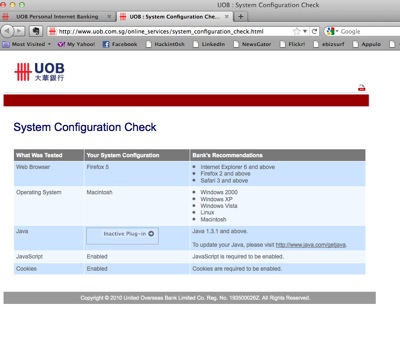
However, if you click on UOB Check Config site.  It said you have everything installed correctly.

Screen Shot 2011-08-04 at 7.18.59 AM.png

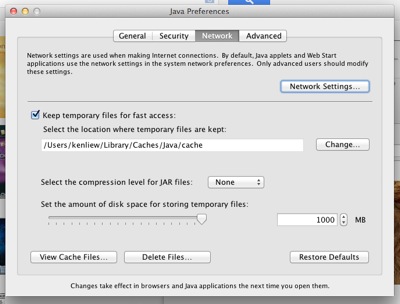
So, you look for alternative methods.... Try go and run Applications/Utilities/Java Preferences...

Click "Enable Applet plug-in and Web Start applications"

Screen Shot 2011-08-04 at 7.01.31 AM.png

To to the "Network Tab" of Java Preferences.  click on "Delete Files"

Screen Shot 2011-08-04 at 7.01.48 AM.png

Delete Applications and Applets, Trace and Log Files...

Screen Shot 2011-08-04 at 7.02.17 AM.png

Unfortunately, you are still stuck at the same thing.  This is what you have done so far...

1.  Install new Java for Lion (manually).

2.  Deleted all applets

3.  Safari does not work.

Let's give Firefox another try.  (You need Firefox)  Now, you go and click on the "Check Configurations" again on UOB using Firefox.  And surprisingly, you saw that there is this "Inactive Plug-In" with an arrow.  Click on that small arrow.

Screen Shot 2011-08-04 at 7.18.23 AM.png

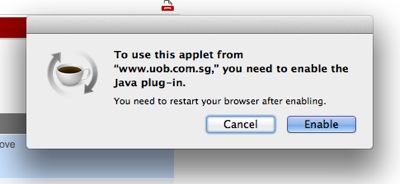
A pop up box came up.  And you click ENABLE.  and then restart your Firefox.


Screen Shot 2011-08-04 at 7.19.18 AM.png

After all these... it finally works on Firefox with a new Java Applet enabled, on a Lion.

NewImage.jpg

Apple or UOB?

NewImage.jpg or NewImage.jpg


Here some guidelines...

1.  Every new release of Operating Systems SURE will have bugs.  This is a fact, but you have to face it.  If you install it on first day, then, don't complaint it.

2.  Apple rectified it with a new Java download on its website.  A bug in Software Update routines which does not download the Java properly.

3.  Apple's Safari did not manage to detect why that Applet does not work?  But Firefox managed to detected it.  Is it a checking routing (from UOB source code) bugs or is it the Browser faults?

4.  Most importantly, why 5 others big bank has no problem with it?  If it is a bug, then, all banks with java applet should not work!

5.  let's look at the following screen again... Did you notice the word "PIB Log Off".  HSBC uses the word "PIB" may be stand for personal internet banking.

Screen Shot 2011-08-04 at 7.13.16 AM.png

Now, you look at UOB page... PIB.OUB.COM.SG... hmmmm... also uses the PIB as short form.  I did not see other bank uses it.

Screen Shot 2011-08-04 at 6.55.21 AM.png


So, I am guessing, may be both HSBC and UOB uses some third party banking soft codes that references PIB as private internet banking.. so, if that is the case, why HSBC can do a better job?  while UOB web page got stuck?

6.  Look at the track record, how many banks have IOS App, who does not have it?

Then, you know who sucks!

NewImage.jpg

Oh... another short story... I knew about this 2 weeks ago, and I have already fix this on my MacBook Air.... Two weeks later, I am using my iMac at home... I thought, at most give the bank 2 weeks to fix the problem.  But after two weeks, to my shock... UOB has not fix this yet.  And yet, no advise was given (is there any?)... They are biggest bank in Singapore, earning the most money, and yet, the Internet banking facilities is... hmmmm....

NewImage.jpgNewImage.jpg


Saturday, July 23, 2011

MacOS Lion: Natural Scroll

Date: July 23, 2011

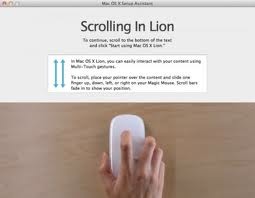
Upgraded to Lion.  The first thing that you notice difference is the Natural Scroll.  So, do you want to be natural or unnatural?

NewImage.jpg

If you look back on the history of the scroll wheel mouse.  It is a great design.

NewImage.jpg

And it is using the wheel pulley theory, to design it.

NewImage.jpg

Means, you push the wheel down, and the opposite force will go the other direction.  So, the scroll wheel mouse was designed that way, the "natural" way of roll down the wheel and the canvas text (screen) goes up.

Then, human being evolved.  They become more clever and invented the touch pad on the laptop.

NewImage.jpg

When poeple invented the touch pad, their intention is to MIMIC the mouse function.  It is not nice to install a scroll wheel on the laptop, so, they copy all the functions, i.e. 2 buttons, and the direction of scrolling text.  No body talks about whether it is natural or not natural.

Then, Apple invented iPhone and iPad...

NewImage.jpgNewImage.jpg

When we used the touch screen on iPhone and iPad, and when you need to scroll, it is like a stack of paper, you simply move the first piece of paper up in order to put that first piece of paper away and show you the second piece.  So, that is Natural scrolling.  Some people can scroll the paper down, but where will you keep these papers when your body is too close to the stack of paper?

NewImage.jpg

So, now Apple is asking themselves... when I design the next operating system, and that operating systems is actually the same as the iOS installed on iPhone or iPad... why is my touch pad or touch mouse scrolling text in an opposite direction????  It is touch UI (user interface), shouldn't it be the same for all devices?  Then, I think they reliazed that they had never asked this question before and they just simply uses what is available to them without questioning about the design whether is natural or not.

NewImage.jpg

So, if you really think about it... is this Natural or unnatural?

NewImage.jpg

Once you decided, simply turn it off if you don't like it.  Otherwise, leave the default there and be part of the true Lion users.


NewImage.jpg

No need to be angry about it.  It's just a design issue, and a users choice selections issue only.

For me, both my MBA and iMac are using the default settings.  And it takes me less than an hour to burn it into my memory.

Have fun!