Date: Jan 17, 2012
WARNING!First part of the blog is OK for normal people. The second part, will get a bit techie, and only sysadmin or netadmin will understand what I am doing. But the end result is to proof that speedtest.net may not be accurate, to get more accurate results, there is a high learning curve, but at the end, the result is somewhat more accurate but still depending on network situations at that time. But just look at the pictures will tell you everything about the network.
I have re-engineered my home network again. I got my 2nd OpenNet network fibre up and running under ViewQwest. ViewQwest recently launch Residential FiberNet Broadband.
A very common way of measuring the speed is to use http://speednet.net
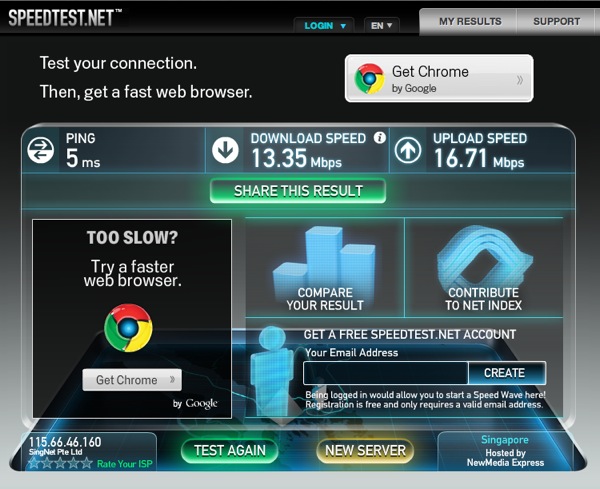
Here is a screenshot of a random launched speednet that measure the speed to NewMedia Express, a hosting company in Singapore. It is a Telco Neutral server. So, most of the time when you launch speedtest, you end up using this.
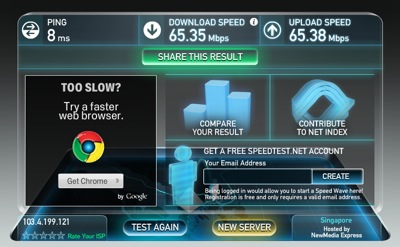
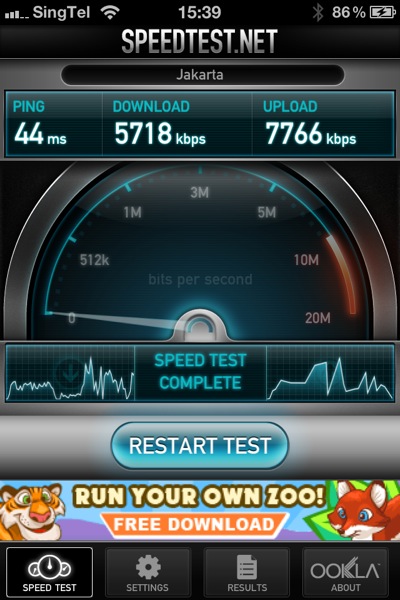
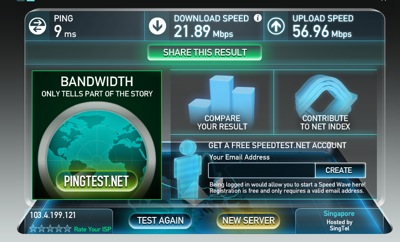
Here is a trick. If you click on the RELOAD button to reload the web URL, they might give you another hosting company, such as Telin. (Look at the bottom right corner - Hosted by Telin). You will wonder why the number keep fluctuating. Telin is the incumbent ISP in Indonesia, not sure why it gives a low download speed.

Here is another example. Hosted by SingTel.
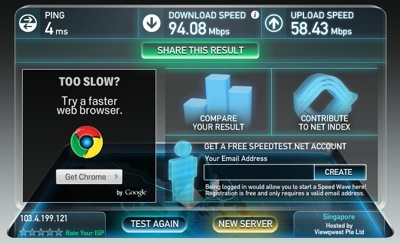
Lastly, I found the one the hosted by ViewQwest. The PING is 4ms, the download speed is indeed close to 100Mbps.
Now, if I re-run the test again.... I got this lower results.
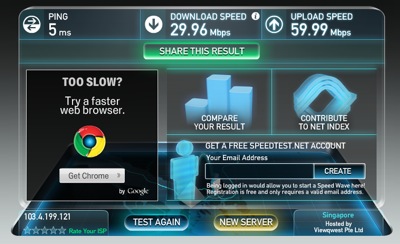
So, what does this mean?
This simply means that speedtest.net is not always accurate.
Most of the time, it depends on what the service provider or hosting partner has put in. You can put a old server and run the speedtest server. Or you can spent lots of money to put in a real server with high network load capacity, etc. But when you think about it? Will the operator put in such money? Believe me, I worked in these ISP before, so, it is always a low priority, and good to have thingy, but you will almost certain that older server will be placed there (server recycle).
Also, what speedtest does is to download a large file over the same network interface. So, under a very good condition, where there is only one person awake and he is the only one person that does the speedtest. There is only 1 file being downloaded over the Gigabits network. Of course, you will get a full speed. But when there are 2 person, 3 person or a whole bunch of person downloading the file at the same time over the same network that hook up to the speedtest server, well, the tast will be divided, the resources will be divided. So, most of the time, you almost end up waiting in a queue for other tasks to be completed. By that, you will get a lesser download speed.
But it is a good benchmark tool, or at least the only one that is available to consumers to benchmark their ISP. Sometimes I found it funny, as a technical person, you know this is stupid as it is not accurate. But sometimes, you got to be amaze that how many people actually believe this. HaHa.
Now, let's try another thing. Turn off your WIRED connection (yes, turn off the gigabits switch port), and then, go into WIRELESS or WIFI mode. So, as you can see, my IP is still the same, and I am switching to a WiFi router which far away from me. Then, no matter how many times I do this, I get a max of 45Mbps. Remember, I should be able to bring the network download up to 90+Mbps. But when I switch to WIFI mode, it is different. Try running this on a laptop, and move around. If you get nearer to the WIFI access point, your download speed also increase. So, WIFI network has limitation, and can give a false impression on your speed. Not to mentioned those home that has a PLC/HomePlug (i.e. Aztech), Ethernet over Powerline that is sensitive to surrounding noise.

So, what do we do? How do we test the broadband speed? Here is my attempt to try to figure things out. It is not the accurate way, but at least it gives you a rough idea.
1. You got to have two points to test the network. A-End is at your home behind the ONT/Router. B-End is somewhere on the Internet, local internet that you are sure to get good backbone capacity to Internet. This is important.
2. Either the end, i.e. A-End or B-End should run as server mode. This is to test both way directions.
3. I running this on my iMac. OK, Mac is a decent port of "unix" that is truely multi-task. I don't recommend it to be done on Windows machine, as sometimes, I don't know... the TCP stacks are "shitty". HaHa (have you read Steve Jobs' biography yet??)
4. First, on my iMac, I installed the program "MacPorts". Download the latest MacPorts release: 2.0.3. Download the Lion version if you are running Lion. Install the program.
5. Next, go to /opt/local/bin and run "sudo ./port install iperf". Key in the password. Yes, this is to install and compile your version of iPerf. What is iPerf? http://openmaniak.com/iperf.php so, basically, you run iPerf to measure the maximum TCP and UDP bandwidth performance. Make sure you get a node from your Network admin before doing this, as iPerf can generate huge traffic and may disrupt your network. :)
6. Once you install iPerf at home, you can run this as a server. So, "sudo /opt/local/bin/iperf -s".
7. Go to "www.whatismyip.com", and try to figure out what is your IP address. This is the IP address of your home PC.

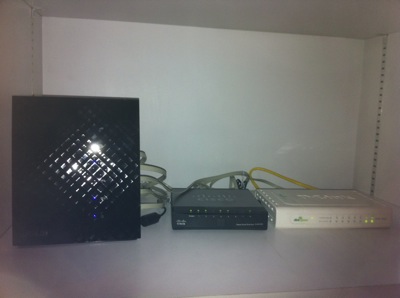
8. But before you can reach this IP address to your home PC, you need to do Port Mapping on your router so that you map this IP address directly to your iMac. So, on my Black Diamond case, I actually put the LAN IP of the iMac into the DMZ zone. My ASUS Black Diamond will do all the rest, port mapping.

9. Then, I remote log in into my office MacBook Air. I used "logmein", it's free! https://secure.logmein.com/ Apple does has a remote desktop "Back to My Mac" application, but I found that the screen refresh is a bit jitter, that is why I did not use that. I simply use logmein on my desktop, laptop, iPad or iPhone. (yes, you need to pay for the iPad and iPhone app).
10. Install the same thing, i.e. MacPorts, iperf.
11. Then, on the command prompt (opps, why I am using DOS name). key in "iperf -f m -i 4 -c 103.4.199.121" and wala... The iperf client is downloading lots of stuff from your iperf server at home. As you can see, the biggest my network bandwidth that I can pump out from is about 73.4Mbps.

12. Of course, if you have a friend out there, can setup a iperf server, ask for his help then. (I don't have control in Office Network Router, so, I cannot set the Port Forwarding to my MacBook Air). So, I happen to have a friend help me to setup a server out there in Singapore. And from my home iMac, I run as iperf client to connect to his iperf server. And this is the result.

13. Of course, when you run it as server, you also can see the console.

14. Let's try a funny thing... and run 3 threads at the same time... As you can see clearly, all three windows gives the similar results and the results is somewhat 1/3 of what I get when I run a single iperf.

15. Let's try it again! With two this time... and as expected the network performance splited into 1/2.

Conclusions:
A. Speedtest.Net is not always accurate.
B. Broadband Network Speed is very depending on what are you doing at that time, and what are other people doing at that time. So, what we can do, is to use simple tool to TRY to find the maximum bandwidth it can pass thru, but face the reality, there are too many people out there, and they may be doing the same thing as you. So, sometimes, your traffic has to be splitted among them.
C. It is the same on Hosting platform, where you try to download things from a single servers. Think of 1 people download 1 file from 1 server. Vs. 10000 people download the same 1 file from the same 1 server. Things will hang. By that time, don't blame the Network operator.
D. Next, think of 1 people accessing the network to 1 website on a single pipe. Vs. 10000 poeple download and accessing from 10000 website on a single pipe. The pipe cannot be infinite. So, soon, there will be a choke.
I don't know how much info you can get from this blog. But, for me, today, I am happy with my ViewQwest. Does not mean that tomorrow I will be happy with them. So, since there is no certainty of anything, why don't we cherish what we have today and be happy about it!
Good Luck!