Showing posts with label SingTel. Show all posts

Wednesday, September 10, 2014

How To Cut The Cable Cords

Date:  Sep 9, 2014

[Disclaimer:  I don’t really watch a lot of TV.  But I like to test and research how to do things.  So, this blog entry is for research purpose and educational purpose.  That’s it!]

IMG 9347

Cut The Cable Cords

OK.  Here is the scenario.

If you do not wish to do the followings:

    1.  Don’t care about watching local TV channels, i.e. Channel 5, Channel 8, etc.

    2.  Don’t want to pay so much money to subscribe Starhub TV or MIO TV.

So, here is what you can do to “cut the cable cords”.  “Cut the cable cords” is a term widely use for the Americans who ditched the traditional cable TV or Satellite TV and subscribed to Netflix, Hulu or Amazon Instant Video.  But that method is not exactly what you looking for.  What you are looking for is an replacement of Live TV.  So, you still need to watch Discovery Channels or HBO channels.  So, what can you do?

NewImage


What I Found

So, after you walk around Sim Lim for a few times.  You will notice that almost all the Sim Lim shops who sell IPTV Set Top Box set is recommending Cloud TV.

So, what is Cloud TV?

Can it really help me to cut the cable cords?

CloudTV URL:  http://cloudtv.bz

CloudTV Download Links:  http://cloudtv.bz/articles/detail/23/

Screen Shot 2014 09 09 at 11 32 32 pm


What So Good About CloudTV?

IMG 0432

Here is what I found out.

1.  It is fast on ViewQwest network.

2.  The streaming is fast and seldom has buffering issues.

3.  Load up is considerably fast.

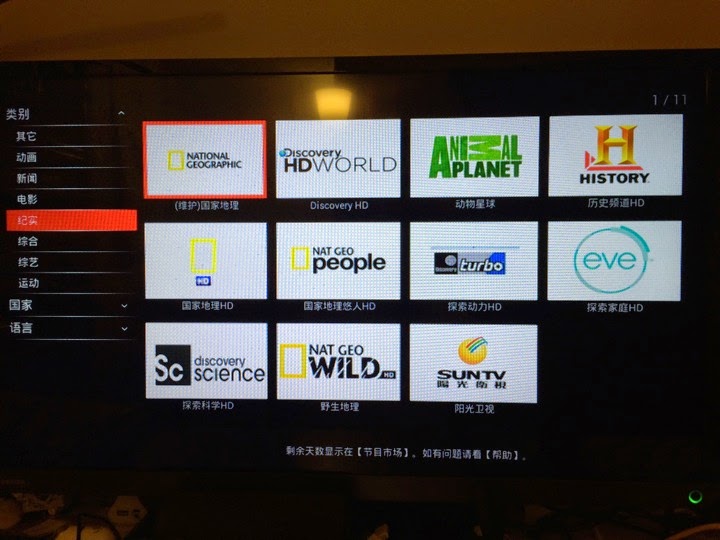
4.  It has more than 160+ channels.   It has National Geographic, HBO and TVB and many more.

IMG 0431

5.  It is NOT FREE.  You need to pay.  In Sim Lim, they sell SGD$80 for 12 months.

6.  You can pay via PayPal within the App itself.

IMG 0433

6.  You can pay via PayPal within the App itself.  US$60 ~= SGD$75.


How Many Channels Cloud TV Has?

Look at the following video to find out. 

It has about 161 channels.

And most of them are HD quality.

I happened to download the Cloud TV and install on my Minix Neo X7 Android Box.  Let’s scroll thru the channels to see what shows they have.

Wow!  They even have Channels News Asia...


Does It Work On My ISP Network?

Sorry, I don’t have so many ISP link at home to test out.  So, pleas refer to the popular Hardware Zone forum for answers.

What I can tell you is how it performed on my 200Mbps ViewQwest network.  Actually the real throughput is about 80Mbps to 90Mbps like that due to my “stupid” network design at home and I actually lost 50%-60% of my bandwidth speed because of using HomePlug Power Ethernet technology to bring Internet from my kitchen washing area to my network cabinet which connected to my structured Cat6 network.

So, what I feel...

1.  It is reasonably fast.  I run the test around 10:30pm which is consider a peak hour.  

2.  Most of the TV streaming are streaming at 500KB-1000KB speed.

3.  Not much buffering.  The App is excellent.

4.  The HD quality is good too.  

5.  Changing channel can be slightly slower than Starhub Cable TV.  But hey, it seems comparable to MIO TV.  hahaha

The following video is running on my ViewQwest ISP network.

I will not know how it performed on Starhub, SingTel, M1 or My Republic.  It is up to you to find out from the HWZ forums.


What About Others?

Well, you have Android powered TV set top box.

That means, you have unlimited “power”.  Simply download Apps and test it out.

So, I was testing another App, but this App does not have English shows.

It is called HDP Live TV.  It is quite decent too!


Is It Legal?

This is the most important question of all.

At the moment it is hard to say.

I think you read about the news where the government trying to get a bill approved on allowing the TV programs operator to request ISPs to block or remove the capability of viewing Internet content such as copyrighted programs, i.e. HBO and so on.

Until then, Internet is a very open network.  You can get almost everything from the App stores, etc.  

I would say it is grey.


Some of my friends ask me about it.  So that is why, I bother to go do a bit of research and trying to find the answers.


Saturday, October 12, 2013

SingTel Exchange Fire: Random Thoughts

Date:  Oct 12, 2013

[Disclaimer:  This is purely my personal views.  It has nothing to do with any of the company I am working with.  This is just some of the random thoughts and express my views on the whole matter.  This country has free speech, right?]

IMG 9231

[The Story]

Some fire broke out in one of SingTel Exchange, burn away a lot of finer optics.  And affected service delivery from SingTel, Starhub, M1, Opennet, DBS, Singapore Pool to consumers.

- Is just a small fire I think.  Because such an important data centre or exchange must have super solid fire protection systems.  I remember, when we design the data centre 10 over years ago, we put in all these dry sprinkle, wet sprinkle, FM200, etc etc.  So, something fire broke out, human beings must be the first one to go, because when these fire protection gas is released, human being cannot survive in there.  

- But judging from the photo posted on the news paper… hmm… it is possible the fire break out from outside the data centre area.  So from data centre room to the MDF room (electrical room of each building), it has to gone thru horizontal and vertical risers.  Are these expose to fire hazards?  I don't know man, I just go outside my apartment and open the riser door, is not lock, and I can see all other OpenNet or Singtel or Starhub fibres running around.  Hmm… for my home, no security.  But I hope for such important SingTel Exchange, it is well guarded.  

[M1 & Starhub]

- Wait now, this is SingTel exchange on fire.  What does it have to do with Starhub and M1?  Starhub & M1 does not have own fibre to some part of Singapore.  So, they depends on SingTel and OpenNet to deliver the fibre for them.  So, partial of their network is rely on SingTel.

- OK.  That is strange.  I thought Starhub have Cable TV?  Sure this Cable TV don't run from SingTel Exchange, right?  Yes and No.  Starhub cable TV within any building is an independent cable.  But from their cable distribution network, how many of these nodes are depending on SingTel to backhaul back to their broadcast node?  Oh, in between nodes, they can use SingTel.  As SingTel is the monopoly player in Singapore in terms of pipes and cabling.

- M1 has their own fibre ring, but it does not goes into every single building.  So, some of the network, they still need to depends on SingTel.

- Wait now, can't M1 and Starhub build their own network?  I guess can.  But hey, if government did not give money to them to build, why should they build it?  I am not saying government have to give money for them to build.  I am just saying, building a fibre network needs lots of money.  Dig out the road, pull the fibre, installing nodes, we are talking about S$400 per meter is the cost I think.

- But M1 and Starhub earn profits in MULTIPLE MILLIONS every year.  Hey, don't touch those money, it is share holder's money, ya.  This reminds me about the past where the board always ask the listed company, how to increase revenue, how to improve bottom lines.  At the end of the board meeting, OK.  Let's don't do any thing, cut the CAPEX, etc.  Yeah, you CTO out there, hate to hear this, right?  Cut the Capex.  Freeze the Capex.  So, may be that is what happen la.

- Seriously, I think they should build diversity instead of relying on Singtel.

[Nucleus Connect]

- Starhub own Nucleus Connect, right?  Isn't that a company that resell fibres?  So, why don't Starhub use Nucleus Connect?  Hey, don't say Starhub own Nucleus Connect.  So sensitive.  They have shares in the company.  That's it.  

- Wait now, I remember, government give money, 250M to Nucleus Connect.  Can't they build separate network?  Nope.  Nucleus Connect is a OpCo, they have to buy directly from OpenNet.  So, they rely on OpenNet.  Their job is to build network equipment on top of OpenNet fibre network.

- So, that means, people like LGA, My Republic and even Starhub depends largely on Nucleus Connect and because Nucleus Connect is based on OpenNet.  So, when fire broke out in the SingTel exchange, it affected the OpenNet, and thus affected all these ISP?  Yes.  That is basically it.  WOW, very scary, it is like the whole country is running on a single fibre network.

- Do you know that, nowadays, because IDA gives 1B to both OpenNet and Nucleus Connect, All the government can ONLY BUY from Nucleus Connect RSP.  They can't even buy from other OpCo.  That is because government gave 250M to Nucleus Connect.  This is what I heard, don't know whether it is true or not.  hahaha Only when the government needs backup or diversity link, then, they consider other OpCo.  

[SingTel]

- They are the incumbent.  That's it.  They control every thing.

- The CTOs of the company always denied me, they said "SingTel can sell us "Protected" circuit, with "Exchange Diversified" link".  Aiyo, to all the CTOs, Network Managers, go check the facts.  I can tell you in Singapore, 95% of the network are not protected.  Means, from the exchange pull the local loop to you, is a single fibre path.  You want a protected circuit, yes, SingTel will give you protection by giving you 2x different fibres running on the SAME PIPE, and may be different SWITCH, but come out from the same exchange.  My dear friends, when excavator that does not have eyes, cut the fibre pipping, every single fibres get cut.  I pity those big corporation, banks who already pay TONS OF MONEY $$$ to Singtel for something that does not work.  Look at this fire example.  You got an idea?

- Exchange Diversity means form Exchange #1 pull a fibre go thru fibre path #1 deliver to point B.  And a second fibre runs from Exchange #2 pull a fibre go thru a different fibre path #2 which is not so close to path #1, and enter the building from another side or another MDF room.  That is what I call Exchange Diversity.  I seriously doubt that there are any Telco int he world do this.  Unless it is Government important operation centre that really needs such diversity.  like the Army, etc.  I don't know.  So, I pity again for this CTOs thought they are getting real exchange diversity.  I pity them already pay so much money to Singtel for that.

Later I explain more how you can do this.

[OpenNet]

- Government give 750M I think to OpenNet.  To pull fibre separate fibre to residential and non-residential.

- So, the easy way out is… Singtel, please lease me the pipe.  And we will pull our own fibre in the pipe.  Oh ya.  fibre is different brand.  May be fibre equipment is different too.  These fibre are running on the SAME fiber PATH, different pipe nia.   But all exchanges for OpenNet == exchanges for SingTel?  Hmmm… OK.  May be I rent a small room from SingTel in their exchange.  

- HaHaHaHaHaHa… OK.  Some Citynet company was formed to do this.  And guess who owns CityNet.  Is it called CityNet?  And Guess who wants to buy over OpenNet?  CityNet.  See the connections?

- The people who wear the purple OpenNet shirts always have 2 sets of STICKERS.  And the FOREIGN TALENTS always asked the supervisor, boss, (shaking head), what should I use (shaking head), Singtel stickers or OpenNet stickers?  These foreign talents trying to decides whether this installation is a SingTel link or OpenNet link.  So that they can decide what brand of stickers to be placed on the Fiber termination box.  HAHAHA Always give me a good laugh.  Oh ya, OpenNet outsource the installation, talking to building management, etc to SingTel.  Every month, I am guessing SingTel gets a big fat pay check from OpenNet.  Hmmmmmmmmmm…. 750M form the government.

IMG 9230

[DONT BLAME ANY ONE]

- Aiya.  Don't blame people la.  Who's fault?  We should be grateful about IDA on the OpenNet thingy.  Otherwise, how is it possible that we the residents get 100Mbps fibre Internet at home within so fast timeframe.  Actually is good thing.

- So, how to fix it?  That's IDA problem.

[SP Tel / Wimax / LTE]

- Singapore Power Telecom.  The newspaper make a good point.  It is just like the power.  It does not make sense to pull different power cable.  so it does not make sense to pull different fibre optic cable into a house.  Wait now.  Then, why can't Internet delivered via Singapore Power?  13 years ago, Pacific Internet partner with SPTel to do Internet over Power line.  I am very sure power line technology is a mature technology by now.  Singapore Power have to dig the ground.  Singapore Power have the capability to reach every house hold.  So, why IDA cannot give some $$ for Singapore Power to come up with an alternative routes?  I am very sure it can be done.

- Wireless technologies are already there.  Licenses already given.  But what's the problem?  the problem is licenses mostly given to existing mobile operations who is also fixed line operators.  So, within those Telco, may be they said, Capex not enough, no market for it.  But I am very sure after this event, every body will start realise the problem. So, all these banking, POS, Singapore pool, they should have major link run on fixed fiber, and then backup run by wireless.  That is why wireless is so important.

- How many of you are frustrated with Wireless@SG.  That is another problem need to be solved too. hahahaha

- Having said so much, I also don't know what I am saying.  But I hope Singapore can learn from this lesson and then, develop an improve fibre strategies, etc.

Ok, time to look after my kids….

Monday, March 18, 2013

Singtel Roaming

Date: Mar 18, 2013

When I go overseas, I always use Bridge Mobile roaming services from Singtel.

I have an iPhone and an iPad that using the multi-Sim. Same number, once roaming, both devices can enjoy unlimited data roaming.


But yesterday, I came to learn that for some countries, they no longer allow two devices with multi sim to use the data roaming at the same time.

If you use it, one of the device will not be connected to 3G and you will keep receiving the above SMS. Saying that you are not logged on to the preferred network.

So what you do is to make sure both iPad and iPhone are manually selecting the preferred network, and then turn off one of the devices for data roaming at each time.

This has cause huge inconvenient. Because, when I do work or in the meeting, I like to use iPad. So while iPad gets the data roaming, iPhone will lose the data. And all your WhatsApp or iMessage will not be delivered. And iPad does not have the WhatsApp on it.

Of course, what you could do next is to totally turn off the data roaming on iPad, and turn on the personal hotspot from iPhone. And allow both devices to use Internet. But that may eat up battery while you travel.

Feel sad regarding this!!!


Oh ya... And the SMS registration process has also increase its complexity. Haha

First you need to select whether is daily or monthly plan.


Then you need to select if you need a multiple days service.


Then you need to select the country.


Since I am in Bangkok. So it's $15 per day for three days. And it is great that they covered up to 20 countries now. But US and Europe is $90 for 3 days. That's a lot of money.


Then you have to select the start date.


Lastly, to confirm your order, don't forget to sent a "Y" reply to activate it. Most of the people might forget this.


Some more info here...


More info...


More info... Their SMS getting longer...


And that's it. The confirmation SMS. Notice the multi sim users...


Of course you also can use the My Singtel app to subscribe. It is much convenient. But you have to do that before you fly.

Because if you reach your destination and you can't find wifi to logon Internet, you can't use the app.


2nd screen Willet you select the country.


Third screen will bring you to the selection of start date. And simply choose confirm.


A lot info is provided. Yeap. Incoming call and outgoing call is expensive.


Each SMS is 60 cents.


You can't check usage. But it tells you how many hours you have use from the 12 midnight of the first day. And I am still confuse if it is Singapore time or oversea time.


Again, milti sim users... You will receive this announcing and threatening message even if you have manually selected the network correctly.


I think M1 and Starhub still good as if you logon to the designated network, you can start use data roaming and they will cap at $15. (Not sure if that has been changed or not)

So, what's your thought on this...

- Posted using BlogPress from my iPhone

Sunday, March 11, 2012

My Home Network Updates

Date:  Mar 10, 2012

This is my finalized design of my home network.  It has been running for the past 7 months with ultimate performance.  :)
Kenneth Network.png
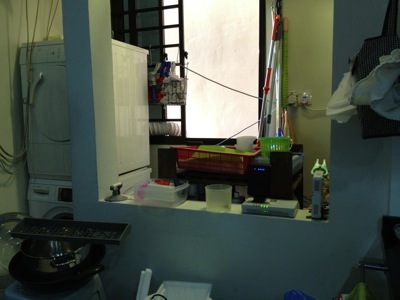
This is my washing area/kitchen.  Behind the wall on the right hand side is where OpenNet put their TP (Termination Point).  You can see I placed my ONT (Optical Network Termination) boxes there.  The main reason is I do not allow SingTel, or OpenNet to drill holes, and placed those ugly cable run from the front entrance.  So, I asked them to come in via the back door.  And the backdoor is the washing area / kitchen.  My network cabinet/cupboard is at the main entrance there.  It is there where all my entire apartment CAT6 cable runs are centralised.  And, I do not have a cable between this two location.  So, what did I do?
IMG_4794.jpg
So, in order to connect from the kitchen, I make used of two technologies.  Homeplug via the powerline and AirWire via the 5.8Ghz wifi space.  From the ONT location, there is no wired / CAT6 cable going to the network cabinet which is just left side of the kitchen (viewing from here).
IMG_4796.jpg
That is my network cabinet.  All the CAT6 network point in the house, except the kitchen, all come back to here.
IMG_4797.jpg
By the way, in my place, I have both ViewQwest and SingTel Fiber Broadband network.  The SingTel fiber broadband is notorious of throttle your traffic if they detect a slight abnomal traffic.  Once they throttle your traffic, all traffic will be slow.  So, I gave this network to my wife to use.  As she will always use it for her WebEx, Video Conferencing, etc.  As for me, I use it for my day to day web surfing and so on, I used ViewQwest Fiber Broadband that does not throttle my traffic at the moment.
1.)  So, for Singtel, I bought a pair of Airwave from X Concept.  They are the distributor of Airwave.  Now, they are located at #07-04, Burlington Square.
IMG_4775.jpg
I have used it for almost 7 months.  And it is still working fine.  I got this from X Concept.  This is a product from Ubiquiti Networks.  http://www.ubnt.com/.  A pair of this will connect at 5.8Ghz Wifi frequencies, without line of sight.  So, from the kitchen to my network cabinet.  It is brainless, simply connect and plug and play.  It is like a real cable like that.  except that they uses Wireless to connect the two points.
OK.  I know, I know, I am a techical guy, I can set up a switch and create a VLAN and pump it thru the power line using homeplug.  Those are the good old days, when you have 2 kids, your time seems to vanish pretty fast.  ahhaha so brainless thing will always catch my attention.
IMG_4776.jpg
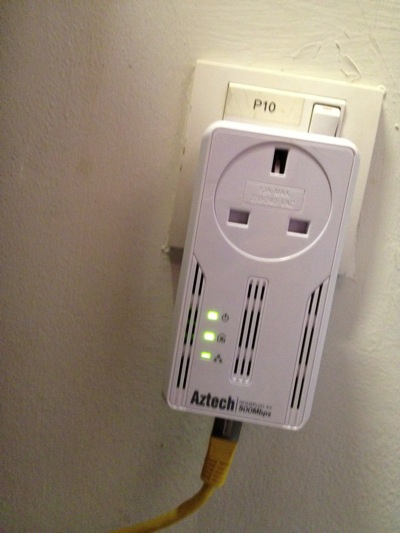
2)  So far, this is the most reliable homeplug that I have tested.  It has not been down, and does not need to reset it all the time as in the 1Gbps version.  It also have a noise filter, where you plug almost other things in there.  This one, I place it just opposite my dryer and washing machine.  My domestic helper wash cloths during day time, where all of us are working.  So, I did not get a chance to test weather the noise level is high during the washing and drying.  So far, I am happy with it.

IMG_4779.jpg

In my network cabinet, I plugged a plug extender on the noise filter of the homeplug.  That means every single electronics, i.e. switches, routers, etc are plugged in and pass thru the Aztech homeplug.  Except the NAS, I plug it separately.

IMG_4785.jpg

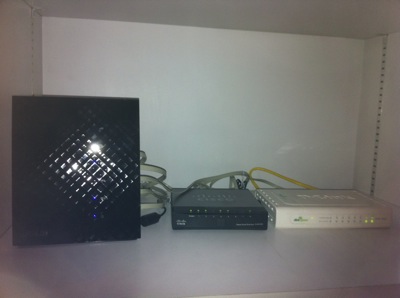
3)  SSID Mouse9 inside the network cabinet.  This is ASUS Black Diamond, the best WAN to LAN and LAN to WAN router in the market.

IMG_4783.jpg

4)  SSID Mouse5, running SingTel network, resides in my study room for my lovely wife to use.  Of course, the switch below is running ViewQwest network.

IMG_4788.jpg

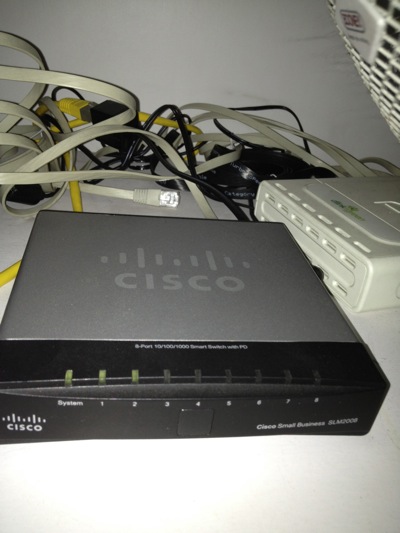
6)  As I threw away the SingTel's 2wire router.  I need this managed switch Cisco SLM2008 to untag the VLANS for me from Singtel Fiber Broadband.  I do this is to increase the performance of WAN to LAN network.  Singtel's 2wire is really crappy!

IMG_4784.jpg

7)  SSID Mouse3, sitting at the TV Console area, provides internet and Wifi exclusively to Apple TV, Wii and XBox, and my Internet Radio.  Apple Airport Extreme does the work here.  When you Airplay the movie on your IOS devices, it is fast!

IMG_4790.jpg

8)  The Internet Radio.

IMG_4793.jpg

9)  SSID Mouse6 in my bed room.  I can received 2-3 bars Wifi Signal from Mouse9, but that is not enough.  so, I put my Apple Airport Express here.

Related Posts:

From here you can explore more related topics at the botom of this post.

http://miniliew.blogspot.com/2011/05/bye-bye-singtel-2wire-5012nv.html

Friday, July 29, 2011

Home Network Improvement Plan - Asus Black Diamond

Date:  July 29, 2011

I just got a new router.  I bought it in Sim Lim for S$220.  But later, when I shop at IMM, one of the computer store beside Challenger is selling at S$209.

IMG_8499.JPG

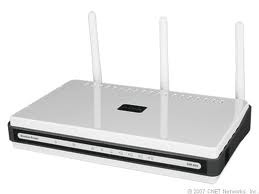
Before that, I replaced my home Internet network router and throw away Singtel useless 2Wire 5012NV Fiber Broadband router (now it is only used for deliverying MIO TV).  I was using a D-link DIR-655.  The Wireless AP served me well for the pass two years.  It's time to change.

NewImage.jpg

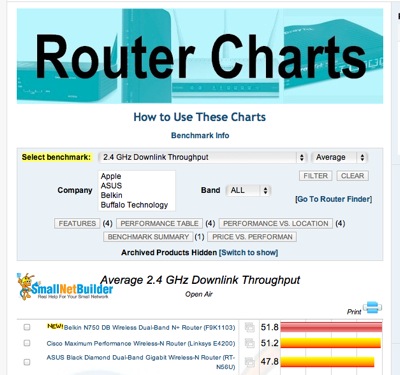
My friend Larry introduced me to a website that has router comparisons.

http://www.smallnetbuilder.com/wireless/wireless-reviews/31436-asus-rt-n56u-black-diamond-dual-band-gigabit-wireless-n-router-reviewed

Go to this website, and start selecting your next router...  For me, I choose "Total Simultaneous Throughput" and you get ASUS Black Diamond Dual-Band Gigabit Wireless-N Router (RT-56U) as the top runner.

Screen Shot 2011-07-29 at 7.11.17 AM.png

And If I compare with the D-Link DIR-655, which is ranked 20th from the top.

Screen Shot 2011-07-29 at 7.14.03 AM.png

My Apple Extreme (ranked 14th) at home is much faster than the DIR-655 ...

Screen Shot 2011-07-29 at 7.15.48 AM.png

And in my office, I think they recently bought a Netgear WNR3500L which is ranked 18th ...

Screen Shot 2011-07-29 at 7.17.36 AM.png

But all these routers I have seen is no where compared with Asus Black Diamond!!!  It is three times faster than my Apple Extreme.  And the router is stylist too.  One thin piece of devise standing vertically.

IMG_8515.JPG

Now, how good is this router and its AP (Wireless) function... Here are some of the test I have done in the office and at home...

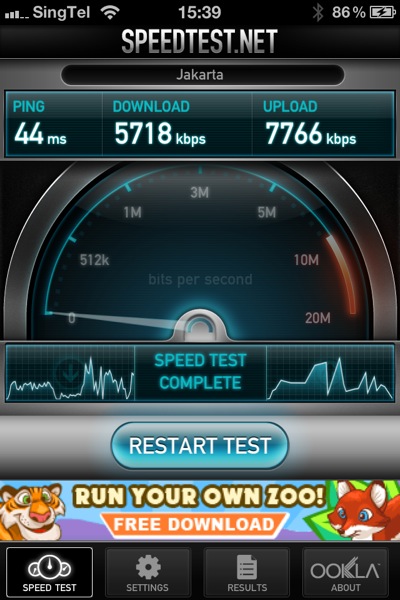
In Office We have two Wireless Access Point Router, where one ofthem is the newly bought Netplus WNR3500L... So, I run the speed test on it... As you can see I can achieve 5.7Mbps download and 7.8Mbps upload.  And I am doing the test ping to the Jakarta speed test server.

IMG_8502.PNG

Then, I disconnect the netplus, and log on to the 2nd wireless router.  I don't know what router is that, but I suspect is a cheap router too.  I will not use this AP router as a reference, as it goes to another broadband link that connects to NewMedia Test server.  I provided it here to give a reference.

IMG_8506.PNG

Then, when I plug in my new ASUS Black Diamond.... WOW... I am speechless.  I managed to get 9.1Mbps download and 14Mbps upload.  I am impressed.

IMG_8501.PNG

So, I re-run another round of testing... just to make sure I don't get some isolated results... and the results came back almost similar...

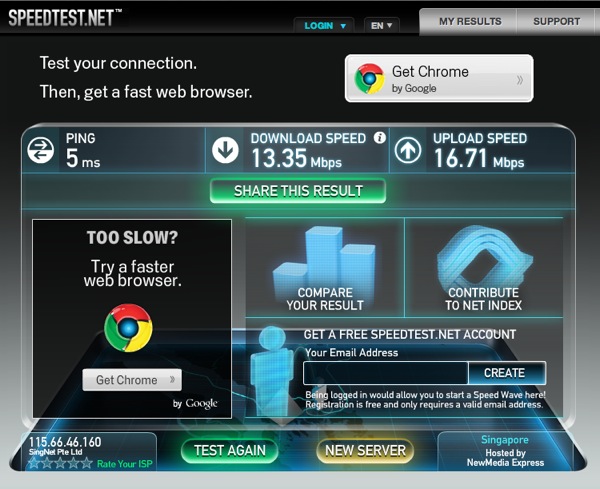
So, next thing I do, is to go back home immediately, and re-run the test at home.  So, at home, before replacing the router, this is what I get... 13.35Mbps DOWN and 16.71Mbps UP.

mouse before Test1.png

And after I plug that ASUS Black Diamond in, replacing the DIR-655...  The speed becomes 26.77Mbps DOWN and 23.85Mbps UP.  That is what I am talking about.  I had an OpenNet fiber, with Singtel Fiber Internet service of 50Mbps.  My speed should at least closer to 50Mbps, right.

wireless after door open Test1.png

So, I am speechless after I see all the result and I am very happy!

So, I go do more research.... For WAN to LAN Thruput, this is to let the Internet come into your home, handled by your router.

Screen Shot 2011-07-29 at 7.33.18 AM.png

For LAN to WAN Thruput, where your Internet going out...

Screen Shot 2011-07-29 at 7.35.40 AM.png

For Maximum Simultaneous Connections.... this is for P2P download... how mcuh you can handle when you download torrents... ASUS Black Diamond is #6 not too far behind..

Screen Shot 2011-07-29 at 7.36.18 AM.png

The 2.4Ghz Wireless Downlink thruput, Black Diamond scored #3...

Screen Shot 2011-07-29 at 7.37.53 AM.png

I think I made a right choice for the router... and I am damn happy about it.  The performance I get is much better than before... and I can feel the speed is very stable too.

GET IT NOW!

NewImage.jpg

I am still keeping my Apple Airport Extreme and Apple Airport for home Wifi access.  :)