Showing posts with label iPad. Show all posts

Saturday, March 1, 2014

iPad Apps - Singapore Math, Bar Models Grade 2

Date:  Mar 1, 2014

Time flies.  Today is first day of March of 2014.  Already.

Today going to introduce one of the app I like and I think Jay Jay not so fond of it, but he has no choice but must learn to like it.

His father say so.  Muahahahahaha.

Oh ya, I do let my kids play iPad from time to time, only before bed time.

And some times I will say “Education Games” for 15 mins, and after education games, you can play any of your game for 10 mins.

This actually works!

The kids actually will get the chance to learn more things from the iPads, before they play the games.

Kay Kay will play his “Sight Words” games.  Very awesome games.

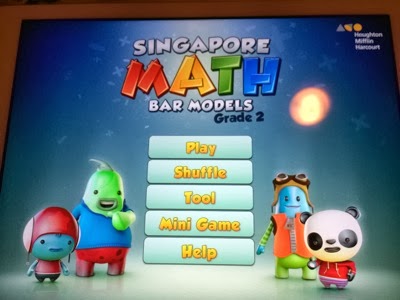
Jay Jay will play this Singapore Math game.  Actually is not a game, it is more like an assessment app.  HaHaHa.

Anyway, the title is called “Singapore Math, Bar Models Grade 2”.  It’s free for few questions, to unlock all questions, you need to pay US$9.99.

A bit pricy, but I think it is a very well done App for kids in P2.

Screen Shot 2014 03 01 at 6 29 35 am 

By the way, if want to know more about other math apps that is suitable for Singaporean kids, go to below link.

http://singaporemathsource.com/resources/singapore-math-ipad-apps/

If you want to know more about this “Singapore Math, Bar Models Grade 2” app, click on below link.  It is quite cool.  And you may have guess, there are Grade 3, Grade 4, and so on.  I am very sure the person who wrote this will be rich.  I got to spent some time to write apps too.

https://itunes.apple.com/us/app/singapore-math-bar-models/id461707896?mt=8

In primary 2, Jay Jay started to learn bar model diagram to solve addition and subtraction problems.

This is what they called “Word Problems” in school.

What I found is Jay spent a lot of time in “drawing” “perfection” rectangle in the word problem instead of trying to figure out what is the problem.  So, it actually “slow” them down in that sense.  As they need to use ruler to draw perfect rectangle and so on.

So, this app helps in the sense that he does not need to draw perfect rectangle as it will always become a perfect rectangle.  So, he can focus in is workings.  And understanding the question.

IMG 0768

On Singapore Math app, you are given a problem, and you simply need to solve it using a bar model diagram.

The process involves drawing two rectangle, size it, add a text in each block, and then add a bracket and show the total, and mark down the question mark for things you need to solve.
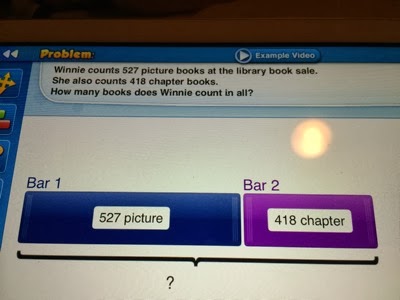
IMG 0775

Then, pull up the working area to write your equations and do your workings.

IMG 0777

Then, you fill in the answer.  If you get it right the first time, it will be 3 stars.  If you get it wrong, each time, 1 star will be deducted.

Cool, isn’t it?
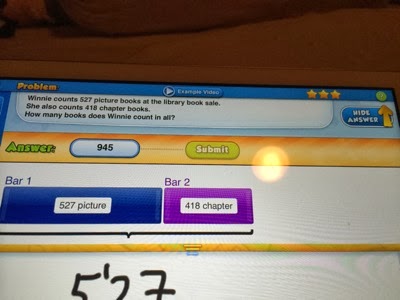
IMG 0778

Here is the video of me trying to solve the word problem.  Quite fun!  Easy to learn.

And most important thing is the concept.  The more question he does, the more bar model diagram he drew, the more better he grasp the concept.

Also, running the app on iPad serve as an incentive for him.  After doing 2 questions per day, he gets to play iPad games such as Minecraft, fieldrunner, monopoly, and so on.

Check out the tutorial, it also teach them how to solve each type of the problems.

When you go to harder questions, it has the necessary tutorials too.

This is the introduction video about this Singapore Math Bar Model Grade 3 app.  Take a look and you get what I mean.

Not only you can play the game in order, they also shuffle the questions so that each time you get a group of different questions.
IMG 0771

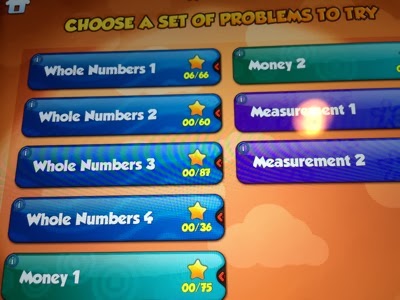
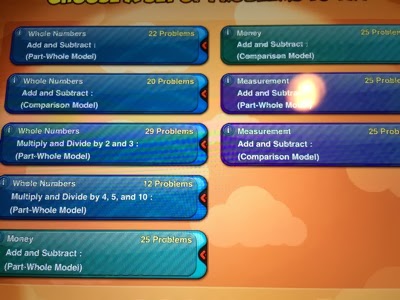
So, you have comparison model, you have part-whole model, and all these are according to MOE P2 syllabus.  Which is a very cool app.
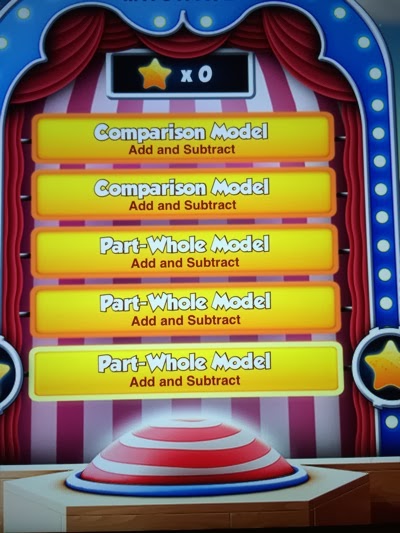
IMG 0784

Later part, there will be money and measurement question too.
IMG 0772

Multiplication and division will reintroduce slowly too.
IMG 0773

So, with this app, not only the child will be happy using it, by giving a little incentives after each lesson, it also encourage them to learn.

Try it!

Sunday, July 21, 2013

Kay - About Learning

Date:  July 21, 2013

Mommy is travelling to US again.  so, I will be taking care of Jay and Kay for a week.  :)

So, let's try some new things while Mommy is not around.  HaHaHa

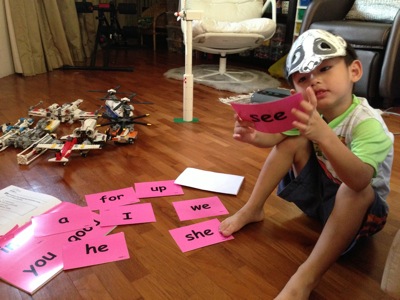
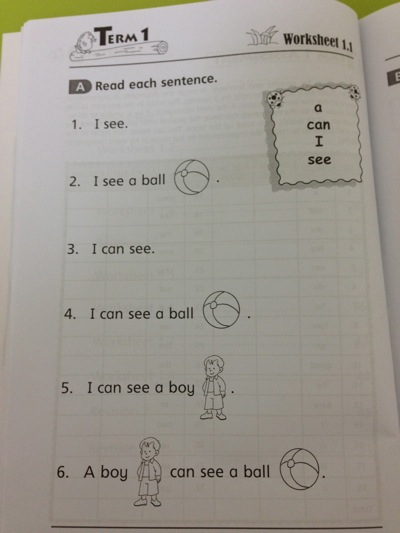
Kay Kay is learning Sight Words in school.  So, I bought a Sight Words book for Kay Kay to try out from Popular Bookstore.  The books comes with flash cards.  So, each lesson, you get to learn 4 new sight words. 

IMG 4757

Some how Kay Kay is very good in his Chinese, but not his English, although his native language seems to be English.  All the Chinese Flash Cards he is very confidently recognising all the words.  But some how not the English words.  So, we need to find some innovative way to teach.

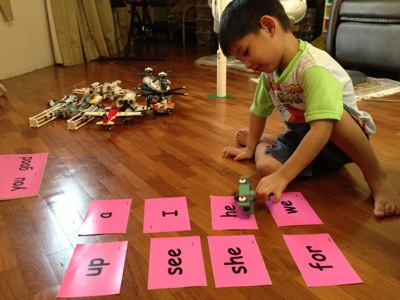
IMG 4683

This is one way you can do it. 

Kay, can you land the airplane on the "He" airport?  

And he has to put the plane on the word "He". 

IMG 4684

He already learned the first set of 4 words.  

IMG 4758

The book teach extra words such as "Ball" & "Boy".

IMG 4760

He was having some problem in recognising the words "The" & "Is".  I am not sure why, but some how, he has a mental block in learning this two words.

IMG 4759

I think we need to find a way to teach him "The" & "Is".

IMG 4761

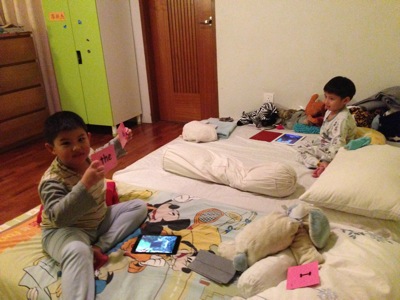
So, at night time, I told them.  

1)  They can play iPad while I take my shower ONLY if Kay Kay learned those two words.

2)  Jay Jay have to teach Kay Kay those two words using the Flash card.

I guess is the magic of iPad.  They have not lay their fingers on iPads for almost 2 weeks.

So, Jay Jay was using the flash cards to find ways to teach him.

IMG 4801

20 minutes later.

I came back to the kids room, and wanted to keep the iPad.  I tested Kay on the words he cannot pronounce.  And he did correctly pronounce the words.  Hmmm… this should be the power of iPad.

Another few things that I have changed.

a)  Mommy is travelling.  So, I told them, coming into my room at night will not find Mommy.  So, useless to do so.

b)  I am not Mommy, and I am not going to sleep with them.  So, after I read the story book, I will turn off lights and walk out the room, and they have to go sleep mode.

c)  Daddy have to watch golf game - The Majors - Tiger Woods is playing.. 

I actually have done that yesterday, and today is the 2nd time I am doing it.  And they did fall asleep by themselves in the room.

Of course, after I read them this story.  This is a must have.

IMG 4802

I am proud that my son under daddy care, can sleep by themselves.  :)  You sure try it too.  (Disclaimer:  It does not work when mommy is around!)

What else is new while mommy not around?

i)  Kay Kay is eating.  He eats the fried prawns (three of them) and my Unaju rice.

IMG 4765

ii)  Kay Kay is eating meat.  (sausages).

IMG 4797

Friday, July 12, 2013

BookU - The Other eBook Reader You Need.

Date:  July 12, 2013

Today, I would like to introduce a new Apple IOS App.  It is called BookU.

Screen Shot 2013 07 12 at 12 41 43 PM

It is just another eBook reader.  But it is in Chinese.

IMG 0085

You don't buy books here.  But you subscribe an account.  For example, for less than US$40/year, you can enjoy downloading and reading high quality ePub books, not those lousy "scanned" PDF books.  

IMG 0081

When I plans for traveling I usually will buy a few books from the book stores to do the planning.  And those cost money.  With BookU, there are many NEW books available here.  Like I download a few Taiwanese Travel books.

IMG 0082

The quality is quite OK.  And the reading is fast.

IMG 0083

The zoom in functions works properly and fast and clear.

IMG 0084

It is quite simple to use too.

IMG 0089

I took another glance of the books, and I think all these books are quite new and recent.

IMG 0086

There are many categories for you to choose too.

IMG 0087

Try it.

Tuesday, May 21, 2013

How to Let Your Kids Learn on iPad/iPhone

Date:  May 21, 2013

This is always my favourite topic.  

iPad & iPhone always have this "love & hate" relationship with the parents.  We love the iOS devices  as it really has a lot of lovely educations apps that we are very sure it can teach our kids well.  However, we also sometimes hate it because of the risk of kids being "stuck" or addicted to using the iOS devices that we like.

Here is a great tip that a lot of parents did not even know about it.  

Paisei… even me, also learn this only recently.  hahahaha

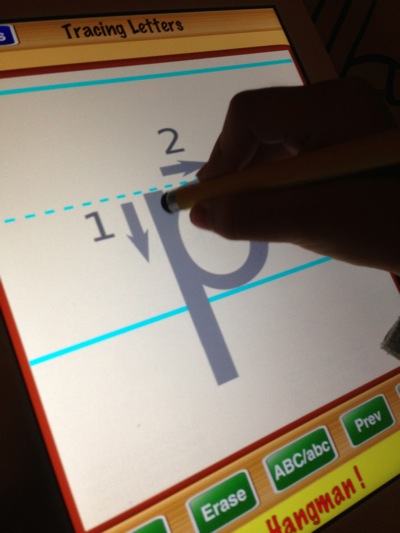
Our Kay Kay needs to learn how to write the alphabets.  In my opinion, the fastest way for him to learn is to run a letter tracing app.

IMG 1904

So, we downloaded this Tracing Letters App.  That has 1-2-3 on it to indicates which strokes to write first.

IMG 1902

One IMPORTANT tip for learning how to write is… to use a proper stylus.  For me, I let Kay Kay use my drawing stylus, which looks and feels like a normal pencil.  Do not let them use their fingers.  

IMG 1911

Everyday we let Kay Kay use this App and learn how to write.  And he begins to write better letters.

IMG 1906

This blog entry is not about this App.

It is about how to let your kids learn on iPad/iPhone without letting other games apps to distract them.

So, Apple has an answer for it.  And no one seems to know about it.  I only knew this from an article I read.

It is called GUIDED ACCESS.

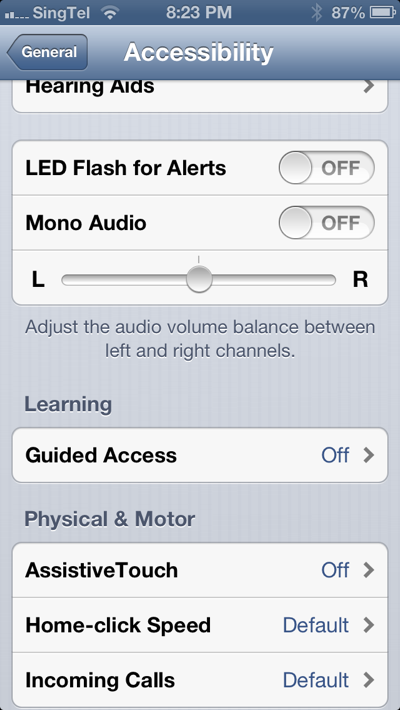
Go to Settings --> General --> Accessibility

Scroll down to see under "Learning" and turn the "Guided Access" function on.

IMG 1908

What does it do?  It actually keeps the iPhone or iPad in a Single App, and allows you to control which features are available.  

I strongly recommend the parents to turn on this.

IMG 1909

So, how do I use it?  When you launch any app, you simply press the HOME button three times.  They called it "Triple Click" the Home button.

IMG 1910

Once you do that, the Guided Access interface will pop up.  You can DISABLE the hardware button, you can enable Touch and Motion.

IMG 1912

It is a great interface!

IMG 1913

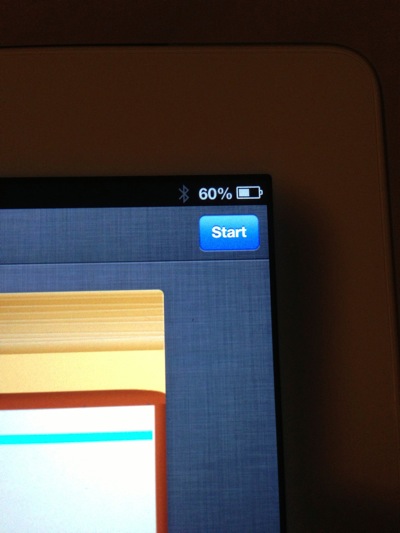
Once you happy with the settings, simply press "Start" button to turn on the Guided Access feature.

IMG 1914

Once it is turn on, the iPad/iPhone will not response  to any hardware button press.  

So, you can leave the iPad / iPhone safely to the child, so that they do not simply any how touch anything to disable or delete any of your important apps.  Or they keep on playing games.  It is not only for kids, if you are a marketing guy, you can run your marketing app continuously and no one can disable it and jump to another program.

IMG 1915

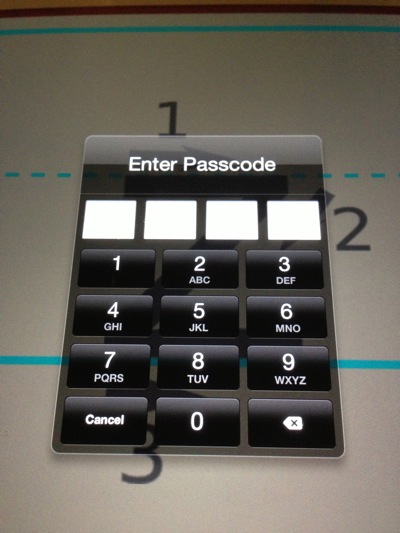
If you press Home three times, a passcode windows pops out.  So, you simply need to enter the passcode to DISABLE the Guided Access.

IMG 1916

Once you are in the Guided Access interface, click the top left corner "End" button will end the Guided Access for that app.

IMG 1917

Like this, your kid will only focus in playing one game, or one education app at a time.  And they will not hang on to the iPad/iPhone forever to play so many games on it. 

Try it now!

Thursday, January 10, 2013

Smart Phones & Tablets: I Have An EVIL Plan!

Date:  Jan 10, 2013

Parents:  We have a very serious situations to deal with!  

IMG 6952

Yes.  All the kids will sit there quietly and play the games on the iPad or iPhone or any kind of portable devices.  But think carefully, what are the impacts?  The impacts not only to him or her, but to the people surrounding him or her.  

IMG 3812

Shouldn't they be playing outside?  Shouldn't they be chasing each others?  Instead of staring at the smart phones and tablets.

DSC00366

I would like to share few recent thoughts I had.

1.  In a gathering, all it needs is one single iPhone or iPad to make the kids quiet, and surround or circling that only iPhone or iPad.  If there is no iPhone or iPad, the kids will be talking and talking and running, and playing.  Some kids will start to ask their daddy or mommy for iPad or iPhone.  So, once you give it, the rest will ask their father and mother for it.

2.  If you have more than 1 or 2 iPhones or iPads.  Groups will be formed.  And all eyes will be staring at the games.  But the kids are not talking too much.  All are watching the screens.  

3.  In one of the recent gathering.  Few boys were looking at one single iPhone.  Then, the iPhone battery went dead.  So, the boy said to his daddy: "iPhone no more battery!".  The next thing you see, these few boys start running around, playing at the pond, and one boy even accidentally drop into the pond.  Laughters and cries.  And the fun running. This is what we want to see our kids grow up with.  Because no more iPhone.  So, they played.  And I look at them how they happily chase each other, that is childhood!

4.  I have 2x iPhones and 3x iPads at home.  But my kids can hardly play them, because we don't allow it.  When we go out and gathering, I can see the "sadness" in my son's eye.  Jay keeps asking me: "PaPa, I have nothing to do.", his eye keeps looking at his friends who is playing iPhone or iPad.  "PaPa, what can I do now?"  I know Jay wanted to ask me for my iPhone, but he knows the rules well!  So, he gave me the sad look.  It is a heart breaking sad look.  But a rule is still a rule.  But at the same, time, you also don't like to see that sad face.   So how?

HaHaHa… So, after some thoughts.  I finally come up with an evil plan.

I WILL GIVE MY SON MY IPAD MINI!

haha… yes, I meant it.  But I will delete slowly the games.  No more Angry Birds, no more Temple Run.  No more arcade games.  Instead… I will keep… the following...

As you can see, are phonics learning apps, spelling apps, math apps, arts, knowledges, flash cards...

Screen Shot 2013 01 10 at 9 42 57 PMScreen Shot 2013 01 10 at 9 43 32 PMScreen Shot 2013 01 10 at 9 44 14 PMScreen Shot 2013 01 10 at 9 44 36 PMScreen Shot 2013 01 10 at 9 45 25 PMScreen Shot 2013 01 10 at 9 45 54 PMScreen Shot 2013 01 10 at 9 46 22 PMScreen Shot 2013 01 10 at 9 46 52 PMScreen Shot 2013 01 10 at 9 47 10 PMScreen Shot 2013 01 10 at 9 47 38 PMScreen Shot 2013 01 10 at 9 47 57 PMScreen Shot 2013 01 10 at 9 48 15 PMScreen Shot 2013 01 10 at 9 48 30 PMScreen Shot 2013 01 10 at 9 48 53 PMScreen Shot 2013 01 10 at 9 49 07 PMScreen Shot 2013 01 10 at 10 01 55 PMScreen Shot 2013 01 10 at 10 01 30 PMScreen Shot 2013 01 10 at 10 01 18 PMScreen Shot 2013 01 10 at 10 01 00 PMScreen Shot 2013 01 10 at 10 00 38 PMScreen Shot 2013 01 10 at 9 59 56 PMScreen Shot 2013 01 10 at 9 49 51 PMScreen Shot 2013 01 10 at 9 49 24 PMScreen Shot 2013 01 10 at 9 50 29 PMScreen Shot 2013 01 10 at 10 02 38 PMScreen Shot 2013 01 10 at 10 02 22 PMScreen Shot 2013 01 10 at 10 00 11 PMScreen Shot 2013 01 10 at 9 50 43 PMScreen Shot 2013 01 10 at 9 51 22 PMScreen Shot 2013 01 10 at 9 51 36 PMScreen Shot 2013 01 10 at 9 52 07 PMScreen Shot 2013 01 10 at 9 52 23 PMScreen Shot 2013 01 10 at 9 52 49 PMScreen Shot 2013 01 10 at 9 53 04 PMScreen Shot 2013 01 10 at 9 59 29 PMScreen Shot 2013 01 10 at 9 58 56 PMScreen Shot 2013 01 10 at 9 58 15 PMScreen Shot 2013 01 10 at 9 57 46 PMScreen Shot 2013 01 10 at 9 57 08 PMScreen Shot 2013 01 10 at 9 59 41 PMScreen Shot 2013 01 10 at 9 53 14 PMScreen Shot 2013 01 10 at 9 54 14 PMScreen Shot 2013 01 10 at 9 54 27 PMScreen Shot 2013 01 10 at 9 54 44 PMScreen Shot 2013 01 10 at 9 54 53 PMScreen Shot 2013 01 10 at 9 55 11 PMScreen Shot 2013 01 10 at 9 56 13 PM

So, if my son come and tell me, "Daddy, I have nothing to do…"

I shall give him this "special customised" iPad Mini.  

Jay will ask: "Where is Angry Bird?"

I will reply "Oh, I have no more angry bird.  Can you play other GAMES?"

Jay will ask again: "Why no games?"  (thinking Angry bird, temple run, etc those arcade games).

I will reply "No, there are lots of games in there… who say don't have?"

So, the point is… you can be the odd one out where all parents giving their kids iPad or iPhone, while you son is odd one out, no iPad and no iPhone.  This will makes them sad.  This will also makes them angry some times.  So, in order to fix that… just give the iPad mini.

So, if Jay come back and says "Those are not games…"

I will reply him "Do you want iPad or iPhone or not?"

He will sure reply YES.  But he will get to launch his EDUCATION games, and learn while playing.  This is far more better than playing angry birds, or shooting games, or race car hames.  

Do you think my plan is EVIL??

I really hope that this will help the kids to grow.  Gain knowledge while playing.

IMG 5168