Showing posts with label Wifi. Show all posts

Friday, October 10, 2014

Wireless@SG Compared to SingTel 4G (3 bars)

Date:  Oct 10, 2014

I was at Marine Parade yesterday.

My iPhone was signing into Wireless@SGx Wi-Fi hotspot.

While checking my mail, the hourly glass keep spinning.  And I wonder why?

IMG 2022

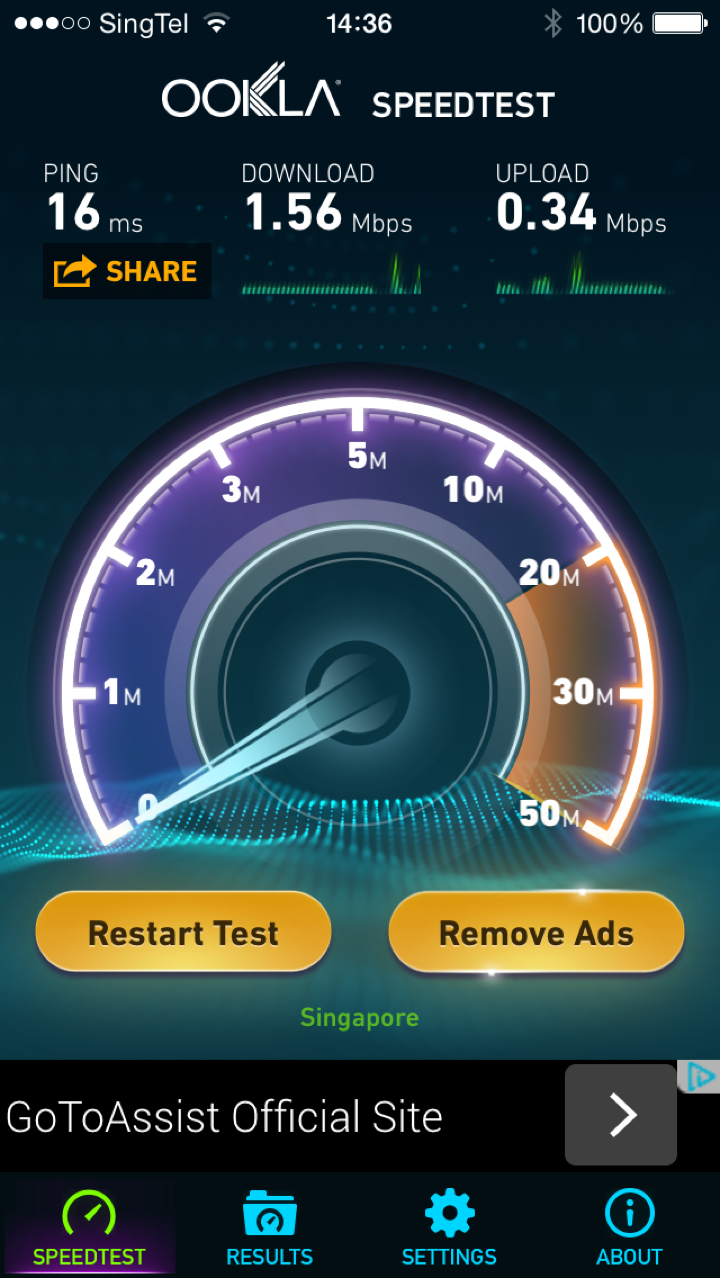
I did many times Speedtest.  This result has been consistent.

IMG 2018

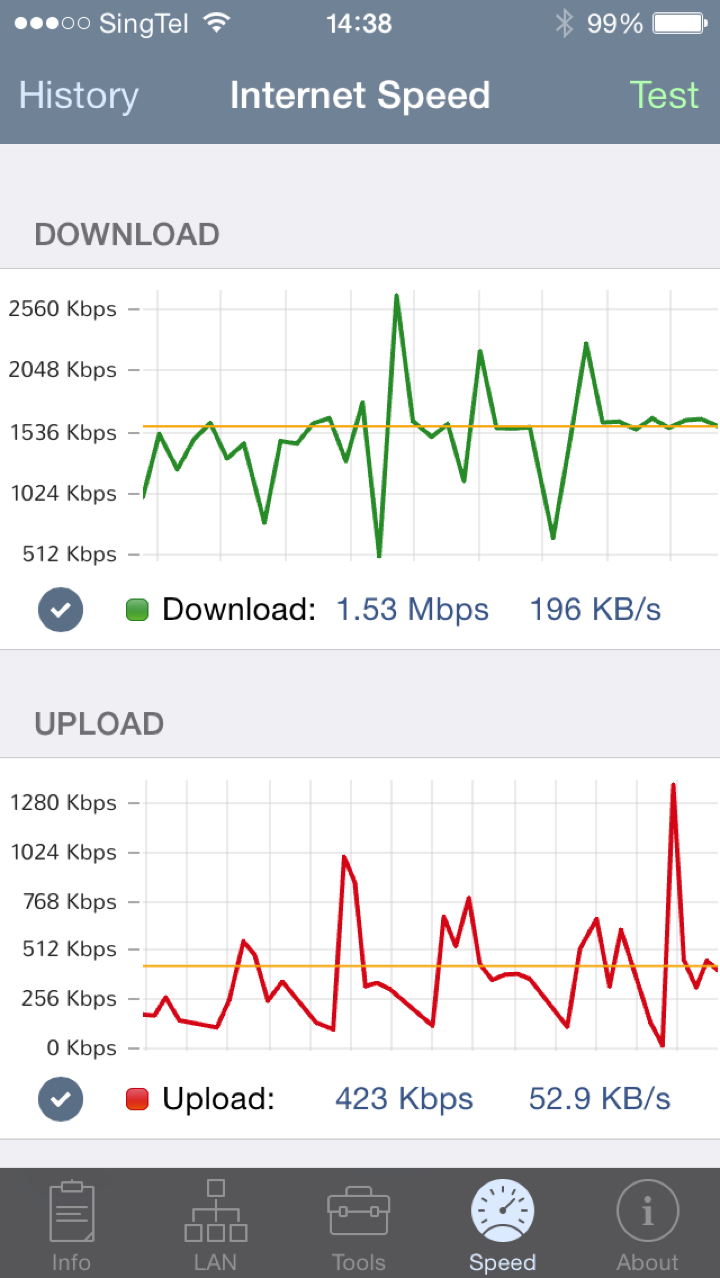
I used another Speedtest App to do the test.  The result is unfortunately, consistent.

IMG 2021

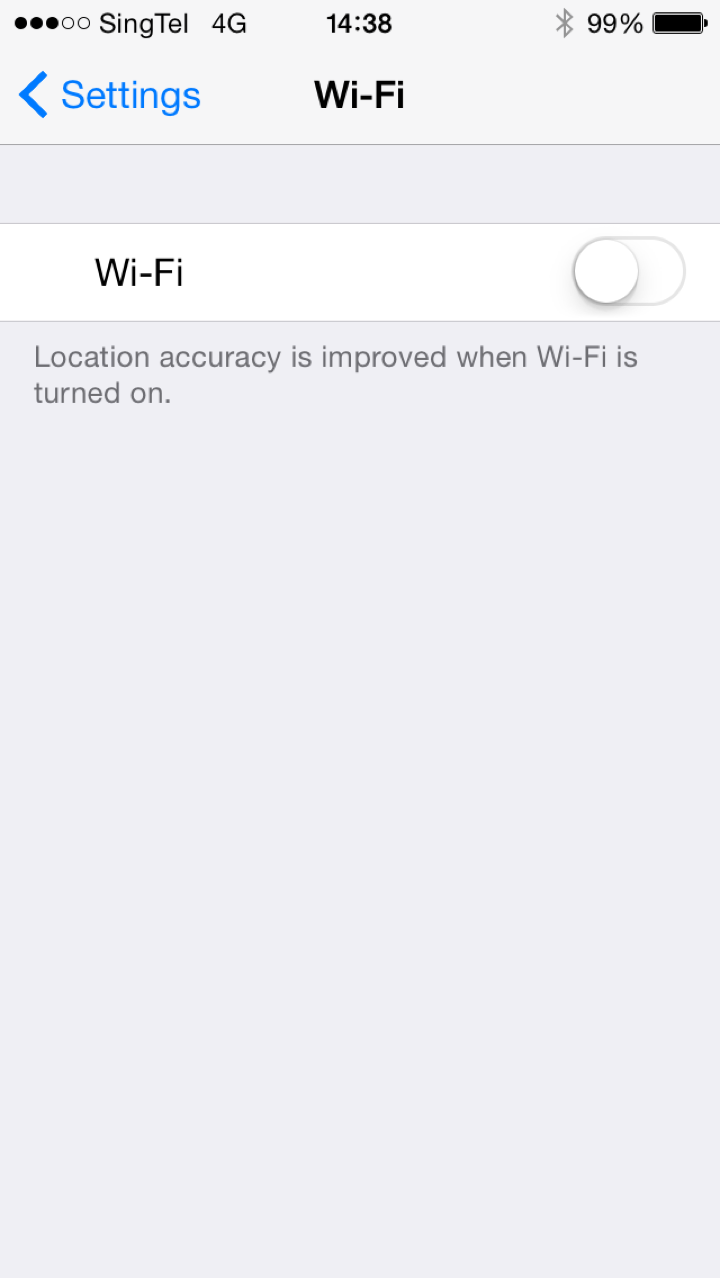
So, I turn off Wi-Fi on my phone and allow my iPhone to use the LTE/4G.  It has only 3 bars.

IMG 2023

So, I redo all the test.  And hey, SingTel LTE/4G gave me close to 70Mbps download speed with close to 25Mbps upload speed. 

What was the Wireless@SG speed again?  Less than 2Mbps download speed.

IMG 2024

The result of course is consistent when use a different speed tester.

And hey, it is only 3 bars signal we are talking about.

IMG 2026

Conclusions:

1.  Wireless@SG sucks!

2.  I don’t see why Wireless @SG which is a free service, need to exist.  There is no point.

3.  It disgrace the Singapore Internet capability.  Imagine, tourist came to Singapore, and use Wireless@SG at a very snail slow speed.  They go back to their home, they might say “Singapore Internet is very backward, can’t even get a decent 2Mbps download speed."

4.  Is this what the country want to show the world?  Slow Internet WiFi speed?  

5.  The Internet Access speed is much faster at any of the coffee shop who offer Free WiFi.

6.  Mind as well give the money to SingTel/Starhub/M1 so that they do a better job or subscription plans for the 4G/LTE.

7.  Wireless@SG really sucks!

Tuesday, December 24, 2013

No WiFi in my Bedroom

Date:  Dec 24, 2013

Few months ago...

http://www.mnn.com/health/healthy-spaces/blogs/student-science-experiment-finds-plants-wont-grow-near-wi-fi-router

Five ninth-grade young women found the following facts...

Left (Green):  Plants grow healthy when it is not near WiFi Router.

Right (Brown):  Plants cannot grow when it is near WiFi Router.

NewImage

I have made a huge decision of my life today.

1.  Shutting down the Apple Airport Express (WiFi Router) in my bed room.  No longer I have strong WiFi signal in my room.  Only when I need it, I will turn it on, and when I don’t need it.  I will shut it off.  

2.  Shutting down the Apple Airport Extreme (WiFi Router) in my study room (just 1 meter away from me).  This is the probably the strongest WiFi router I have at home.  So, I will use it only when I really need it.  For now, it will be turned off most of the time.

IMG 6384

3.  Removing all the Apple chargers in the room.  If you have a charger in your room, that means, you will charge your iPhone or iPad.  Bad!  So, these chargers will be moved elsewhere.  Benefits will be tremendous.  No SMS, no Whatsapp.  But best of all, no devices in your room to get WiFi or 3G or 4G signal.  

The only active WiFi router will be in the living room and the network cabinet and my Kitchen Washing area.  So, that is fine, those can leave it on.  My iPhones/iPads in the study room can still get a WiFi signal from these routers. 

Let’s live a better and healthier life, ya!


Tuesday, September 25, 2012

Something about Speedtest.net

Date:  Sep 25, 2012

Speedtest is a good benchmark tool.  However, you know to know how to use it before taking advantages of it.

IMG 0324

This is what happen today...

Me and Shao Yi were at Millennium Walk.  Both of us draw out our iPhone 5.  

It is my BLACK iPhone 5 Vs. his WHITE iPhone 5.

(of course you know, regardless of BLACK or WHITE iPhone 5, the performance is the same on the 4G Network!)

It is my SingTel LTE Vs. his M1 LTE.

We run speedtest.net

As a result...

My SingTel LTE gave an impressive 17Mbps download and ~14Mbps upload speed Vs.  his M1 7Mbps download and 6Mbps upload.

Screen Shot 2012 09 25 at 10 04 01 PM

Again… we walked to Suntec Tower One, and we draw our iPhones 5 and compare the speedtest again!!!  And yet, I won!  With similar results.  (Both of us using the same Speedtest Server! and we have 3-4 Bars)

Then, just now, I saw my friends post this… Which I must say it is quite consistent on M1.  But do notice that it has ONLY 2 BARS.

Screen Shot 2012 09 25 at 10 06 20 PM

What does it mean?  

Let me try to give more example… and you decide how you want to use Speedtest as a benchmark.

I am sitting in my study room, facing the Clementi Mall.  

I run speedtest using SINGTEL Speedtest server.  I ran a few time, my SingTel LTE has estimate of 17Mbps of download and 26Mbps of upload speed. Not exactly sure why the upload speed is so high.  But look at the ping time, it actually takes 79ms to reach Singtel speedtest server.  I have no idea where they put this speedtest erver.  seems to me they place it in Japan or Korea (~80ms).

IMG 0317

So, at the same location.  I run speedtest using SGIX server.  The Singtel LTE responded with ~15Mbps upload speed and 13Mbps upload speed.  Yet, the ping time is 32ms.  I am sure that SGIX place their servers at Global Switch data center or 1-Net data center.  So, why does it takes 32ms to reach it.

IMG 0319

Let's change it to use NewMedia Express.  At the same location, NewMedia Express gives a different reading.  But the ping time to speedtest server which they co-locate in Kallang or Equinix or Global Switch is roughly the same as the SGIX location.  But the speed for both download and upload are able to reach > 25Mbps both ways.  Very impressive.

IMG 0321

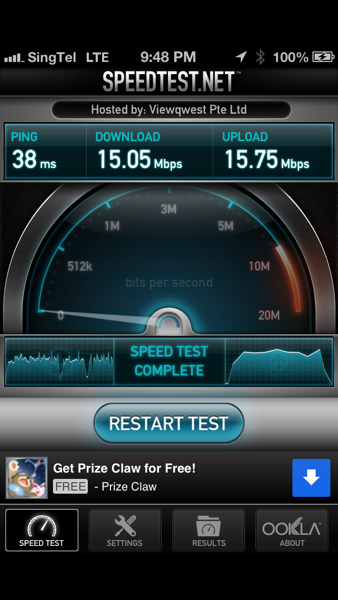
OK.  Now, let's look at ViewQwest.  They placed their server at their own co-location at Pantech21 data center may be, or at Equinix or Global Switch.  The ping time is around 38ms.  Which is close to both SGIX and Newsmedia.  I still cannot figure out what went wrong with Singtel with higher ping time thou…  The upload download is roughly the same at 15Mbps.
IMG 0322

Lastly, let's look at Telin (Indonesia PT Telkom) who may co-locate their speedtest server at their Changi Cable Landing Station or Equinix.  That explain the 31ms.  But their speed is slower.  I ever asked them before, and I suspect that they re-cycle an old PC and used it as a speedtest server.

IMG 0323

CONCLUSION #1.  Speedtest DOES NOT give you an accurate result of what your LTE true speed is.  As you can see, I have 4 bars SingTel LTE, and I am doing the above 5 tests at the same location, which is in my study room, in front of my iMac facing Clementi Mall direction.  And I have chosen 5 different speedtest server in SINGAPORE, and yet all servers gives you different result.  We wall know that speed within local locations should be very fast.  So, the reason of this difference mainly because of the PC Server that you use, How many people are using it?  And the bandwidth they supply to this speed test server.  i.e. speed test server is attached to a 10Mbps shared Internet backbone Vs. 1GE dedicated Internet backbone.  So, rule of thumb is to choose the one that is fastest, as that will mean that very likely the speed test server is using a huge bandwidth.  That will gives more practical result.

CONCLUSION #2.  If your server is located in Singapore soil.  And it should not have too much different where it located in Singapore, as the data center to data center speed is quite fast locally.  It is about 30ms-40ms.  I cannot explain why Singtel gave 78ms thou...

CONCLUSION #3.  It cannot tell you the true speed.  But it can help you to compare speed among the 3 Telcos.  How?  By simply CHOOSING THE SAME SPEED TEST SERVER every time you want to do the test.  By using the same server, 

So, if you cannot determine the correct LTE speed?  What is good to do the test?

Take a look at below.

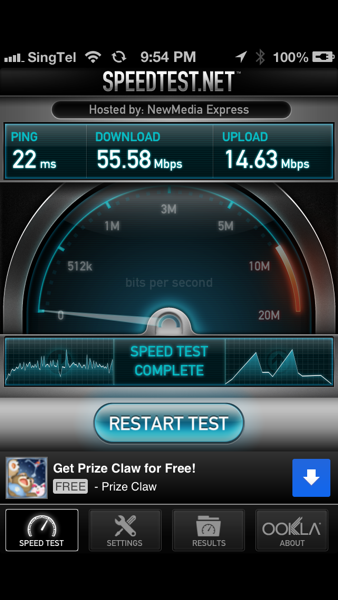
This is using a VIEWQWEST 100Mbps broadband plan.  From OTE, it goes thru Ethernet over Power Line (Homeplug) then into a ASUS Black Diamond router.  So, I am happy to get 55Mbps download with 14Mbps upload.  One thing you have to know is the WiFi at home is not symmetrical.  If I plug my router just behind the OTE, I am getting 90+Mbps both ways.  The asymmetrical results of download vs. upload is a WiFi characteristic.  And it takes 22ms to get to Kallang.  Which is OK.

Btw, the Wireless Access point is a Apple AirPort which connect Cat6 15 meter away from the ASUS router. 
IMG 0325

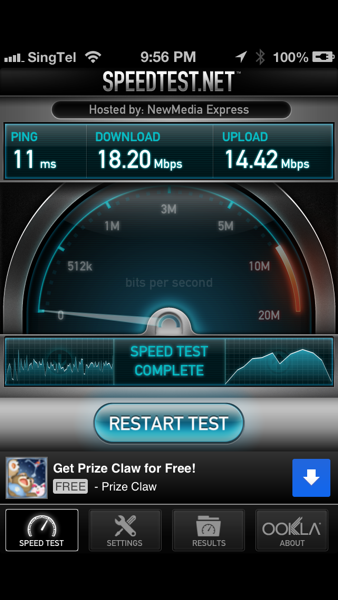
NOW… If I switch my Wireless to SINGTEL 50Mbps Broadband plan.  The OTE will go thru a 5.8Ghz point to point WIFI to the patching point the same location as my ASUS Black Diamond for ViewQwest.  From there, it is a cat6 cable to another ASUS Black Diamond which is for SingTel and just in front of me, beside the Apple AirPort.  As you can see, 11ms to get to the server.  The speed is 18Mbps. I am getting a decent 36% of the 50Mbps.  Although the ViewQwest one, I am getting a >50% performance.
IMG 0328

Lastly, I connect my iPhone 5 to the ASUS Black Diamond WiFi.  This is 15 meter away from me.   And I get this result.  As you can see… the download speed is dropped to 30%+.

IMG 0329

CONCLUSION #4.  Wireless play a big part in speedtest.  Many people don't know this, but I am sure Telco loves all of you to have smart phones, such as Apple iPhone.  Because it uses Wireless.  WiFi has different standards… Why Telco loves you?  Because, your home can subscribe to 100Mbps broadband, but since most of the time you are on your smart phone, you can only draw a certain bandwidth constraint by your wireless.  That is why you will not max out the usage of the entire 100Mbps.

Do you know that 802.11a only delivers 11Mbps shared and max bandwidth… while 802.11n can deliver to 300Mbps download speed?

Do you know that the download and upload speed for WiFi is different.  It is asymmetrical?

Do you know that if you have 802.11n, and you expected close to 300Mbps performance.. but yet you can only 11Mbps… you know what is the reason?  because, if you have a single device that is only 802.11a, the 802.11n AP router will drop to accommodate it.  That is why I DO NOT allow any slower than 802.11n devices connect to my 802.11n WiFi network.  Many people don't know this!  So don't blame the sales man sell you a crapy 802.11n that claims can do 300Mbps.  First must check what are all your devices, connecting at?

Do you know that although the advertising is 300Mbps on 802.11n, but you will never get 300Mbps.  You can roughly about 25-40% of the said "theoretical" max speed.

Also, do you know that when you stand near to the WiFi router does not mean that you will get the strongest signal?  In fact, it is hard to determine where is the strongest WiFi signal.  Strong WiFi signal means bigger download speed.

Now, let's see what does my iMac says… The iMac is 2012 model.  So, I am using a WIRED connection to my ViewQwest router.  And when I use NewsMedia speed test server.  I get an impressive 54Mbps download but a disappointing 10Mbps upload.  Why?

Screen Shot 2012 09 25 at 10 47 05 PM

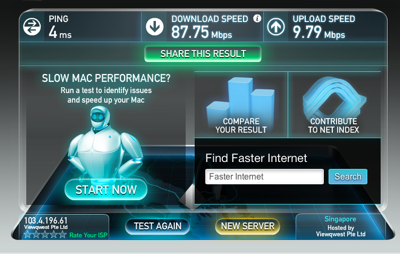
Same machine same location same network, but different speedtest server.  Now I am using ViewQwest speedtest server.  And I get 87.75Mbps.  But yet, the upload speed is 10Mbps.  Hmmm… getting strange.  Because the IOS device on Wireless can get about 14Mbps on average, why is it I am getting only 10Mbps throughput upload speed.  It is a mystery, but I will figure out that part eventually.
Screen Shot 2012 09 25 at 10 47 52 PM

Same machine, same location, same network, but different speed test server - Telin.  Yet the result is striking similar to ViewQwest one.

Screen Shot 2012 09 25 at 10 48 39 PM

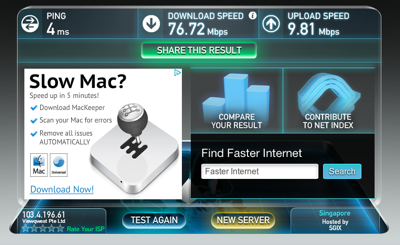
Same machine, same location, same network, and using SGIX server.  The download speed is dropped.  But upload speed is the same.
Screen Shot 2012 09 25 at 10 49 22 PM

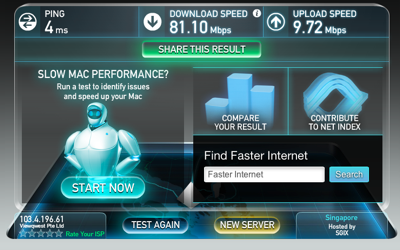
Let's use the same iMac, same location, but instead of WIRED network.  Let's use the VIEWQWEST Broadband WIRELESS network in front of me.  And let's check the speed test.

OK.  The speed is no far from 76Mbps.  And the upload speed is the same.
Screen Shot 2012 09 25 at 11 05 19 PM

Let's switch to SINGTEL Broadband WIRELESS network.  So, my answer is pretty clear.  I was able to get 14Mbps on the upload speed this time.  :) some one capped my traffic at 10Mbps for upload speed.

Screen Shot 2012 09 25 at 11 07 29 PM

Now, let's switch back to ViewQwest Broadband, and a far end Wifi point which is 15 meter away from me.

Yes, the download have to go down.  But the upload remains at 10Mbps.

Screen Shot 2012 09 25 at 11 09 55 PM

CONCLUSION #5.  If you use iMac which is much powerful than an iPhone.  The download result is faster.  81Mbps on iMac Vs. 56Mbps on iPhone.  Same location, using same WiFi access point located just in front of me.  So, faster processor can have better result on speedtest.

Again, if you do more speedtest, and willing to put more thoughts on how it get the data, and its dependence on machine type you are using, machine type the speedtest server the provider install it on, and the backhaul network the provider provide.  It is not hard to realise the fact that speedtest is actually a CRAP!

To me, it is just fun to find out all these facts about Wifi, your machine, your IOS devices, your Telco, etc etc.  Very interesting...

Oh.. By the way, every time when you launch speed test, it will RANDOMLY give you a server which many people does not know it and blindly reports it as performance issue.  

Disclaimer:  I am a very fair person, and I analyse data based on what I actually get from my machines.  And my conclusions is made based on the limited knowledge I know of.  So, use it freely.  And please do your own test, and figure out what is best for your network.   Now, I must go and find out and question, why my UPLOAD SPEED is capped at 10Mbps when I used iMac + ViewQwest combination, while when I used iPhone + ViewQwest, It gives a max of >14Mbps.  So strange… 

Tuesday, August 7, 2012

Apple Airport Single SSID Wifi Zone

Date:  Aug 7, 2012

I know I know I am late, but it's better than nothing...

I used to have 3x SSID at home, i.e.  Mouse3, Mouse6, Mouse9, etc.  So, when i walk into my bed room, I will need to switch my IOS devices to another SSID in order to get the strongest signal.  

I bought another 2 AirPort WiFi APs… So, all together, I have 4 of them running at my place.  I put one at the server cabinet, one at the living room, another one in my study room and the last one in my bed room.

Screen Shot 2012 08 07 at 1 15 15 PM

All the while, if I mix and match other access points, when I go into the bed room, somehow, it still hang on to the access point in the study room, and the signal becomes very weak.  I need to manually switch it to the bed room one to ensure I have "high speed" going into my IOS devises such as iPhone or iPads and Apple TV.

And when I walk into the Study Room, my iPhone change to connect the Airport in the study room.  When I walk into the bed room, it actually switch to the Bed Room's Airport.  I am guessing that the 4x AirPort all work together to serve the iPhone, there should be checks on who is the strongest AP and it will automatically switch to that strong AP.  I never run single SSID before, so, this is new to me.  So, I am very happy about this!

Screen Shot 2012 08 07 at 1 28 01 PM

Cool!

Sunday, December 25, 2011

Please Feedback Wireless@SG Failed Site to IDA

Date:  Dec 25, 2011

NewImage.jpg

Provide feedback on Wireless@SG

The director in charge of infrastructure development wishes to get feedback on locations where Wirelss@SG is not working well. Please send the feedback to them at the following:


Why we need to feedback?

1.  We all know Wireless@SG sucks!

2.  We all know IDA funded this Wireless@SG.  They used our hard earned tax payer money to fund M1, iCell & SingTel for putting up these Wireless AP around the island, but usually it is SLOW, and most of the time it does not work!

3.  Back in the past, you need to login to get online.  Now, they provide Wireless@SGX so that you do not need to every time login.  But still, most of the time it does not work!

4.  How can you tell?  If you have an iPhone, and you set Wireless to auto-connect.  So, when you are at home, no problem.  When you are at office, no problem.  When you are at some nice restaurant that provide free Wifi, no problem.  But most of the time, when you are at public area, it will auto select to Wireless@SGX without you knowing.  And then, all your WhatsApp messages not coming in. Why? Because iphone has switch from 3G to Wireless@SGX Wifi connection where it allow you to connect, but no data flow or very slow data flow thru.  That is not nice!  That is super frustrated.

5.  When you call up SingTel, M1 or iCell, they will say, it is free service, it is congested, too many people logon, etc.  So, the QoS (Quality of Service) is almost zero.  None at all.  But then, if you are a paying customer of a certain Telco, surprisingly, the WiFi works some times.  So, Free service get zero QoS?  That is not right!  Our tax payer money has paid for that!

6.  So, please make sure all your friends know about the email address to sent feedback.  Oh yes, when the WiFi (Wireless@SG) is not working, and how you suppose to sent it to wireless@ida.gov.sg????? Luckily, there are some clever people in the department also provide the SMS 79777 hotline for people to complaint the site.

7.  Please tell every one to have this SMS 79777 template in their SMS for easy to sent in complaint.

IDA myemail@myemailaddress.sg Cannot connect to Wireless@SG at Vivo City

or

IDA myemail@myemailaddress.sg Can connect to Wireless@SG but cannot use or no response

or

IDA myemail@myemailaddress.sg Wait very long time to login to Wireless@SG

or

Anything you wish to complaint.

Please help the nation.  And show the government the power of the people.  We should execute our right as a tax payer, to have the right to use a good QoS WiFi Infrastructure in Singapore.

Thanks!

P/S:  Not sure why http://wireless.infocomm123.sg/ website returns a blank page.

Screen Shot 2011-12-25 at 2.09.10 PM.png

Crap!

Crap!

Hope the SMS works hor... Sibei JiaLat!


Sunday, December 4, 2011

Wireless @ SG Revamp!

Date:  Dec 4, 2011

Wow!

IMG_1567.jpg

I just got a few comments on this:

1.  I thought the Download/Upload speed of the Wireless@SG is 512Kbps or below?  Because I can never get a speedtest that is more than half of that bandwidth.  Whenever I use Wireless@SG, the speed most of the time is SLOWER than 3G.  Given that 3G is already very congested and slow.

2.  But the most importantly, Wireless@SG does not work in most of the shopping mall.  The only place that I have consistent good coverage so far is @ KFC at Suntec Tower One basement.  There, I have my daily breakfast and read news without problem.  But whenever you go to other malls, I was forced to turned off my WiFi because it automatically log on to the Wireless@SG but most of the time, it does not work!

3.  So, If today, the 3G network is giving you up to 7.2Mbps, I don't see what is the reason that Wireless@SG wanted to capped at 1Mbps per laptop, per smartphone.  This is not right!

4.  Most of the time, people use it on smartphones nowadays.  So, every smartphones or iPad most likely have a 3G sim chip.  So, what is the problem of using the 3G Sim as authentication?  Don't asked me to key in my username and password all the time!

5.  I believe a lot of our money (Taxpayer money) has been thrown into this crappy Wireless@SG.  But there is no QoS (Quality of Service) at all.  So, if these operators is asking for extra funding for any upgrades, please put in QoS clauses to make sure that they do the job right!

6.  So, please, do not only see the problem one dimension.  Don't just fix the easy authentication and forgot to fix the backhaul bandwidth.  100Mbps is sold today below S$40.  So, I don't see a reason why these Wifi hotspot are not getting 100Mbps backhaul speed to the Internet, and why can't the hotspot open up full WiFi bandwidth for us to use it.

Sorry Sorry... Everytime I talk about Wireless, I always easy to get agitated.  Do you have this experience, where, you walk into a Wireless@SG, and your smart phones start switching to Wireless@SG and because Wireless@SG is not working at that time in that area, you did not get important WhatsApp message or emails, etc.  Until you realize it, you quickly have to turn off the WiFi and use the 3G, a at least not so crappy network connectivity.  Then, when you get back to home and office, you then have to manually to turn on the the WiFi again.  Ain't that annoying?


Saturday, November 19, 2011

Cotes Du Rhone = Kenneth Liew?

Date:  Nov 17, 2011

When I attend "The Science, Art & Business of Wine" class @ Singapore Poly, on the graduation dinner, my teacher, Malcolm Tham match my character to a Blend Red Wine from Rhone.

Finally, I had a chance to open this Cotes Du Rhone, a blend red from Rhone.  Sweet, fruity, soft tannins, is a pleasant wine.  So, Malcolm actually mean I am a Pizza Man?  As this wine goes well with Pizza.  HaHa

IMG_0949.JPG

Grenache (60%) + Syrah (30%) + Mourvedre (10%)

Soil & Climate:
Première Côte is grown in the Village of Courthézon (one of the villages included in the appellation Chateauneuf-du-Pape). The soil is composed mainly by large pebbles. The region has a warm, dry climate, which is nonetheless modified by the influence of the powerful mistral wind. The combination of these factors permits an environmentally friendly approach to viticulture, with minimum intervention.

Vinification:
After a light pressing, the grapes undergo a long fermentation of 5-6 weeks, with soft extractions, at a maximum temperature of 25 C. In order to allow the full expression of a terroir both maritime and continental which is associated with the rounded stones found in this region, our Cotes du Rhone is matured in traditional concrete vats, out of contact with the air, for at least 8 months. Each varietal is vinified and matured separately before being blended for the final wine.

Tasting notes:
Bright red in colour, our Premiere Cote displays aromas of spices and wild herbs (garrigues) and red fruits. The palate is defined by the sweetness of the fruit, and the softness of the tannins, with a freshness which brings finesse and elegance.

Food pairing:
A good accompaniment to pizzas and all Mediterranean dishes.

Serving Temperature:
To enjoy at its best, open the bottle half an hour before serving. Serve at room temperature or even slightly chilled on a summer day.

Can be kept for up to 4 years.

The other Cotes Du Rhone that I think it is very good is this bottle, where I had 2 bottles that day.  The Cotes Du Rhone from M. Chapoutier.

IMG_0176.jpg

So far, I like both the wines.  No complaint at all.  Nice.


Friday, October 28, 2011

Gadget Playoff: Apple Airport Extreme Vs. ASUS Black Diamond

Date:  Oct 28, 2011

This is the two wireless access point I have at home.  Let's compare their performance.

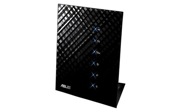
Asus Black Diamond RT N56U VS.   Apple AirPort Extreme 4

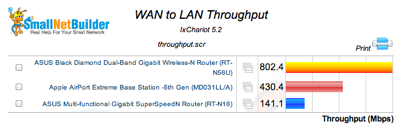
1.  WAN to LAN Throughput.  This router is connecting to your Internet Provider.  And it shows how fast the top speed it can handled.  ASUS is clearly superior in this as its processor are much faster and can handle much more.  Both devices has GE ports.

Screen Shot 2011 10 28 at 9 39 12 AM

2.  LAN to WAN Throughput.  This is important where the outside Internet content how fast can they sent to your network.  Clearly, ASUS is double the speed of Apple.

Screen Shot 2011 10 28 at 9 39 26 AM

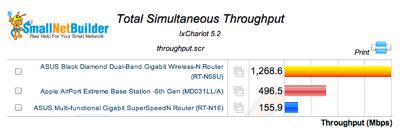
3.  Total Simultaneous Throughput.  The throughput seems impressive.  Not sure what does it mean.

Screen Shot 2011 10 28 at 9 39 38 AM

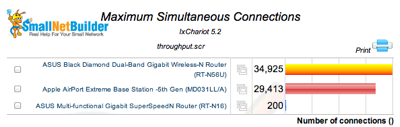
4.  Maximum Simultaneous Connections.  I think this is the TCP IP Sessions.  Actually Apple is not far behind.

Screen Shot 2011 10 28 at 9 39 57 AM

5.  Average 2.4Ghz Downlink Throughput.  Again, Apple is not behind of ASUS.

Screen Shot 2011 10 28 at 9 40 11 AM

6.  Average 2.4Ghz Uplink Throughput.  Apple in this case is also not far behind,

Screen Shot 2011 10 28 at 9 40 26 AM


Conclusions:

A.  ASUS Black Diamond Router definitely stay behind SingTel Fiber ONT.  That is because I want to ensure the LAN-to-WAN and WAN-to-LAN at the top speed.

B.  Apple Extreme is to move to beside Apple TV.  This is to ensure I have very good speed on Wireless connecting to Apple TV with minimum Cat6 cable length.  This is to ensure Air-Play capability is optimum at my place.  And now, when I played Real Racing 2 or Chopper 2, I don't see much lagging anymore.

:)

Sunday, August 21, 2011

Network Performance (1) - Wireless Comparing

Date:  Aug 21, 2011

I found a good benchmark tool from the Synology web admin pages.  Let's learn about our WiFi signal using this tool.

Synology

It is called "Resource Monitor".

Resource Monitor

The resource monitor basically runs the monitoring to monitor the Synology Harddisk.  It monitors CPU, Memory usage and Network Flow.

Resource Monitor Screen

So, with the Synology connecting to my Cisco SLM2000 managed switch at 1000Mbps port speed.  The Synology will always be "constant" or "fixed".

Today, the matter subject is two of my Access Point.

1) ASUS Black Diamond who is connecting directly to the SLM2000 switch.

2) Apple AirPort Extreme who is connecting to the same switch but it is located in my study room, which is connecting by a cat6 internal wiring.  Bear in mind, the cat6 internal cable should give greater throughput then wireless itself and it may have some distant losses there.

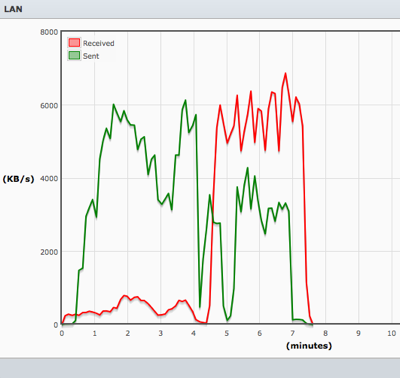
Here is the result.  I am transferring a 939.4MB movie file, i.e. "2012.480p.mkv" to and from the Synology onto my Macbook Air with SSD harddisk.

Test A.  The file is downloaded onto the laptop at the speed close to 8000KB/s.  This is equivalent to about 62.5Mbps.  (8000KB/s / 1024K/M x 8b/B = 62.5Mb/s)  I am connecting to Apple Extreme which is 0.5 Meter away from my laptop.

Observations:

Here you notice that the file transfer rate is high at first, about 14000KB/s (about 109.375Mbps) but then, it actually drop back to 8000KB/s.  This is WiFi characteristics.  The signal strange can change even during a stationary position.  It all depends on how the signal amplifies and bounced back from walls, as well as any other people using the WiFi device.

Also, this Apple Airport Extreme supported 802.11N.  So, on the paper it says 300Mbps.  And you will never get that speed.  See, the top speed we got is 109.375Mbps.  (I have done a couple of times, result is similar).

Mouse3 near

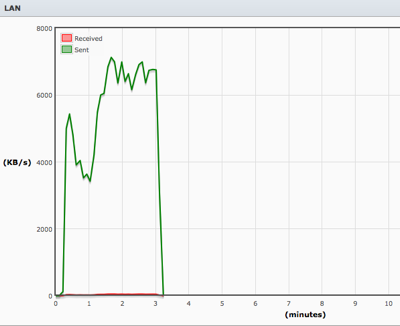
Test B.  Then, at the same location, I switch my WiFi to ASUS Black Diamond which is located beside the switch, and it is far at the other end of the study room.  Which is about 15 Meter away.

Observations:

Again, ASUS Black Diamond is a 802.11N, and with a distant of 15 Meter away, the connection actually stable at around 6000KB/s (about 48.875Mbps).  Both upload and download seems to be consistent.

Mouse9

Test 3.  I move my laptop to 0.5 Meter away from ASUS Black Diamond.

Observations:

As you can see, the transfer rate is about 58.59Mbps (7500MB/s).  ASUS Black Diamond, has similar or slightly lower performance then Apple Airport Extreme in terms of WiFi-to-LAN or LAN-to-WiFi performance.  If you recall, the ASUS Black Diamond is superior in LAN-to-WAN and WAN-to-LAN performance.

Mouse9 near

Test 4.  Now, At 0.5 Meter away from the ASUS Black Diamond, I switched the WiFi back to Apple Airport Extreme which is about 15 Meter away.  And then, about half way, I walked back to the Study room with the laptop and sit down eventually beside the Apple Airport Extreme.

Observations:  As you can see, when I move, the signal strength got stronger, and managed to increased from 4000KB/s to 7500KB/s.  But do notice that, when you move further away, Apple Airport Extreme tends to drop to quite low.  (i.e. 4000KB/s to 7500KB/s).  But for Black Diamond, it fluctuated from 6000KB/s to 7500KB/s).

Mouse3 far then near

So, with this simple test, as a conclusion,

1)  To determine a good AP (Access Point), the Signal has to be consistent as possible, while you are on the move.  Some AP is very good when you are near.  Some, is fluctuate at higher differences.

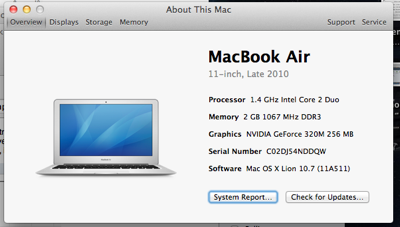
2)  You have to choose the best location for your Wifi.  To do so, click on "About the Mac"

Screen Shot 2011 08 21 at 8 28 23 AM

then, click More Info

Screen Shot 2011 08 21 at 8 28 31 AM

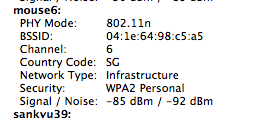
Then, click "System Report", then select "Wi-Fi" under "Network" you will find your signal strength.  As you can see, the signal strength for Mouse9=ASUS Black Diamond which is 15 meter away is -73dBm / -91 dBm (noise)

Screen Shot 2011 08 21 at 8 29 34 AM

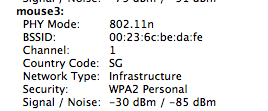
Scroll down, and you should be able to see all your others WiFi Access point at home…  Such as Mouse3 = Apple Airport Extreme which is 0.5 meter away.  Has -30dBm / -85dBm Signal and Noise.

Screen Shot 2011 08 21 at 8 29 47 AM

Just look at another AP I have, which is the Apple Airport Express which is located inside my bedroom, with a door and wall blocking where I am now.  The signal is even worst.

Screen Shot 2011 08 21 at 8 29 55 AM

What is dBm?

All numbers are given in decibels (dB) and are expressed as negative numbers.

Smaller numbers i.e. 10dB, is more strength than -90dB.

Signal -> Low is good.  i.e. -10dB is better than -85dB.

Noise -> High is good.  i.e. -85dB is better than -10dB.  (lower noise)

For example, if you have

Signal = -30dBm

Noise = -85dBm

SNR = Signal - Noise = -30dBm - (-85dBm) = 55dBm (SNR is Signal Noise Ratio)

Signal Quality = Signal/Noise X SNR = -30dBm/-85dBm x 55dBm = 19.4% Signal Quality

The higher signal quality the better.

Here are some Myths about Wi-Fi Interference.

It is a nice reading from Cisco, to understand more about Wi-Fi interference.

http://www.cisco.com/en/US/prod/collateral/wireless/ps9391/ps9393/ps9394/prod_white_paper0900aecd807395a9_ns736_Networking_Solutions_White_Paper.html


Wow, Microsoft also have good documents to teach people how to improve their WiFi at home.

http://www.microsoft.com/athome/setup/wirelesstips.aspx


Some Wiki about WiFi.  You will find out from 802.11, there is only 3 REAL Channels.  Although they always claims that there are 11 channels.  Out of the 11 channels, only channel 1, 6 and 11 are REAL channels, and the rest are somewhat overlapped.  And thus, more interference will occurred.  But bear in mind, all the AP vendors knows that too, and they will tends and try to use 1, 6, 11 too.  So, there is no real solutions to get around this but to trust your AP intelligence to provide you the best channel.

http://wireless.wikia.com/wiki/Wi-Fi