Showing posts with label Aztech HL115EV. Show all posts

Sunday, March 11, 2012

My Home Network Updates

Date:  Mar 10, 2012

This is my finalized design of my home network.  It has been running for the past 7 months with ultimate performance.  :)
Kenneth Network.png
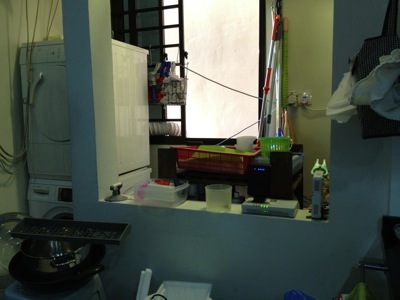
This is my washing area/kitchen.  Behind the wall on the right hand side is where OpenNet put their TP (Termination Point).  You can see I placed my ONT (Optical Network Termination) boxes there.  The main reason is I do not allow SingTel, or OpenNet to drill holes, and placed those ugly cable run from the front entrance.  So, I asked them to come in via the back door.  And the backdoor is the washing area / kitchen.  My network cabinet/cupboard is at the main entrance there.  It is there where all my entire apartment CAT6 cable runs are centralised.  And, I do not have a cable between this two location.  So, what did I do?
IMG_4794.jpg
So, in order to connect from the kitchen, I make used of two technologies.  Homeplug via the powerline and AirWire via the 5.8Ghz wifi space.  From the ONT location, there is no wired / CAT6 cable going to the network cabinet which is just left side of the kitchen (viewing from here).
IMG_4796.jpg
That is my network cabinet.  All the CAT6 network point in the house, except the kitchen, all come back to here.
IMG_4797.jpg
By the way, in my place, I have both ViewQwest and SingTel Fiber Broadband network.  The SingTel fiber broadband is notorious of throttle your traffic if they detect a slight abnomal traffic.  Once they throttle your traffic, all traffic will be slow.  So, I gave this network to my wife to use.  As she will always use it for her WebEx, Video Conferencing, etc.  As for me, I use it for my day to day web surfing and so on, I used ViewQwest Fiber Broadband that does not throttle my traffic at the moment.
1.)  So, for Singtel, I bought a pair of Airwave from X Concept.  They are the distributor of Airwave.  Now, they are located at #07-04, Burlington Square.
IMG_4775.jpg
I have used it for almost 7 months.  And it is still working fine.  I got this from X Concept.  This is a product from Ubiquiti Networks.  http://www.ubnt.com/.  A pair of this will connect at 5.8Ghz Wifi frequencies, without line of sight.  So, from the kitchen to my network cabinet.  It is brainless, simply connect and plug and play.  It is like a real cable like that.  except that they uses Wireless to connect the two points.
OK.  I know, I know, I am a techical guy, I can set up a switch and create a VLAN and pump it thru the power line using homeplug.  Those are the good old days, when you have 2 kids, your time seems to vanish pretty fast.  ahhaha so brainless thing will always catch my attention.
IMG_4776.jpg
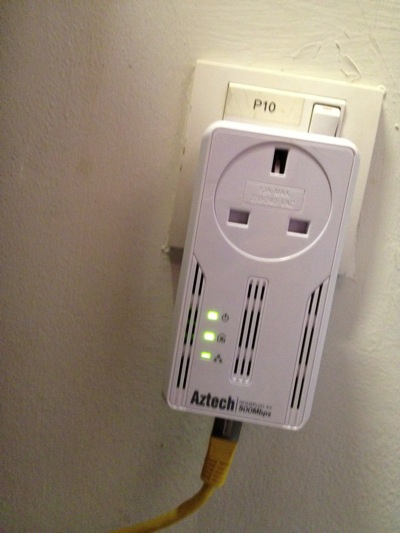
2)  So far, this is the most reliable homeplug that I have tested.  It has not been down, and does not need to reset it all the time as in the 1Gbps version.  It also have a noise filter, where you plug almost other things in there.  This one, I place it just opposite my dryer and washing machine.  My domestic helper wash cloths during day time, where all of us are working.  So, I did not get a chance to test weather the noise level is high during the washing and drying.  So far, I am happy with it.

IMG_4779.jpg

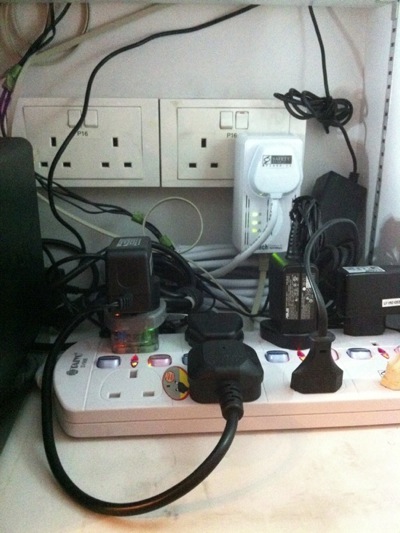
In my network cabinet, I plugged a plug extender on the noise filter of the homeplug.  That means every single electronics, i.e. switches, routers, etc are plugged in and pass thru the Aztech homeplug.  Except the NAS, I plug it separately.

IMG_4785.jpg

3)  SSID Mouse9 inside the network cabinet.  This is ASUS Black Diamond, the best WAN to LAN and LAN to WAN router in the market.

IMG_4783.jpg

4)  SSID Mouse5, running SingTel network, resides in my study room for my lovely wife to use.  Of course, the switch below is running ViewQwest network.

IMG_4788.jpg

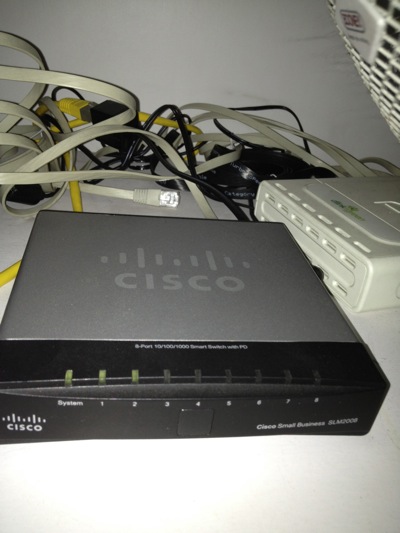
6)  As I threw away the SingTel's 2wire router.  I need this managed switch Cisco SLM2008 to untag the VLANS for me from Singtel Fiber Broadband.  I do this is to increase the performance of WAN to LAN network.  Singtel's 2wire is really crappy!

IMG_4784.jpg

7)  SSID Mouse3, sitting at the TV Console area, provides internet and Wifi exclusively to Apple TV, Wii and XBox, and my Internet Radio.  Apple Airport Extreme does the work here.  When you Airplay the movie on your IOS devices, it is fast!

IMG_4790.jpg

8)  The Internet Radio.

IMG_4793.jpg

9)  SSID Mouse6 in my bed room.  I can received 2-3 bars Wifi Signal from Mouse9, but that is not enough.  so, I put my Apple Airport Express here.

Related Posts:

From here you can explore more related topics at the botom of this post.

http://miniliew.blogspot.com/2011/05/bye-bye-singtel-2wire-5012nv.html

Sunday, August 28, 2011

Slow HomePlug? Try A Powerline Filter

Date:  Aug 28, 2011

www.Smallnetbuilder.Com has a very nice article about the powerline noise generated but all sort of Electrical Appliance and the solutions to it.  HomePlug or PLC is really a good solution at home, but those handphone chargers however are killing it.  So, you need to somehow isolate it.  Thanks Larry for sharing it.

http://www.smallnetbuilder.com/lanwan/lanwan-howto/31316-slow-homeplug-try-a-powerline-filter

I switched to use Aztech HL115EP, the latest one that comes with a AC Pass Through, and I have run it for almost 2 months, without any issue (cross fingers, touch wood).  :)  I actually switched from the Aztech HL280E which delivers 1Gbps speed using MediaXtream technology.  I used that for almost 2 moths, but I had problem stablizing it.  I end up needed to restart the HL280E quite often, as well as let it cool down for 15 minutes before I turned it back on again.

NewImage.jpg

The above diagram is in fact the correct way to use it.  Make sure you plug your near by electrical alliance behind the AC passthru filter.  I believe that is a noise filter that will isolate the noises out.  Even if you have 3 others plugs there, don't use them.

Below is how I actually setup my HomePlug HL115EP.  As you can see, I did not use the near by power plugs at all.  I just put an extension plug behind the HomePlug HL115EP and run all my Synology, Routers, Switches behind it.  I even run a cooling fan to cool down the cisco SLM2008 switch.

photo.JPG

But I still hope that I can buy the Surestreamer.  I look at their youtube on the performance.  I am amaze with it.  But it is not available yet, and I am trying to find

http://youtu.be/kUAnL3ZxToQ


Friday, July 29, 2011

Home Network Improvement Plan - HomePlug HL115EP

Date:  July 29, 2011

If you remember, I uses Aztech HL280e to connect direct from the OpenNet ONT box to my Network Cabinet without installing those ugly cable run.  In the beginning it runs perfectly, however, later it becomes rather unstable, and usually I need to turn on and off the HL280e quite often.  Another thing is, my network at home runs 24x7x365, so, it tends to make the devices a bit hot.  Occasionnally when it gets way too hot, you will need to shut it down for at least 5-10 minutes to let it cool down.  My wife even put in some fish tank or laptop fan to try to cool it down, without knowing that the fan motor will actually affect the speed of the HL280e.

http://miniliew.blogspot.com/2011/07/home-networking-why-my-aztech-hl280e.html

Overally, HL280e is a unique new technology using MediaXtream rather than the HomePlug and PLC technology.  It uses the frequencies range from 50Mhz to 300Mhz to deliver 1000Mbps (GE) over the power line.  A comparison of the HomePlug Vs PLC Vs MediaXtream devices are nicely written here in this link (In Chinese).  If you wants great speed, then no doubt HL280e is the one to go.  However, you need to install it in a aircon room or else the heat accumulated in my network cabinet will tends to heat it up and make it unstable.  So, when this pair of monsters working fine, it is the best of the world getting the best speed.  But when it is not working, your wife will curse and swear.  hahaha  check out the heat generated ranged from 40.5C (no traffic) to 52C (loaded)... it is the highest...

http://klseet.com/index.php?option=com_content&view=article&id=10&Itemid=9

So, lately, Aztech has a new model come out.  It is Homeplug AV 500Mbps pass through.  The new HL115EP.  Before that, the HL110e has already got a good rating.  But there are few things you need to take note...
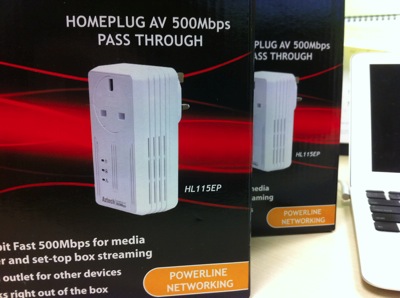
IMG_8498.JPG

1.  If Aztech already breakthru and come out with HL280e which is gives the highest speed test result against every single other competitors of PLC & Home Plug, why do you think Aztech come out with HL115EP, which delivers 1/2 of the speed, i.e. 500Mbps Vs the HL280e's 1,000Mbps.  ? ? ?  There must be some untold reason.

2.  By the way, the price of HL115EP is $10 more than HL280e.  So, it is not the price issue where Aztech thinking to offer cheaper range of Homeplug/PLC by reducing its speed.  I think Aztech is not stupid, they want to earn big bucks, but first, they have to overcome the instability issue.

3.  This one comes with the AC pass thru filter.  What does it mean?  It means, they are trying some technology to include a filter, so that they can isolate all these noise frequencies and handle it with a filter so those noise does not affect too much the HomePlug/PLC network.

There is this Malaysian company which I have been monitoring it for quite a while, since last year.  They have come up with a device, which is a line noise filter that will promise to help reducing the line noise and make your PLC/HomePlug more stable in date rates.  Look at this video.  You will see that even the cell phone charger and laptop battery charger is going to affect the HD TV streaming.  The technology is promising, but no dates to offer its product yet.  And yes, the surge protection power adapter also will affect the date rates.  Not to mention, washing machine, dryer, hair dryer, and all those electical appliance.  I can't wait for SureStreamer to come out.  So, let's wait and see.

http://www.youtube.com/watch?v=kUAnL3ZxToQ

Back to the Aztech HL155EP.  I bought 3 of them, and each is $75/each.  And my purpose of the HomePlug/PLC devise is to hook at the OpenNet ONT to my router in the Network cabinet.  So, it is just a point to point link.  And the 3rd one is to hook up to the Mio TV.

And the network has been running fine for 3 days.  Usually with HL280e, I will have to "reboot" the HomePlug/PLC device.  But for this pair HL115ev.  It works OK so far, and the heat is much lower than the HL280e.  And the data stream is much stable as I can see from my constant ping monitoring to routers, to DNS server (Internet).  As you can see, running for few days, 197410 packets has been sent and the packet lost is around 0.1% which is very good.  As you know my ONT is back in the kitchen and utility room, you would imagin there are lots of noise going to be generated during day time, i.e. dish washer, dryer, washing machine, juicer, etc.  But I see the result is far more better than the HL280E.  Which is a good sign.

Screen Shot 2011-07-29 at 6.36.18 AM.png

One more thing...  You notice that I do not use the rest of the three outlet, and instead, I plug my Asus Black Diamond AP Router, Cisco SLM2008 Managed Switch, Dlink GE Switch and my Synology DS411+ into a power strip that is plug into the AC Pass Thru socket on the HL115E.  I was hoping that the line noise filter within the HL115E does its work of isolating the noise.  And at the ONT end, it is plug into the wall socket (away from the 13Amp Washer/Dryer socket) directly.

IMG_8514.jpg

So far, it works perfectly, and no complaints!

There is a reason why Aztech keep coming out with new Homeplug/PLC product.  It's improvement product.  So, I suggest you change it when it comes out with new product.  (of course, after understanding what it is)  :)