Showing posts with label Aztech HL280e. Show all posts

Sunday, August 28, 2011

Slow HomePlug? Try A Powerline Filter

Date:  Aug 28, 2011

www.Smallnetbuilder.Com has a very nice article about the powerline noise generated but all sort of Electrical Appliance and the solutions to it.  HomePlug or PLC is really a good solution at home, but those handphone chargers however are killing it.  So, you need to somehow isolate it.  Thanks Larry for sharing it.

http://www.smallnetbuilder.com/lanwan/lanwan-howto/31316-slow-homeplug-try-a-powerline-filter

I switched to use Aztech HL115EP, the latest one that comes with a AC Pass Through, and I have run it for almost 2 months, without any issue (cross fingers, touch wood).  :)  I actually switched from the Aztech HL280E which delivers 1Gbps speed using MediaXtream technology.  I used that for almost 2 moths, but I had problem stablizing it.  I end up needed to restart the HL280E quite often, as well as let it cool down for 15 minutes before I turned it back on again.

NewImage.jpg

The above diagram is in fact the correct way to use it.  Make sure you plug your near by electrical alliance behind the AC passthru filter.  I believe that is a noise filter that will isolate the noises out.  Even if you have 3 others plugs there, don't use them.

Below is how I actually setup my HomePlug HL115EP.  As you can see, I did not use the near by power plugs at all.  I just put an extension plug behind the HomePlug HL115EP and run all my Synology, Routers, Switches behind it.  I even run a cooling fan to cool down the cisco SLM2008 switch.
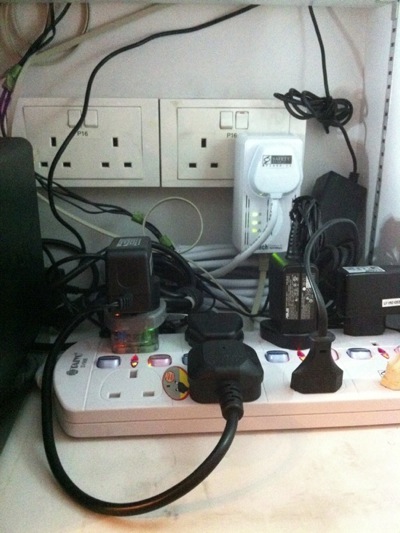
photo.JPG

But I still hope that I can buy the Surestreamer.  I look at their youtube on the performance.  I am amaze with it.  But it is not available yet, and I am trying to find

http://youtu.be/kUAnL3ZxToQ


Monday, July 25, 2011

Home Networking: Why My Aztech HL280e Keep Going Down...

Date:  Date 25, 2011

In my home, after SingTel enter my place via Openet, I uses Aztech HL280E to bring the big Internet pipe back to my Network cabinet where all my switches and routers are stored (without ugly cables).  Lately, I found myself to reset the Homeplug/PLC quite often which is unusual due to lost of signals, etc.  And I think I just found out why....

NewImage

Few weeks ago, my wife bring to my attention of a thing that she did.  She said, "your network cabinet is very warm and hot".  I think it is your router that generate a lot of heat.  I have installed this cooling fan to cool down your Aztech HomePlug adapter.

NewImage

Then, 1 week later, she said with a smile, "I have used your Moshi Zefyr Cooling Pad" to cool down your Dlink Router."

And Indeed, my network cabinet is really cooler.  But then, it started to give some problem, from time to time, I will loss the signal from the Fiber ONT to my Switch.  And I did not suspect anything, until I read this article below...

IT IS THE FAN that is causing all this, I suspect.  Because HomePlug is very sensitive to power noise generated from hair dryers, fan, etc.  And I just got 2 fans, plug into the same power adapter with the PLC/HomePlug equipment.  Today, I am going to take out the fans and see whether the network is down again or not.

Here is the images from the HomePlug 101 (In Chinese).  Quite informative.  Enjoy.... The original blog posting is at this URL...

http://klseet.com/index.php?option=com_content&view=article&id=10&Itemid=9


Homeplug 01

Homeplug 02

HomePlug 03

HomePlug 04

HomePlug 05

HomePlug 06

Homeplug 07with comment

HomePlug 08